PT - 262
9.19 Member Card Transaction
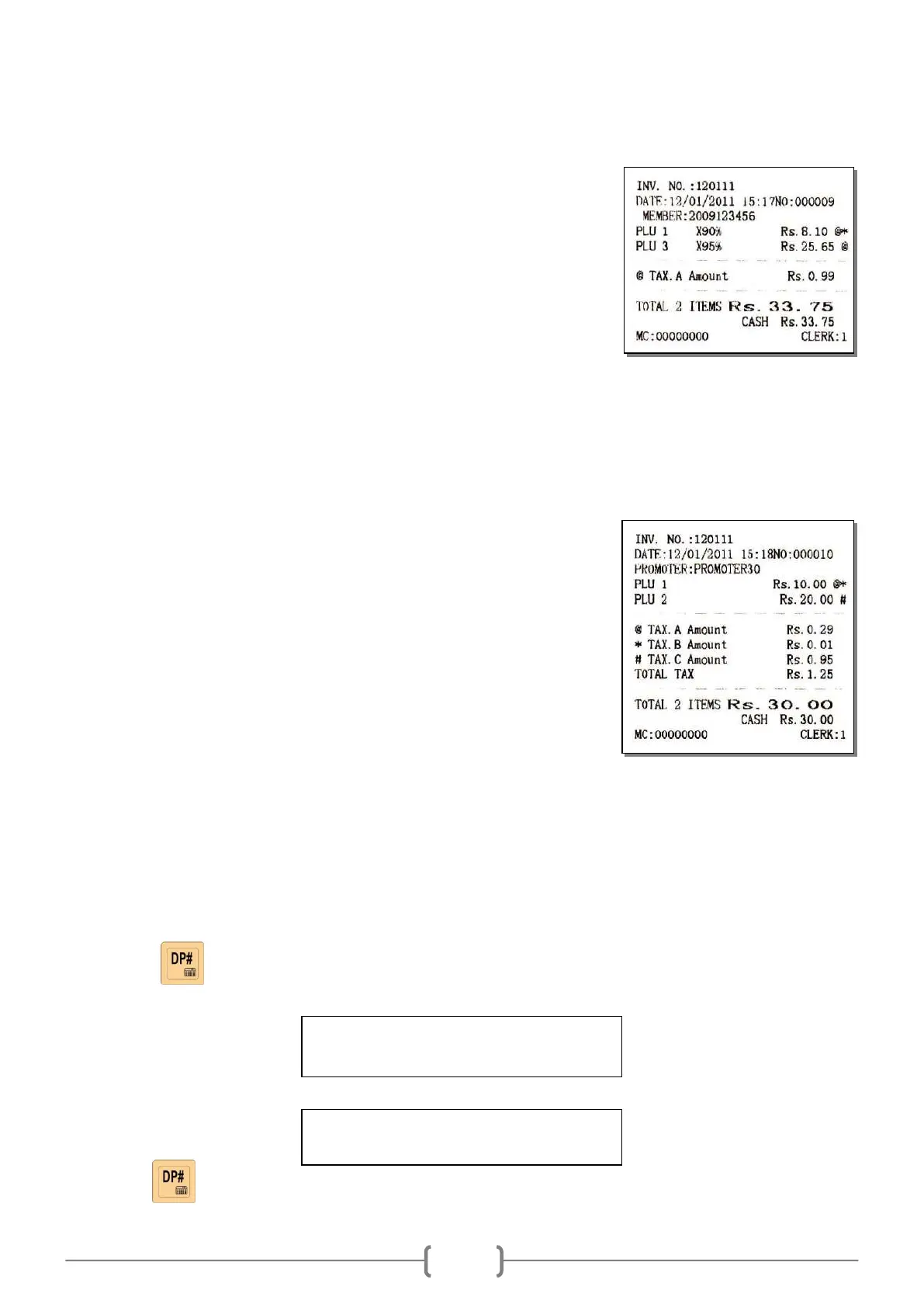
Member card number 2009123456 for example:
Input the member card number [2][0][0][9][1][2][3][4][5][6]
Use member card payment
Press [SHIFT][MEMBER]
Sell PLU
[1][PLU]
[3][PLU]
Settle accounts [CASH]
Note: If you want to input the member card number manually, the item „MEMBER SET / MANUAL INPUT
MEMBER CARD NO.?‟ in SET mode must be set „YES‟.
9.20 Promoter Operation
The cash register supports 30 promoters totally.
E.g. Promoter logins (before transaction has been done)
No.1 promoter logins:
Press key [PROMOTO]
System prompts: <INPUT PROMOTER>, press promoter‘s No.
[30][CASH]
Sell PLU [1][PLU]
[2][PLU]
Settle accounts [CASH]
Note: After the client settles account, the promotion worker logouts automatically. When the promotion worker
promotes next time, he or she needs to login again.
9.21 Calculator Operation
The machine has calculator function:
Press key when the cash register is not in the transaction status. It can work as a calculator.
LCD display:
E.g. 26×3
[2][6][X][3][CASH]
Note: press key again to exit calculation mode.



 To Next Page