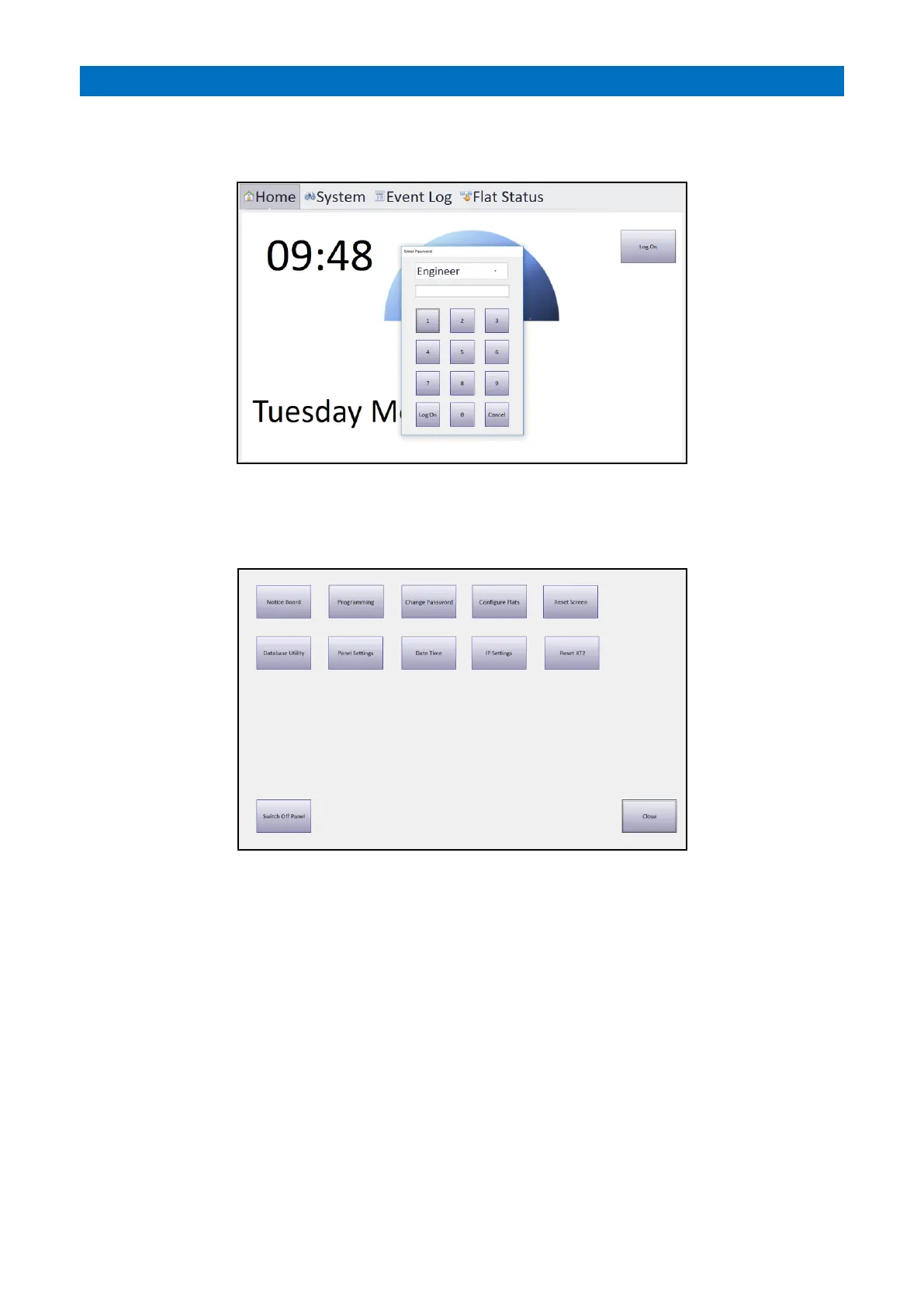
On power-up the Manager’s Panel will display the Home screen.
Press the Log On button and the Enter Password box will appear as below;
Select Engineer from the drop-down list.
Enter the default password 2371 then press the keypad Log On button.
The System Setup screen will be displayed as below;
Notice Board – enter details of events etc. to be displayed on a separate large screen monitor connected to the HDMI
port. The monitor should have a resolution of 1920x1080p otherwise the Notice Board will not be properly rendered.
Programming – allows the site Manager to setup basic system features e.g. activity monitoring, I’m OK, etc. All other
system setup must be performed from the XT2 Controller integral display.
Change Password – allows passwords to be changed.
Configure Flats – allows flat labels and the order they are displayed on the Manager’s Panel flat status array to be
changed.
Reset Screen – used to clear a panel lock-up.
Database Utility – allows the panel data to be copied to/from a USB memory stick.
Panel Settings – used by an Engineer to setup what features are available to the user, enter a site name, set panel as
the Controller or Satellite, set XT2 network IP address etc.
Date Time – used to set the Windows date and time.
IP Settings – used by an Engineer to setup Windows IP addresses.
Reset XT2 – used to restart the XT2 system.



 To Next Page