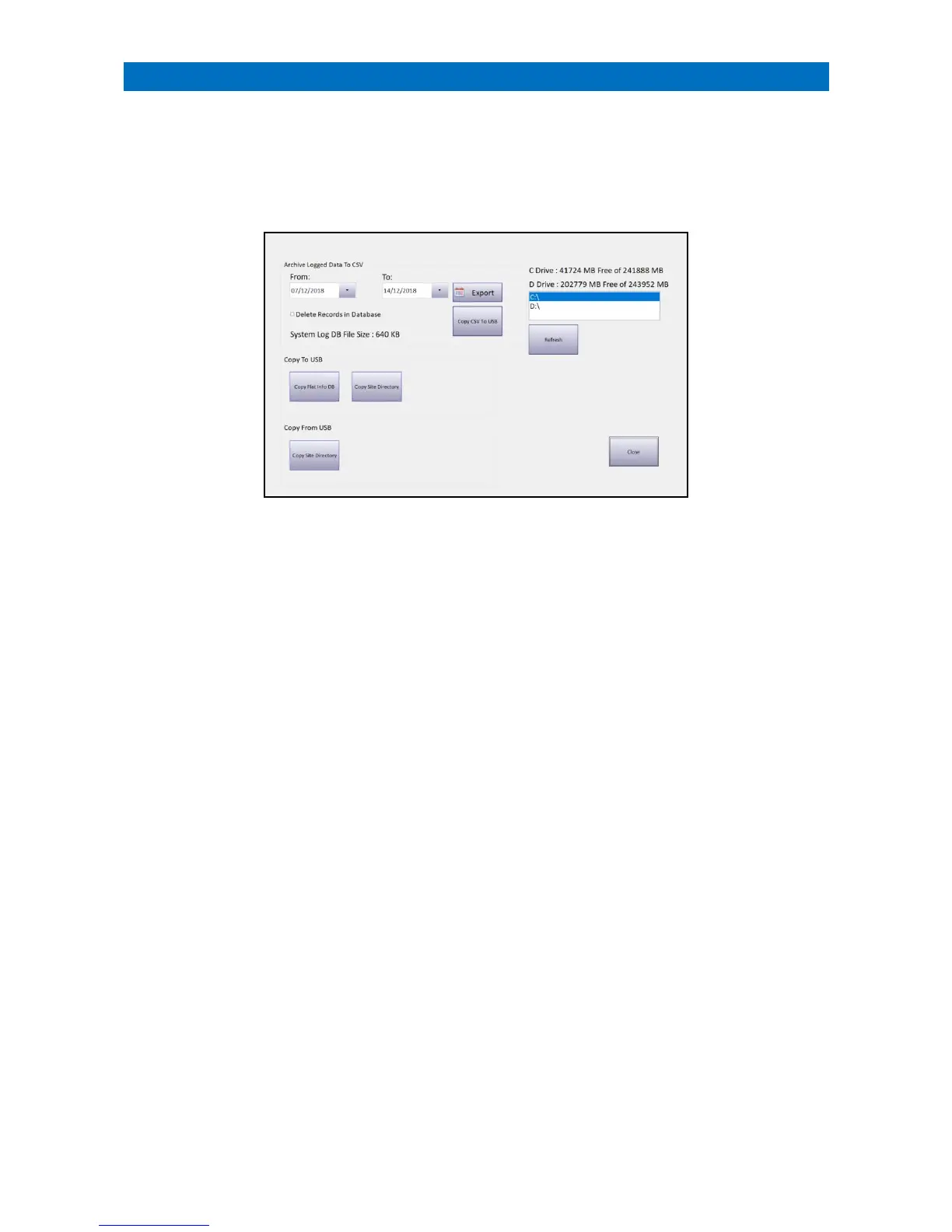
The database utility can be used to export logged data to a CSV file. The data can be selected over a date range and
once exported is saved into an Archive directory. During this process there is an option to delete the files from the
Manager’s Panel database to reduce its size.
Once the file has been exported, it can be copied to a USB stick. There is also an option to copy the Flat Info Database
and contents of the Site Directory to USB. The Site Directory can also be copied to the system from a USB.
Log on using the current Manager (or Engineer) password and touch the Database Utility button.
To Archive Logged Data to CSV
Select the From: and To: date range of events you want to archive.
Set the Delete Records in Database check box if you want to delete the records from the Manager’s Panel.
Press the Export button to save the data to an Archive Directory.
To copy the CSV Data to a USB stick
Select the USB drive from the list on the right-hand side of the screen.
Press the Refresh button to update the free space available on the drives.
Press the Copy CSV to USB button.
Copy to USB
Press the Copy Flat Info DB button to copy the flat number and resident details database to USB.
Press the Copy Site Directory button to copy Notice board, flat text files etc. to USB.
Copy From USB
Press the Copy Site Directory button to copy the Notice board, flat text files etc. from USB to the Manager’s Panel.



 To Next Page