Step 1: assembling the UltiController Assembling and connecting the UltiController94
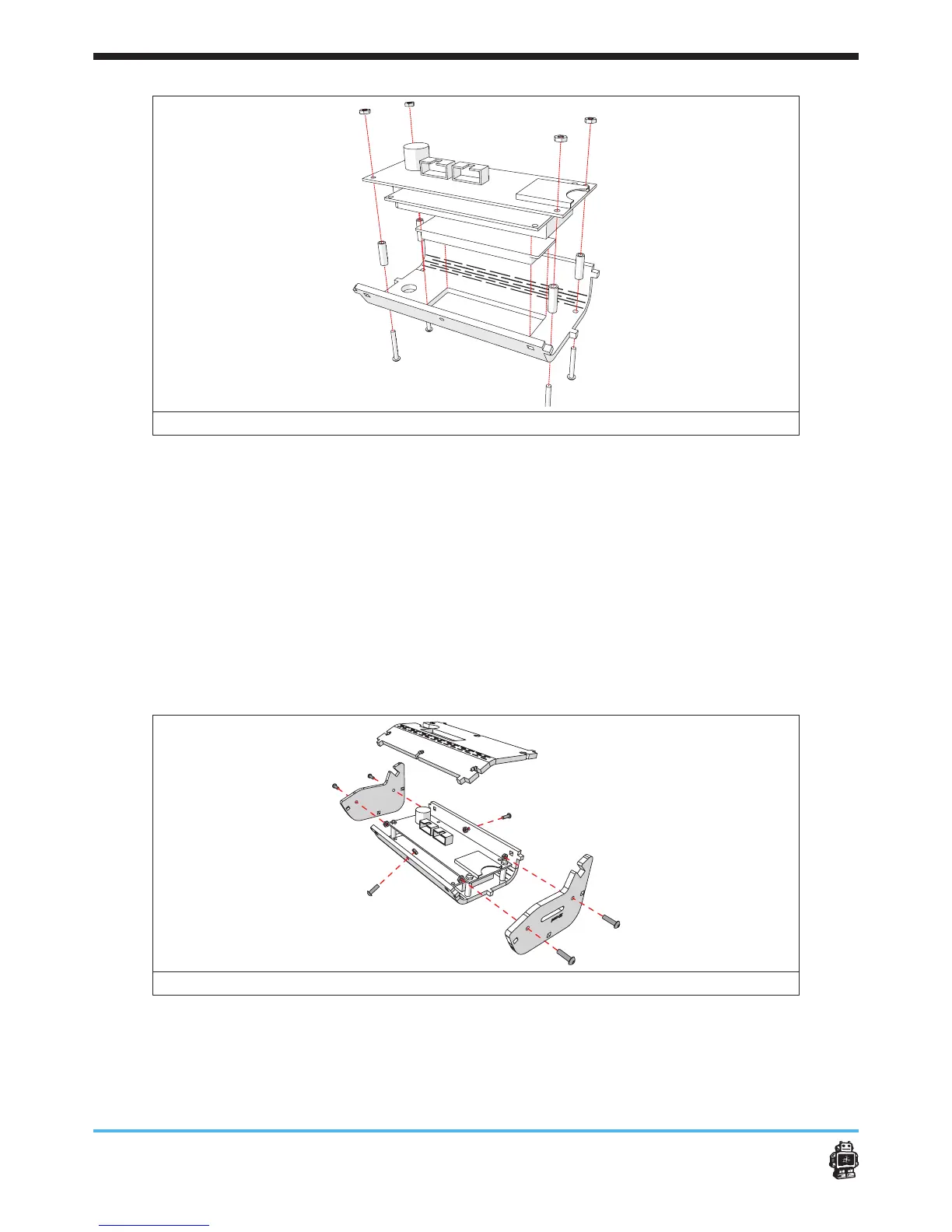
image 111: mounting the display v 1.0 to the UltiController FRONT
(for action 4-8 see image 112)
5. Turn the controller on its back.
6. Plug both of the PCB connector cables into the connectors.
Plug 1 into connector 1. Plug 2 into conncetor 2.
7. Place six hex nuts 3mm inside the slots of the UltiController BACK.
Tip: Use tape to keep the hex nuts 3mm in position.
8. Attach the UltiController BACK onto the UltiController FRONT,
Use two bolts M3 x 10mm at the long sides.
9. Attach the side parts.
Use two bolts M3 x 10mm for every side.
image 112: mounting the back plate and the side parts
10. Put the button in place, see image 113.


 To Next Page
 Loading...











