YK11-0016-DI-002-08
50
Multi-function contact input function description
ON OFF
S2 ※4
Air/Water cooled
switching
Air cooled Water cooled
S3 ※5
Main speed frequency
command switching
Analog input command Normal operation
S4 ※6 Abnormal reset Abnormal reset Normal operation
S5 ※7
Multi-Step Speed
Reference1
Switch to the Multi-Step
Speed Reference1
S6 ※7
Multi-Step Speed
Reference1
Switch to the Multi-Step
Speed Reference2
S7 ※8 Wating mode Wating mode operation Normal operation
No. Feature Description
State of the contact
Operation in the normal
operation or analog input
command
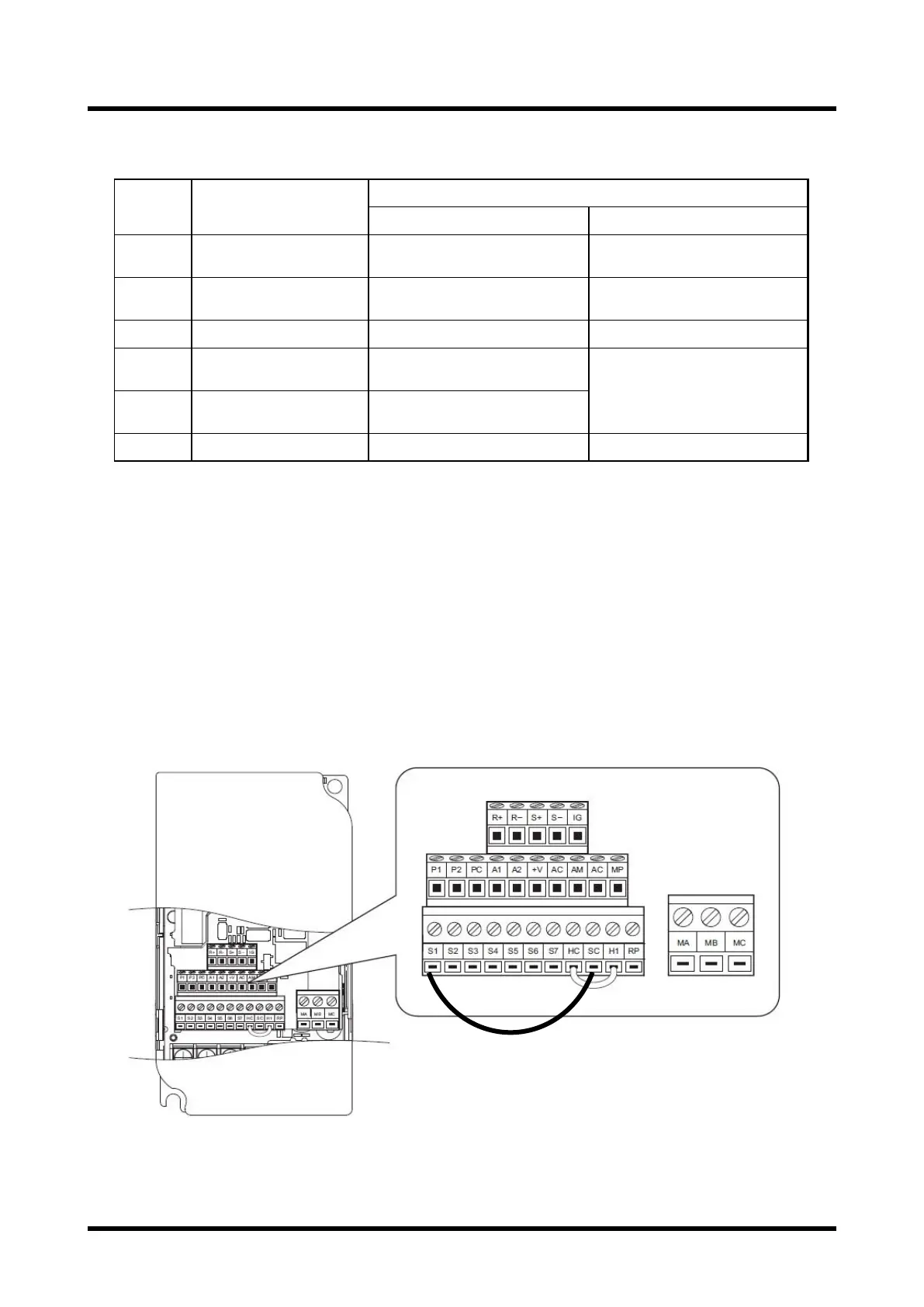
※ 4) If you want to use a water-cooled specification, remove the short-circuit wiring of the "S2-SC", please
the cooling water flowing prescribed amount.To PMB100D, it does not have this switching function.
※ 5) If you want to use the analog input command, please ON.
※ 6) Please be ON when you reset the inverter fault.
※ 7) "S5" or I will switch to ON, the multi-speed directive "S6".
"S5", if you ON "S6" at the same time, you will switch to multi-speed command 3.
Without ON the "S3", it will switch to the multi-step speed reference.
※ 8) Selection of Wating mode
Wating mode: the load of the pump is lower state, and will continue for 30 seconds, it will reduce the
number of revolutions of the pump automatically. Load senses automatically, if the load is increased, it
will switch to normal operation automatically.
In automatic, if you do not want to reduce the number of revolutions, please do not use this feature.
To PMB100D, it does not have this feature.
Water-cooled specification control wiring diagram
※ Short circuit wiring between "S2-SC", please remove


 To Next Page