XTi- VBox Android TV Gateway User
Manual 5. Setting up XTi-VBox TV Gateway using the Web Interface
5.2. Step 5- Finish
12
5.2 Step 5- Finish
Recordings Setup
Step 5 – Finish
5.3 Step 1 – System Setup
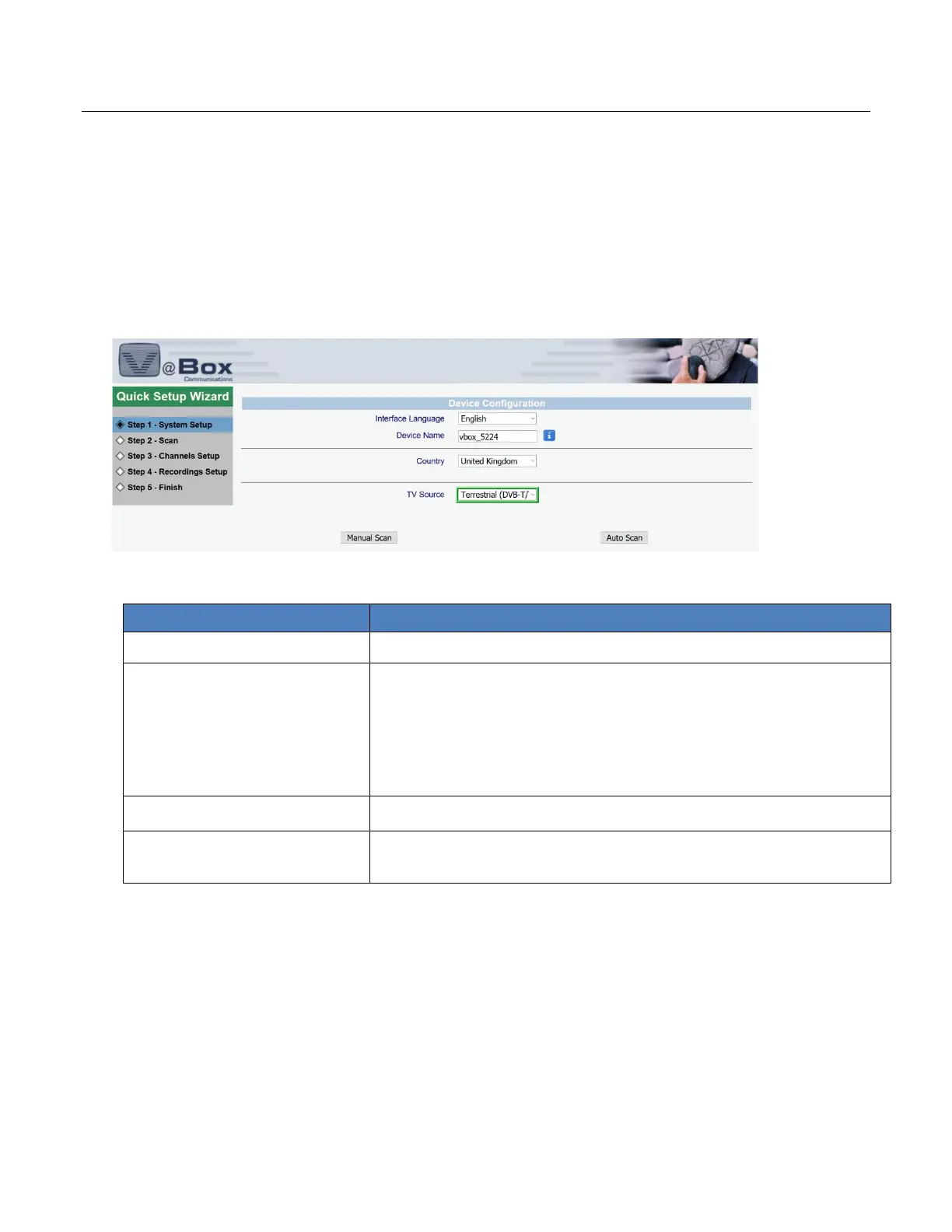
Step 1- System Setup requires that you first select your configuration (Figure 6).
Figure 6: Quick Setup Wizard – Step 1 – System Setup: Device Configuration page
1. Configure your system settings as explained in Table 2.
Table 2: Quick Setup Wizard – Step 1 – System Setup: System Settings page
Select the language of this Web interface from the list.
Set name your device.
The name of your XTi-VBox TV Gateway device.
This name appears on devices that are connected to your network and
have the UPnP Protocol enabled, Use the default name or override it by
entering a new name.
In this selection the system will go through all frequencies and scan
them
5.4 Step 2 – Scan for XTi 4144/74 Models
Step 2 – Scan allows you to review your DVB-T/T2/ISDB-T/ATSC and frequencies settings and perform the scan
(Figure 7).
Figure 7: Quick Setup Wizard – Step 2 –Scan: Scan Settings Review page (XTi-4144/74 model)



 To Next Page