41
English
■■
■■
■ Universal mounting frame
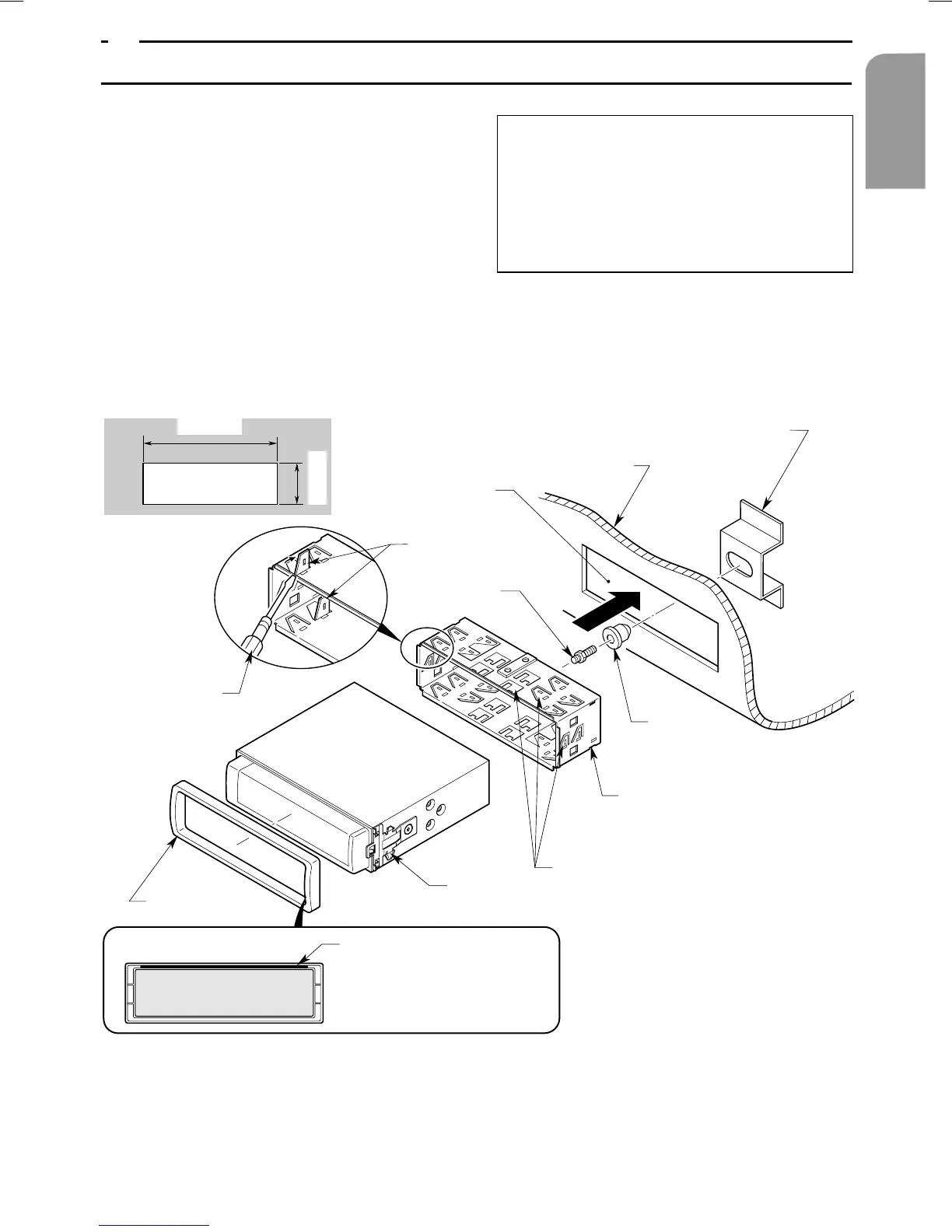
1. Insert the universal mounting frame into the
instrument panel, bend the individual sheet
metal tabs of the universal mounting frame
inwards using a screwdriver and secure as
shown in Figure 6.
2. Connect wiring as shown in Section 8.
3. Push the main unit into the universal moun-
ting frame until it engages.
4. Attach the outer decorative mouldings so
that all studs engage.
Note:
1) For certain vehicle types, special kits are
required for correct installation. Please
contact a VDO Dayton dealer for details.
2) Ensure that the front sheet metal tabs are
properly secured to prevent the main unit
from becoming loose.
5. INSTALLING THE MAIN UNIT
Figure 6
Note:
Insert the outer moulding so
that its metal component on
the back fits into the upper
edge of the main unit.
• Cut-out dimensions for console
182 mm
53 mm
Installation aperture
Screwdriver
Outer moulding
Sheet metal tabs
Special screw
Main unit
2 springs
Sheet metal tabs
Universal mounting frame
Rubber
grommet
Rear fastening bracket (on vehicle)
Instrumentpanel
Cut-out


 To Next Page
 Loading...