Wall Mounting 2-6
Chapter 2: Installing the IP Phone
Edge 5000 Installation / Configuration Guide
Wall Mounting
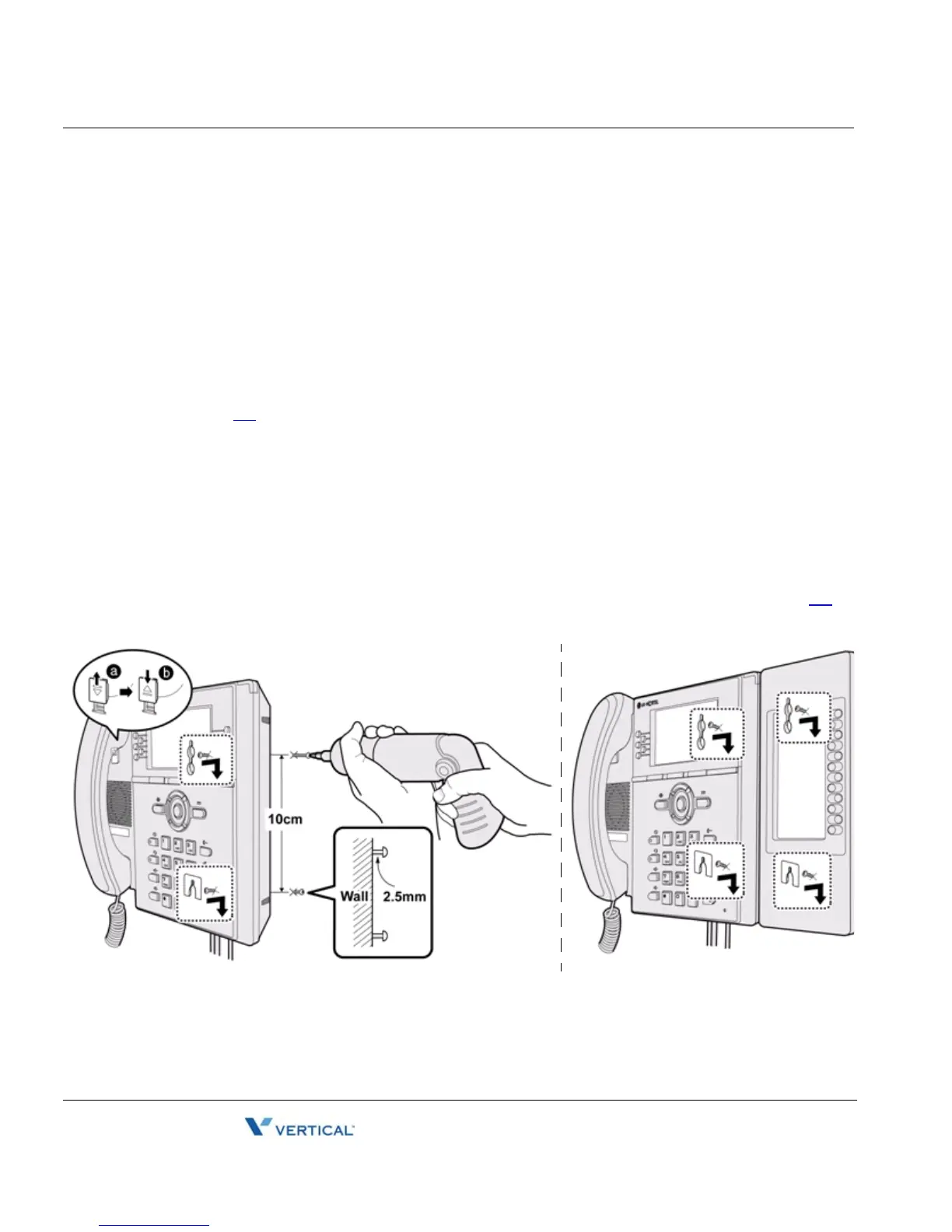
The IP5000 series phones incorporate wall mounting in the base of the phone housing. Using
the instructions below and the illustration, wall mount the IP-5000 phone.
• Mark and drill two 7 mm holes for plastic wall anchors with a vertical separation of 10
cm.
• Insert two (2) anchors into the holes, then insert and tighten the two (2) screws leaving
about 2.5 mm exposed. Refer to the figure below.
• Attach all wiring to the IP Phone as described in "Connecting the IP Phone" starting on
page
2-1.
• Slide the IP Phone over the screws and assure the phone is secure. Note it may be
necessary to remove the phone and tighten or loosen the screws for a secure
mounting. Also note, the Foot Stand must not be attached to the IP Phone when wall
mounting.
• Remove the Handset hook from the phone as shown in the figure below. Reverse the
hook and re-install in the IP Phone so that the hook catches the groove in the handset
receiver.
• Complete all wiring as described in "Connecting the IP Phone" starting on page
2-1.



 To Next Page