Flexible Button Setting 3-31
Chapter 3: Using the LCD Configuration Menu
Edge 5000 Installation / Configuration Guide
Flexible Button Setting
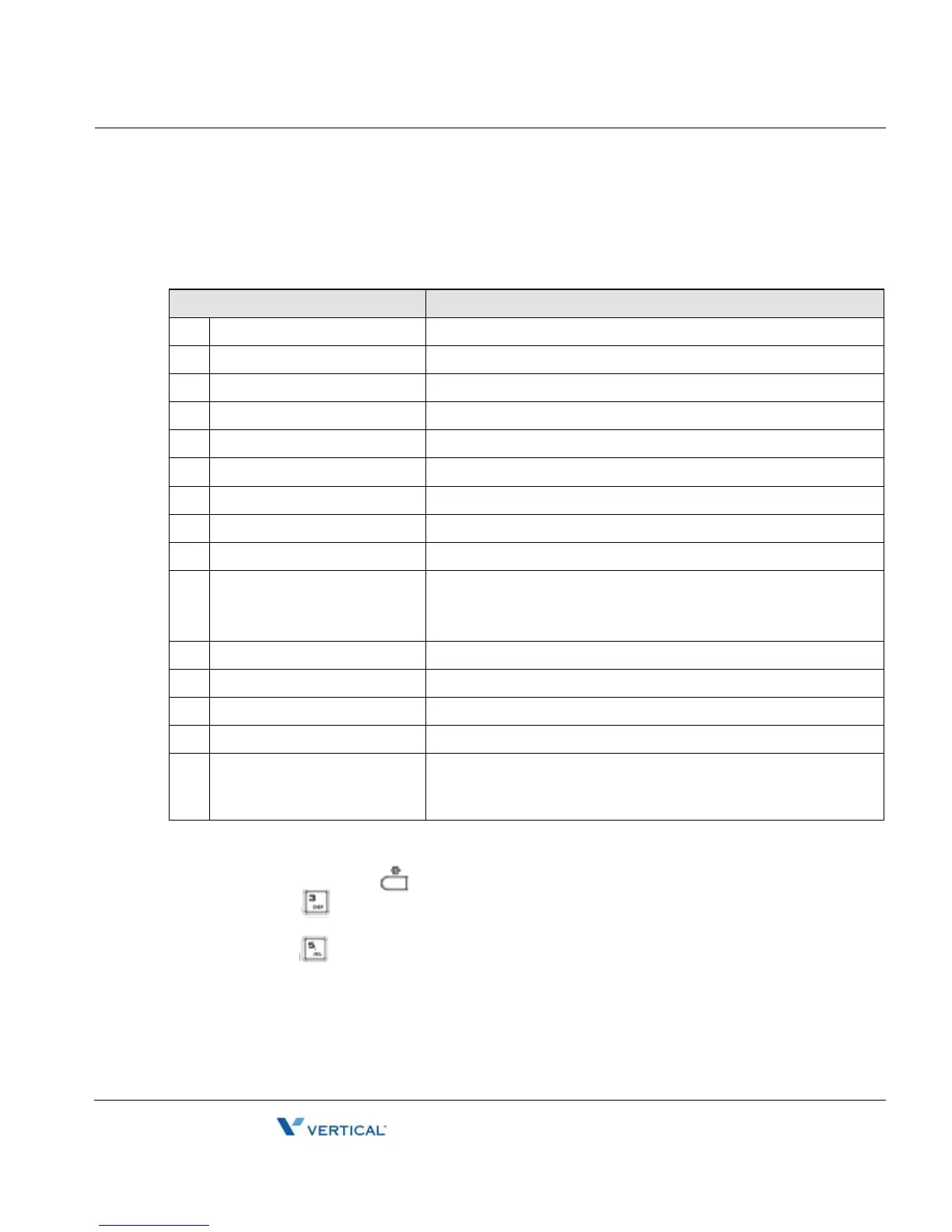
The flexible buttons not assigned as line buttons can access various functions. The table below
indicates the available functions with a description of each.
To assign a function to a flexible button:
• Press the Settings ( ) button.
• Press the digit, or move the cursor to 3.Phone Settings using the
[Next]-[Previous] softkeys and press the [OK] softkey.
• Press the digit, or move the cursor to 5.Flexible Button using the [Next]-[Previous]
softkeys and press the [OK] softkey.
• Select the desired flexible button.
• Select a function using the [Next]-[Previous] softkey and press the [OK] softkey. Refer
to the table above for "Flexible Button Functions".
Feature Description
0 No Function Unassigned
1 Speed Dial Function Dials the assigned number
2 Phone Book Function Views the personal phone book
3 Call Log Function Views the call log list
4 Mute Function Toggles the Mute feature on and off
5 Headset Function Toggles the Headset on and off
6 Redial Function Dials the last number dialed by the user.
7 Return Call Function Dials the number of the last answered call
8 Set Call Forwarding Sets the call forwarding configuration
9 Conference Function 1. Initiates a conference call
2. Joins calls in a conference
3. Terminates the conference call
10 Transfer Function Initiates a call transfer
11 Hold Function Places an active call on hold
12 Do not disturb Toggles the DND on and off
13 Set Ringer Off Toggles the ringer on and off
14 Message Function Views the number of new and old messages stored in the Voice
Mail server, and dials the Voice Mail server by pressing the
[Dial] softkey



 To Next Page