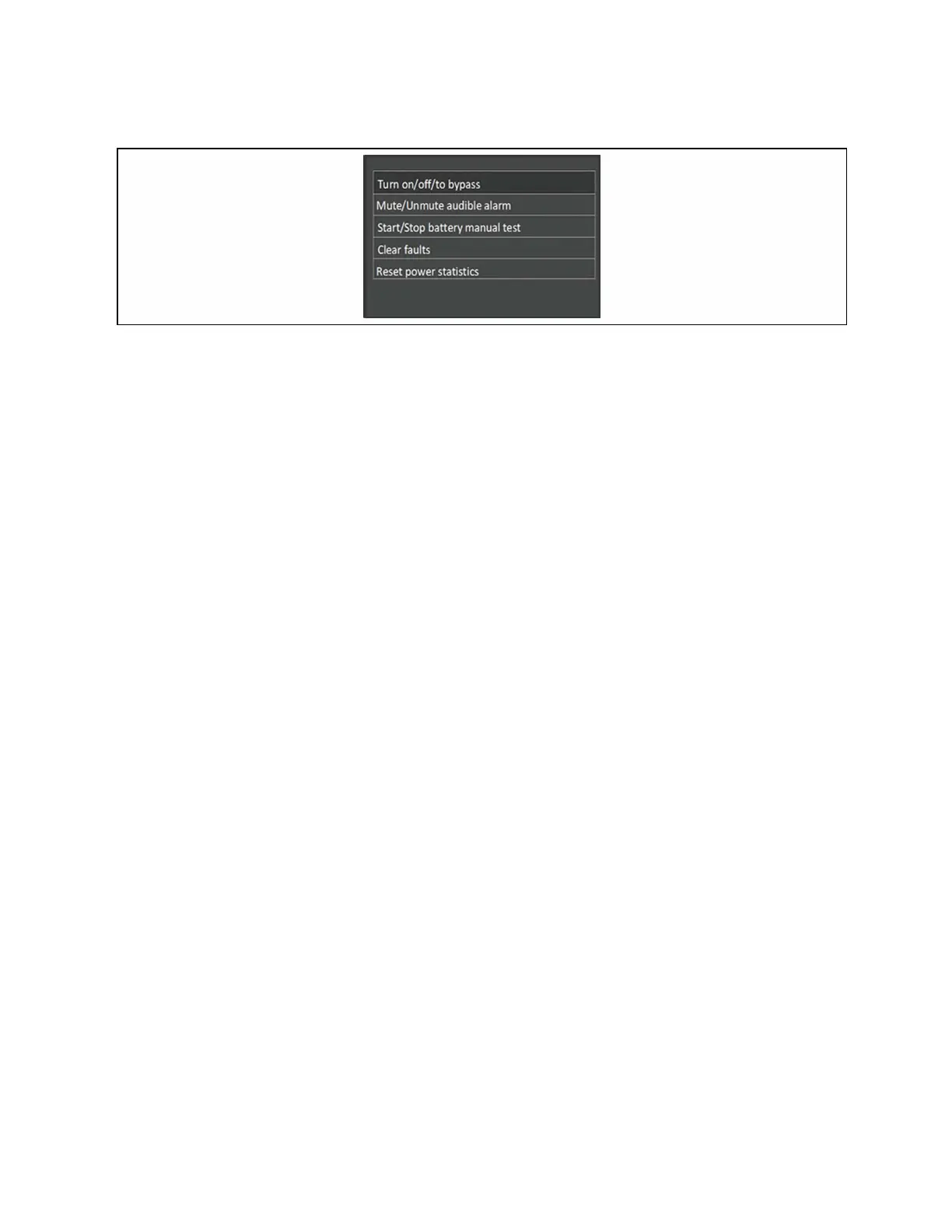
Figure 5.6 Control Screen
Control Options
Turn on/off/to bypass
Opens the dialog to change operating modes, see Operating the UPS on page33.
Mute/Unmute audible alarm
Silences or un-silences the audible alarm, see Silencing the Audible Alarm on page33.
Start/Stop battery manual test
Starts the battery self test manually. If the manual self test is already running, stop the self test.
Clear faults
Clears displayed faults after the issue causing the fault is resolved, see Table 7.2 on page64, for a description of the faults.
Reset power statistics
Resets the values tracked to calculate the Efficiency graph, see About Screen on page52.
5.2.6 Log Screen
The Log Screen offers tabs that list the current alarms and the alarm/event history. Table 5.4 on the facing page, describes
the alarm messages you may see in the logs.
To view the logs:
1. At the main menu, select the Log icon, and press Enter.
2. Use the arrow buttons to move the cursor left/right and select a tab, then press Enter to display the log for the
selected tab.
48 Proprietary and Confidential ©2024 Vertiv Group Corp. 5 Operation and Display Panel
Vertiv™ Liebert® GXT5 UPS Installer/User Guide



 To Next Page