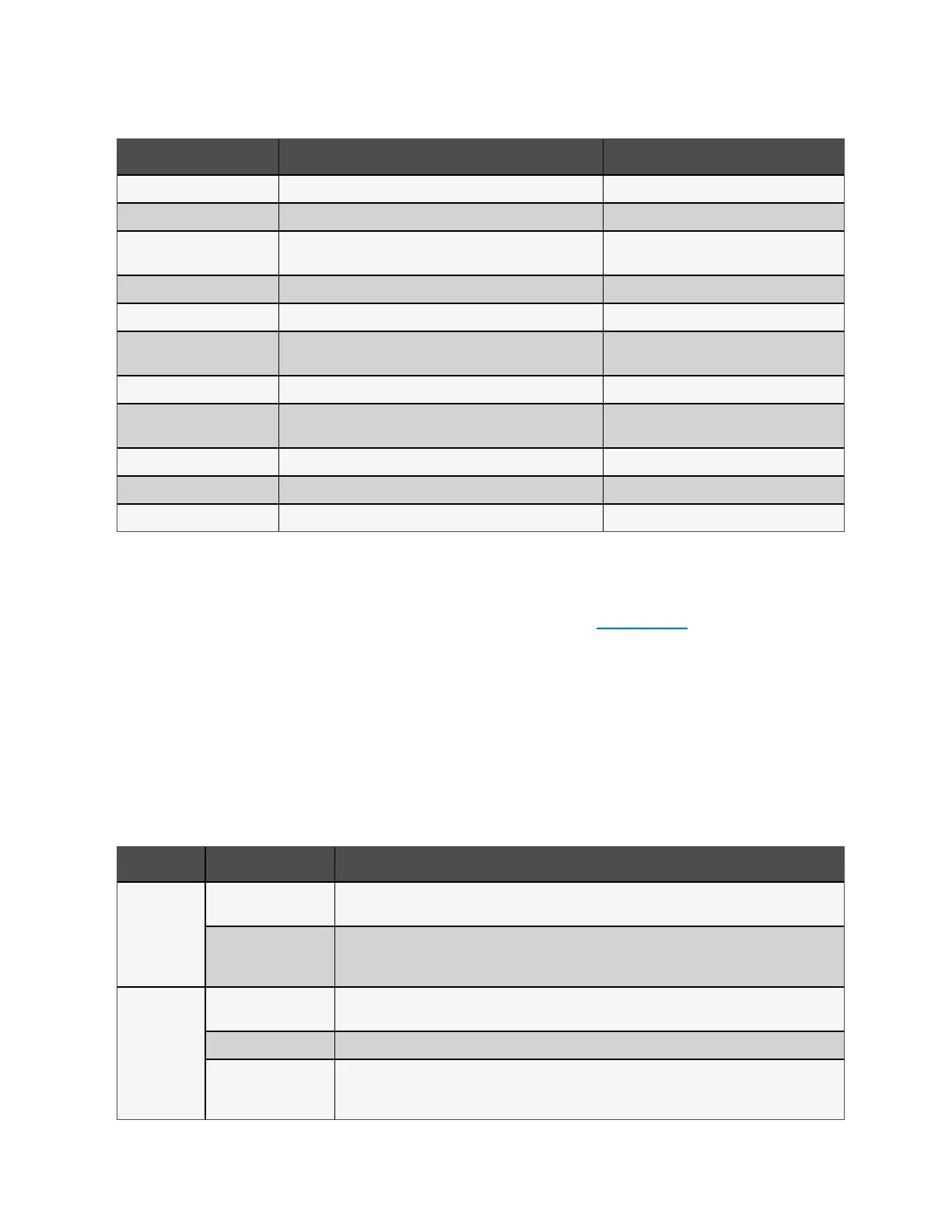
Displayed Fault Cause Corrective Steps
Battery test fail The battery is bad or weak. Contact technical support.
Rectifier fault A rectifier failure occurred. Contact technical support.
Inverter overload, Bypass
overcurrent
The UPS is overloaded, Bypass is over current. Reduce the load and contact technical support.
Inverter fault The inverter is faulty. Contact technical support.
Battery aged The battery is bad or weak. Replace the battery.
Output short The output connection is short-circuited.
Shut-down the equipment and contact technical
support.
DC bus fail The DC bus is faulty. Contact technical support.
System overtemp
Over-temperature condition in the UPS. The UPS will transfer to
bypass mode.
Reduce the load and contact technical support.
Charger fault The charger is faulty. Contact technical support.
Fan fault At least one fan is faulty. Contact technical support.
DC/DC fault A DC-DC charger failure occurred. Contact technical support.
Table 7.2 Description of Displayed Faults
7.3 Troubleshooting UPS Issues
In the event of an issue with the UPS, refer to Table 7.3 below, to determine the cause and solution. If the fault persists,
contact Vertiv Technical Support. Visit the Vertiv™ Liebert® GXT5 product page at www.vertiv.com for contact information.
When reporting a UPS issue to Vertiv, include the UPS model and serial number. These are located in several places for your
ease of location:
• On the top panel (rack mount orientation)
• The left side (tower orientation)
• The rear panel
• On the front of the unit behind the front plastic bezel
• On the LCD select Main Menu > About
Problem Cause Solution
UPS fails to
start
UPS is short-circuited or
overloaded
Ensure UPS is Off. Disconnect all loads and ensure nothing is lodged in output receptacles. Ensure loads
are not defective or shorted internally.
Batteries are not
charged enough or not
connected
Check to ensure the internal battery is connected. If it is not, make the connection and try to start the unit. If
the battery is connected, leave the UPS connected to input power for 24 hours to recharge batteries, then
try to start the unit.
UPS has
reduced battery
backup time
Batteries are not fully
charged
Keep UPS plugged in continuously at least 24 hours to recharge batteries.
UPS is overloaded Check load level indicator and reduce the load on the UPS.
Batteries may not be
able to hold a full charge
due to age
Replace batteries. Contact your Vertiv representative or Vertiv Technical Support for replacement battery
kit.
Table 7.3 Troubleshooting
64 Proprietary and Confidential ©2024 Vertiv Group Corp. 7 Troubleshooting
Vertiv™ Liebert® GXT5 UPS Installer/User Guide



 To Next Page