Vertiv™ | Liebert® LDMF™ Distribution Monitoring User Manual | 29
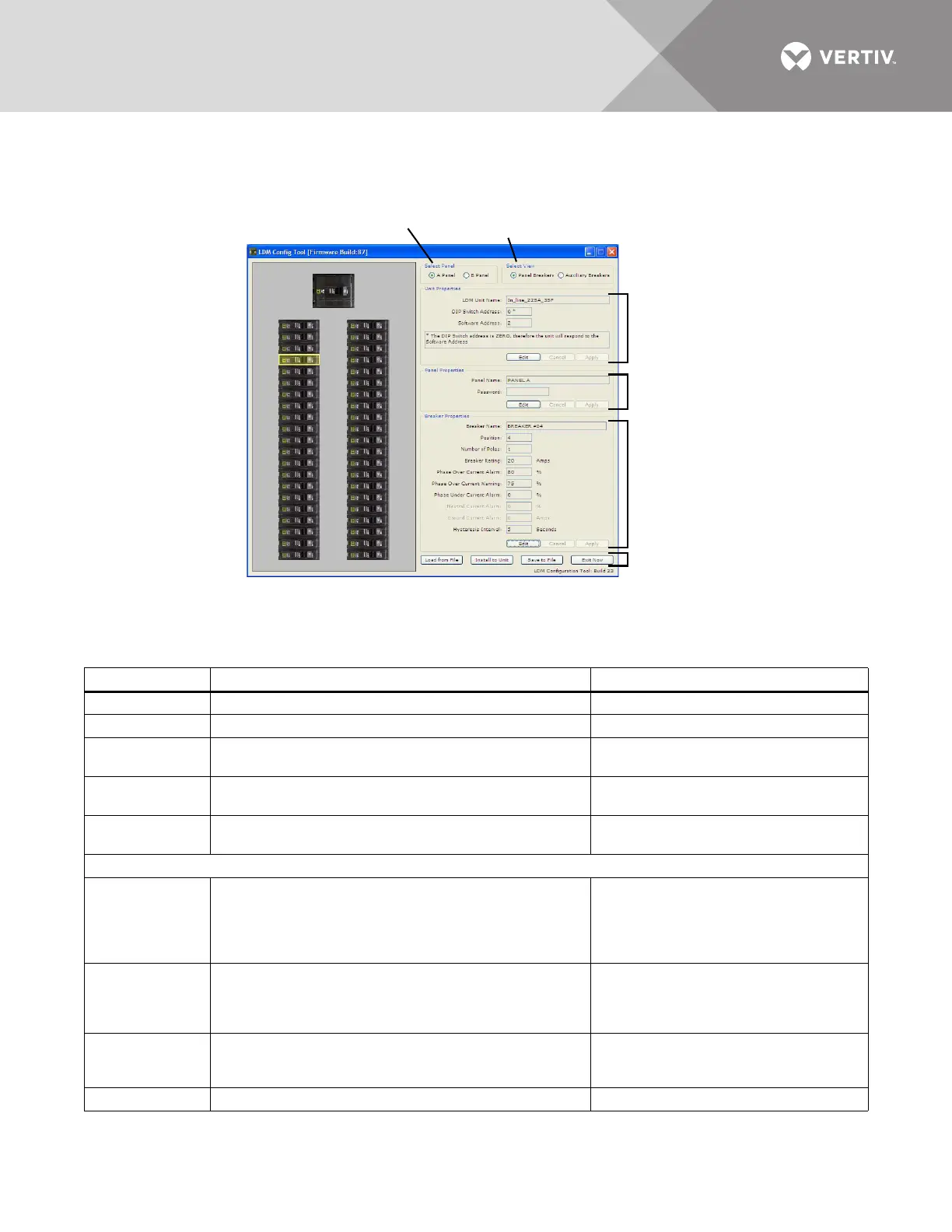
5.5.2 Main Configuration Window Overview
The Configuration window shows breakers graphically in the left pane and associated breaker
data at right. Selecting a breaker in the left pane changes the display of data in the right pane.
Table 10 shows the main sections of the window, along with a description and a reference to
step-by-step instructions for each.
Table 10 Overview of main Configuration window
Section Function For details, see:
Select Panel Toggles the display between Panel A and Panel B. 5.5.6 - Select Panel to View
Select View Toggles between Panel and Auxiliary Breakers. 5.5.7 - Select Breakers to View
Unit Properties
Displays the name and communication settings of the
Liebert LDMF unit.
5.5.8 - Edit the Liebert LDMF Unit
Properties
Panel
Properties
Displays the name of the selected panelboard; also
password setup for security purposes.
5.5.9 - Edit the Panel Properties or Set a
Password
Breaker
Properties
Displays breaker parameters and alarm setpoints. 5.5.10 - Edit the Breaker Properties
Configuration Mode Buttons
•Load from File
Uploads a saved configuration file from the PC to the
Liebert LDMF.
This feature may be used to install a backup copy of a
configuration file or set up a new Liebert LDMF
installation.
5.5.3 - Load a Configuration File from
Disk
•Install to Unit
Uploads the current configuration from the PC to the
Liebert LDMF after making changes to the configuration.
This step is required to update the unit with the latest
changes.
5.5.4 - Install Configuration Changes in
the Unit
• Save to File
Saves a copy of the configuration file to the PC.
This feature is useful when a backup copy of the
configuration file is needed.
5.5.5 - Save the Configuration File to
Disk
• Exit Now Closes the Configuration program. —
Select Panel
Select View
Unit
Properties
Mode
Buttons
Panel
Properties
Breaker
Properties
1
3
5
7
9
11
13
15
17
19
21
23
25
27
29
31
33
35
37
39
41
2
4
6
8
10
12
14
16
18
20
22
24
26
28
30
32
34
36
38
40
42



 To Next Page