Vertiv™ | Liebert® LDMF™ Distribution Monitoring User Manual | 30
5.5.3 Load a Configuration File from Disk
A previously saved configuration file—created
by Vertiv technical personnel or saved from a
Liebert LDMF unit—may be transferred from a
PC to the Liebert LDMF.
This feature allows for quick setup based on
another unit’s configuration or replacing a
configuration file in an existing installation.
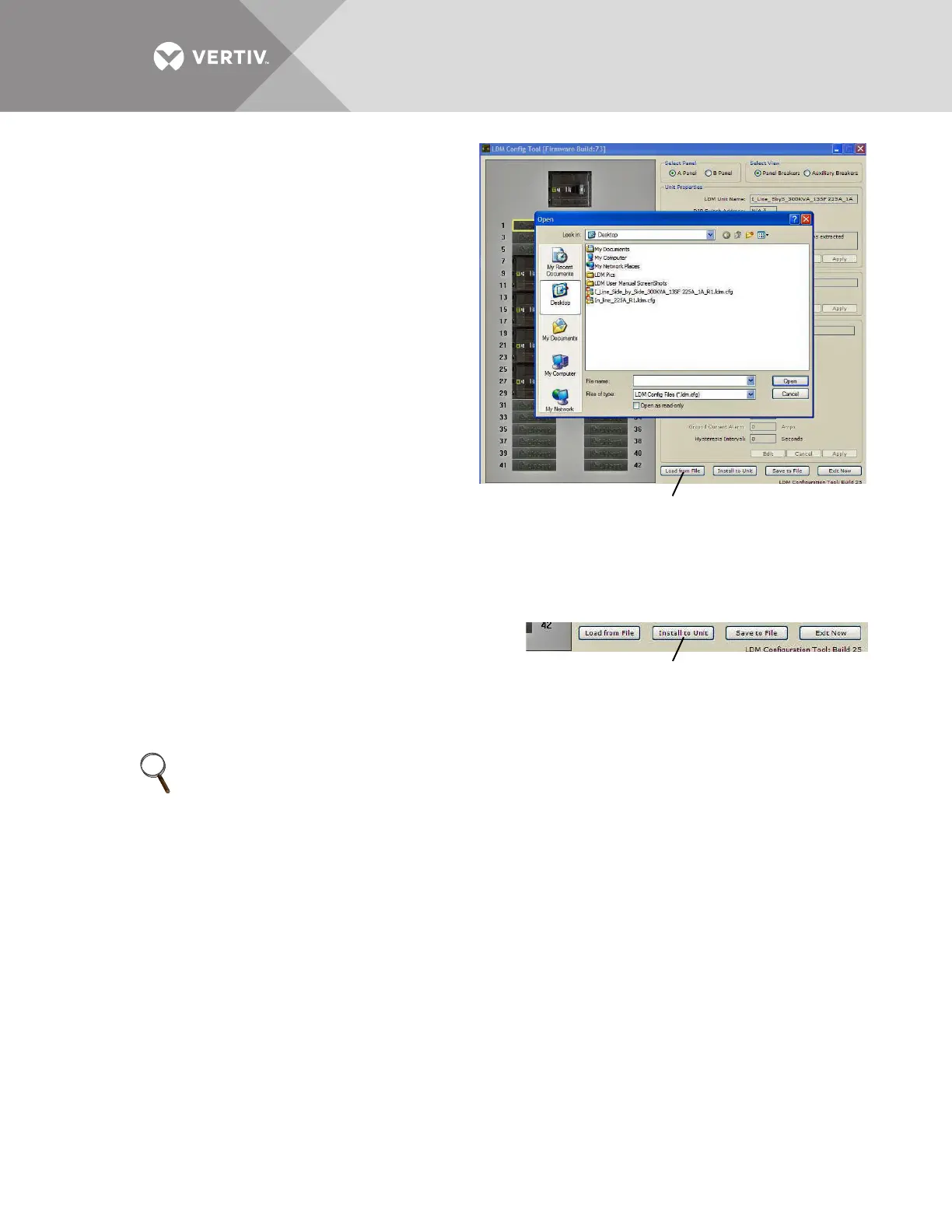
To upload the configuration file:
• Click on the Load from File button at the bottom
of the Configuration window.
•In the Open window, navigate to the
configuration file, then click Open.
After a short delay, a confirmation message
appears. The Liebert LDMF is now updated with
all breaker and subfeed data from the
configuration file that was just loaded.
5.5.4 Install Configuration Changes in the
Unit
Whenever configuration changes are made using the Configuration program, the changes must
be installed in the Liebert LDMF using this procedure.
To install changes in the unit:
1. Click on the Install to Unit button at the bottom of the
Configuration window.
2. During the upload, the circuit board will reboot and
cause a loss of communication with the monitoring
products.
Once the rebooting process is complete, the configuration is active.
NOTE
Configuration changes are not stored in the Liebert LDMF until the Install to Unit button is
clicked.



 To Next Page