Vertiv™ | Liebert® LDMF™ Distribution Monitoring User Manual | 35
5.5.11 Add a Circuit Breaker
After having an electrician physically install a circuit breaker(s) in the panelboard, use the
Configuration software to add the new breaker to the configuration file.
Run the configuration program using the steps outlined in 5.5.1 - Starting the Configuration
Program. Once connected, the configuration file that is currently programmed will be displayed.
To add a 1-, 2- or 3-pole circuit breaker:
• Run the Configuration program (see 5.5.1 - Starting the Configuration Program).
• If needed, select the panel and breaker view with the new breaker:
•In the Sel
ect Panel box, click on Panel A or Panel B depending on the panelboard where the new breaker was
added.
• In the Select View box, choose Panel Breakers if the new breaker is installed inside the panelboard (branch
breaker) or Auxiliary Breakers if located outside the panelboard (subfeed/output breaker).
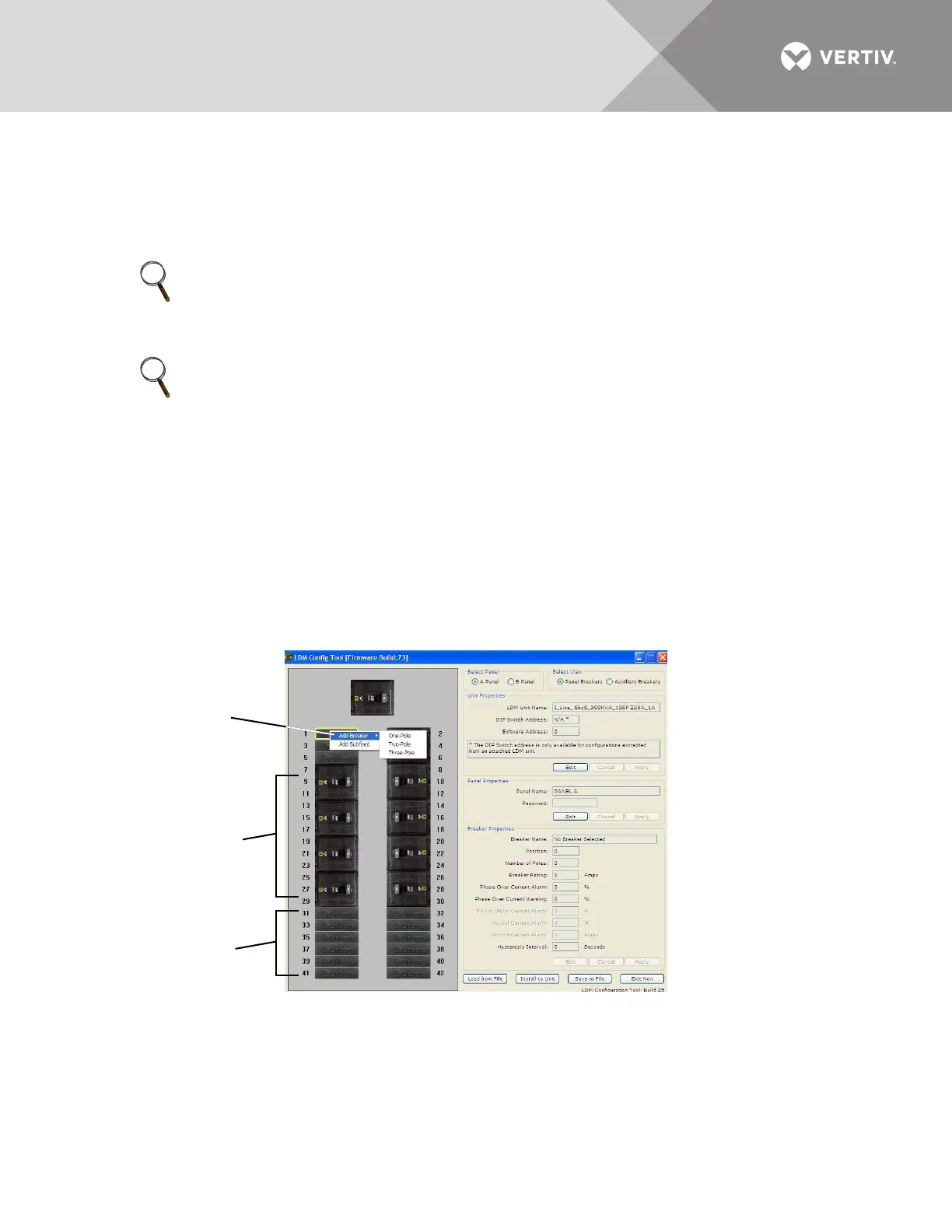
• Right-click on the new breaker position in the left pane. The selected breaker has a yellow outline.
• In the pop-up menu, click on Add Breaker and then click on the type of breaker that was installed: One-Pole,
Two-Pole or Three-Pole.
•In the Breaker Properties at right, change the breaker’s name, parameters and alarm settings as needed
(see 5.5.10 - Edit the Breaker Properties).
NOTE
Vertiv highly recommends saving the configuration file to the local PC as a backup before making
any changes to the configuration file. Perform the steps outlined in 5.5.5 - Save the
Configuration File to Disk before proceeding.
NOTE
Check to make sure the location for the new breaker does NOT have a breaker already assigned.
If it does, first remove that breaker assignment (see 5.5.13 - Delete a Circuit Breaker/Subfeed
Breaker), then return to this procedure.
An error message appears if you attempt to add a breaker to an assigned position.
• If NOT assigned, a breaker position is shown with a Liebert logo.
• An assigned breaker position appears as a picture of a circuit breaker.
Assigned
Breaker Positions
Unassigned
Breaker Positions
Add Breaker



 To Next Page