Vertiv™ | Liebert® LDMF™ Distribution Monitoring User Manual | 33
5.5.10 Edit the Breaker Properties
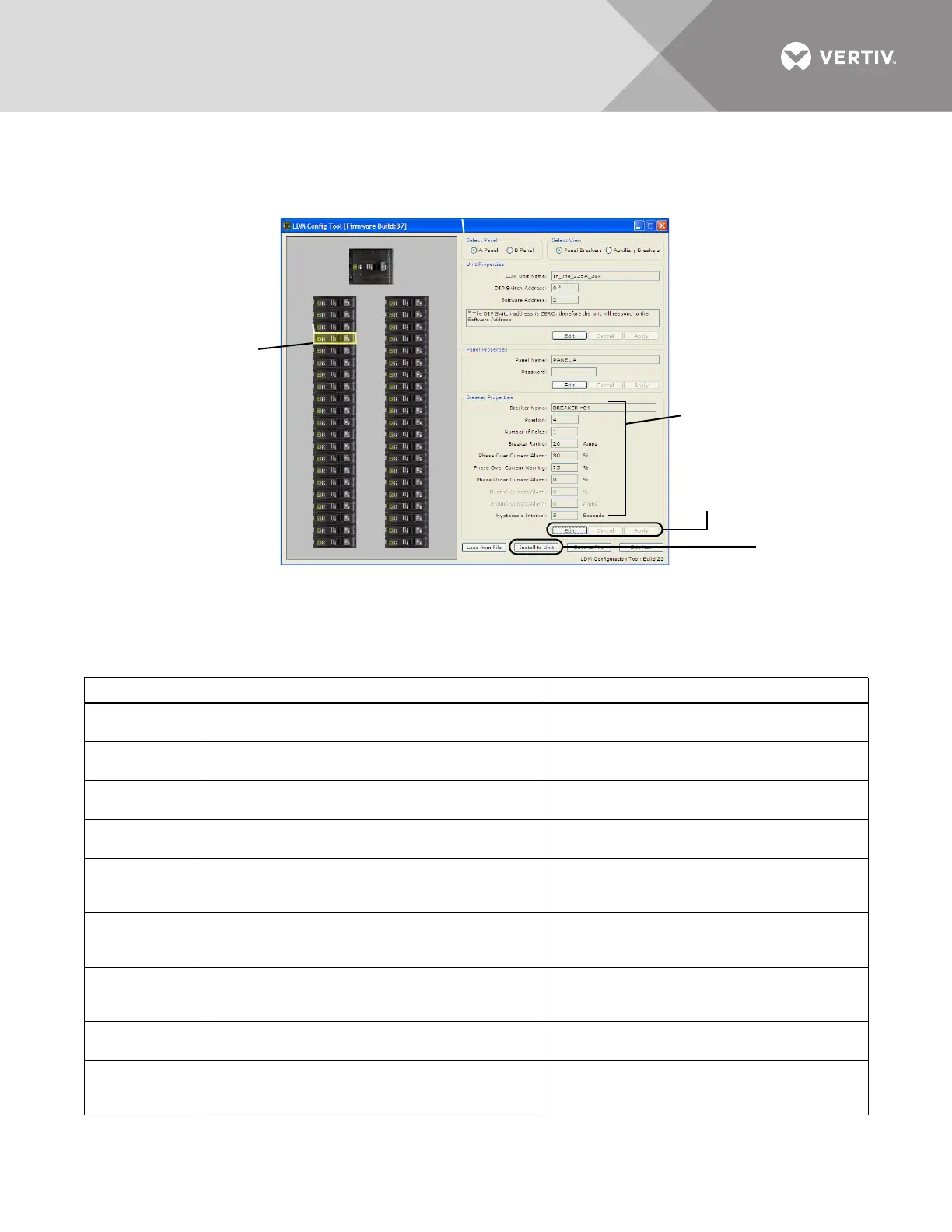
The Breaker Properties box displays the breaker name, rating, breaker parameters and alarm
settings.
To view or change parameters and alarm settings of a breaker:
• Click on the breaker in the left pane. When selected, the breaker has a yellow outline.
•Refer to Table 11 to make changes:
Table 11 Edit breaker properties and description
Parameter
Description To make a change:
Breaker Name
The name of the selected breaker. The default
names are BREAKER #01, BREAKER #02, etc.
• Click in the Breaker Name box, click Edit and
enter a name, then click Apply.
Position
The location of the selected breaker on the
panelboard.
(Cannot be Edited)
Number of
Poles
The number of poles selected when the breaker was
added to the panelboard.
(Cannot be Edited)
Breaker Rating
The amperage for which the circuit breaker is rated.
The default is 20A.
• Click in the Breaker Rating box, click Edit and
enter a value, then click Apply.
Phase
Overcurrent
Alarm
Percentage of the breaker rating that triggers an
overcurrent alarm. This value must be higher than
the Phase Overcurrent Warning.
• Click in the Phase Overcurrent Alarm box,
click Edit and enter a value, then click Apply.
Phase
Overcurrent
Warning
Percentage of the breaker rating that triggers an
overcurrent warning. This value must be lower than
the Phase Overcurrent Warning.
• Click in the Phase Overcurrent Warning box,
click Edit and enter a value, then click Apply.
Phase
Undercurrent
Alarm
Percentage of the breaker rating that triggers an
undercurrent alarm. The default is 0 (zero), which
disables the alarm.
• Click in the Phase Undercurrent box, click Edit
and enter a value, then click Apply.
Neutral Current
Alarm
Percentage of the breaker that triggers a neutral
current alarm.
• Click in the Neutral Current Alarm box, click
Edit and enter a value, then click Apply.
Ground
Current
Alarm
Amperage that triggers a ground current alarm.
• Click in the Ground Current Alarm box, click
Edit and enter a value, then click Apply.
Breaker
Properties
Select a
Breaker
Install to Unit
(click to save
changes to
Liebert LDMF)
Edit and
Apply
buttons
1
3
5
7
9
11
13
15
17
19
21
23
25
27
29
31
33
35
37
39
41
2
4
6
8
10
12
14
16
18
20
22
24
26
28
30
32
34
36
38
40
42



 To Next Page