Vertiv™ | Liebert® LDMF™ Distribution Monitoring User Manual | 32
5.5.8 Edit the Liebert LDMF Unit
Properties
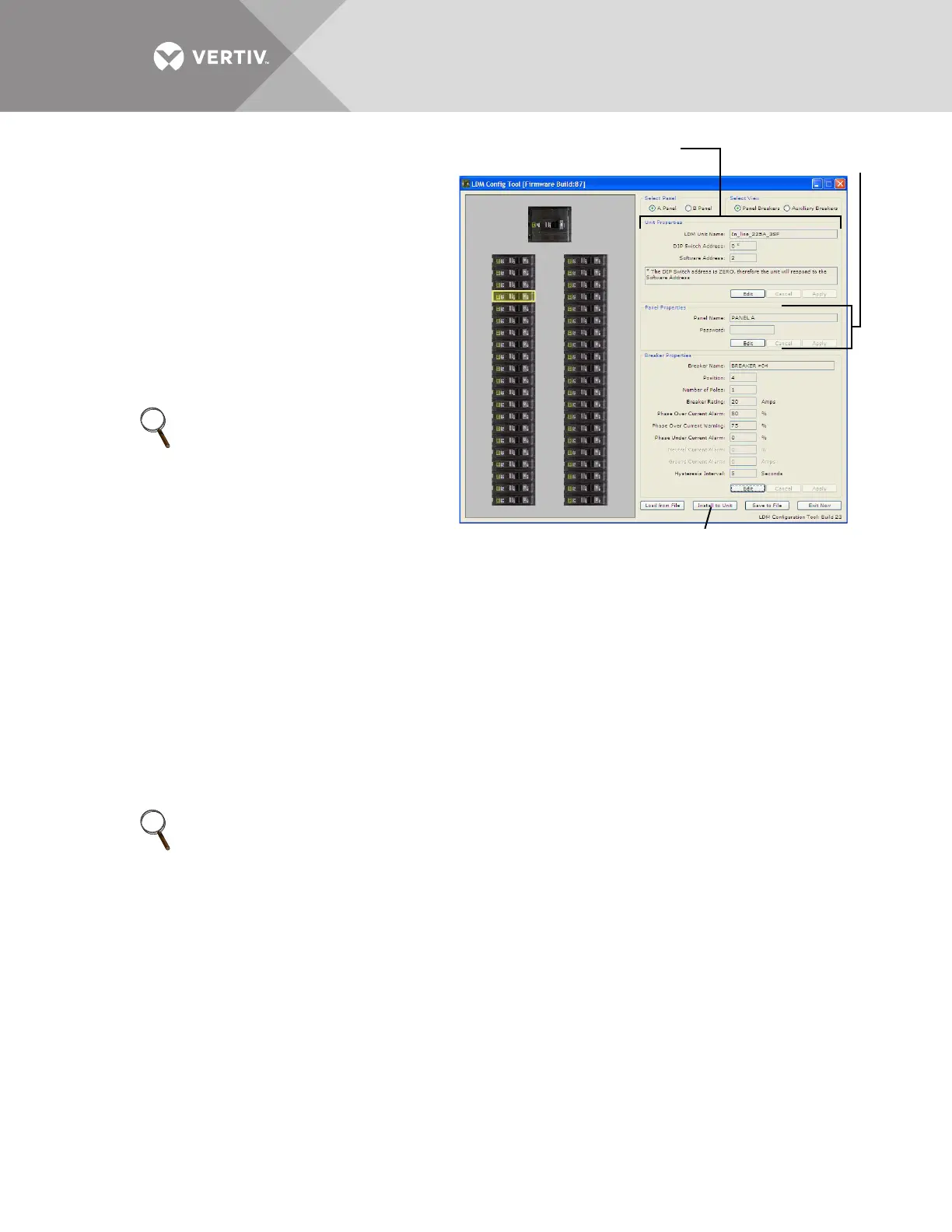
The Unit properties box displays the name
and software address of the Liebert LDMF
unit:
• LDMF Unit Name - a name assigned to the
Liebert LDMF unit.
To make a change, click Edit and enter a name,
then click Apply.
• Software Address - the address is configured
using the communication configuration tool.
• When finished, click Install to Unit to upload
the changes to the Liebert LDMF.
5.5.9 Edit the Panel Properties or Set a
Password
The Panel Properties box (see image above) displays the name of the selected panelboard, as
well as a Password box for creating a password to protect against unwarranted changes to the
configuration:
• Panel Name - the default panelboard names are PANEL A and PANEL B.
To change a name, click Edit and enter a name, then click Apply.
• Password - a password required for users to make changes to the configuration file.
To create a password:
•Click in the Password box, click Edit and enter a password.
The password may be up 10 characters long and may consist of any combination of numbers, letters and
special characters. The password is not case-sensitive.
•Click Apply.
• When finished, click Install to Unit to upload the changes to the Liebert LDMF.
NOTE
The configuration changes will not
be stored in the Liebert LDMF until
the Install to Unit button is clicked.
NOTE
The configuration changes will not be stored in the Liebert LDMF until the Install to Unit button is
clicked.
Unit
Properties
Panel
Properties
Install to Unit (click to save changes to Liebert LDMF)
1
3
5
7
9
11
13
15
17
19
21
23
25
27
29
31
33
35
37
39
41
2
4
6
8
10
12
14
16
18
20
22
24
26
28
30
32
34
36
38
40
42



 To Next Page