Vertiv™ | Liebert® LDMF™ Distribution Monitoring User Manual | 37
5.5.12 Adding a Subfeed Breaker
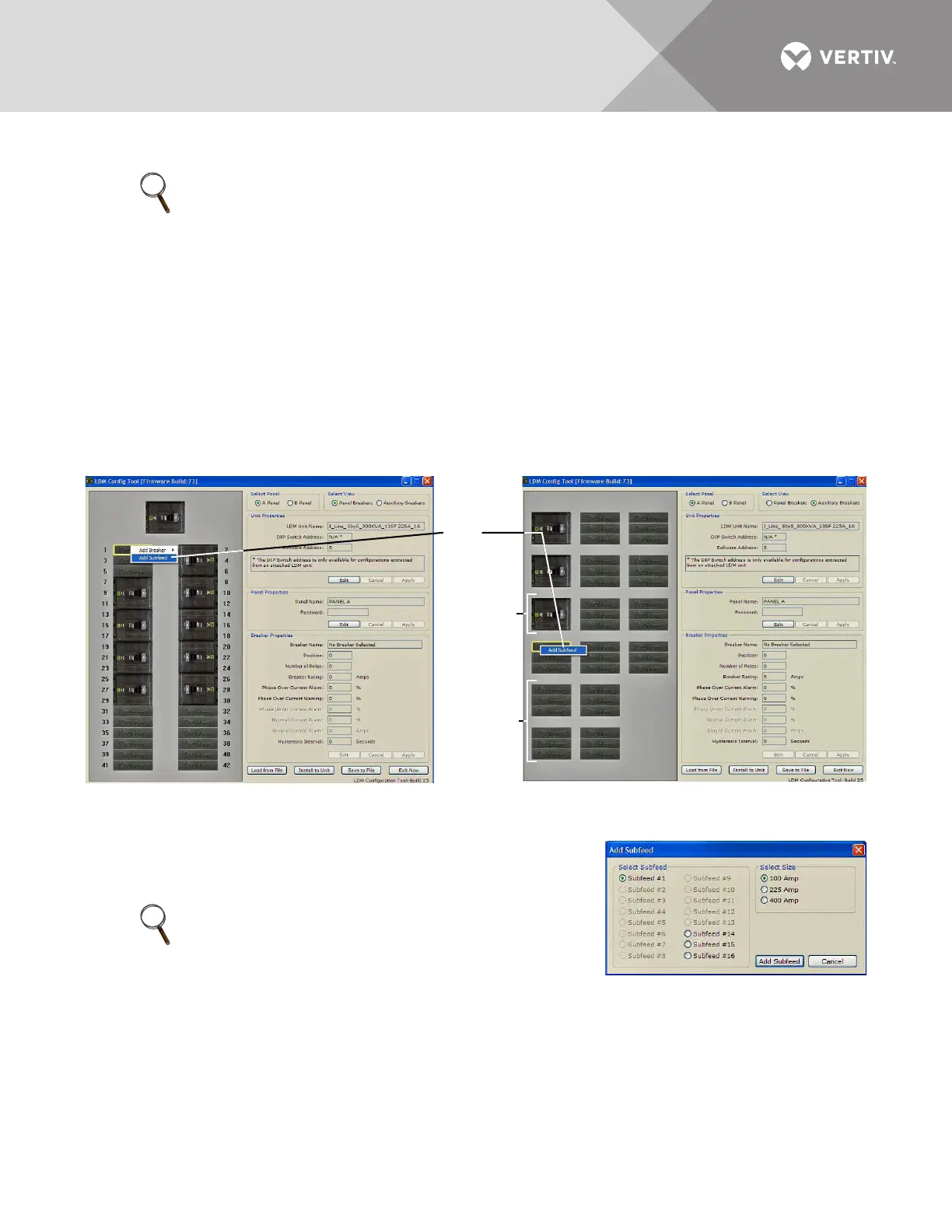
To add a 3-pole subfeed breaker circuit:
• Run the Configuration program (see 5.5.1 - Starting the Configuration Program).
• If needed, select the panel and breaker view with the new breaker:
•In the Select Panel box, click on Panel A or Panel B.
•In the Select View box, choose Panel Breakers if the new breaker is installed inside the panelboard or
Auxiliary Breakers if it is located outside the panelboard.
• Right-click on the new breaker position in the left pane. The selected breaker has a yellow outline.
• In the pop-up menu, click on Add Subfeed.
•In the Add Subfeed window:
• Click on the subfeed—for example, Subfeed #1 or Subfeed #2—
in the Select Subfeed box.
•In the Select Size box, choose the rating of the new breaker: 100 Amp, 225 Amp or 400 Amp.
•Click on the Add Subfeed button to return to the main Configuration window.
•In the Breaker Properties box of the Configuration window, change the subfeed breaker’s name,
parameters and alarm setpoints as needed (see 5.5.10 - Edit the Breaker Properties).
NOTE
Check to make sure the location for the new breaker does NOT have a breaker already assigned.
If it does, first remove that breaker assignment (see 5.5.13 - Delete a Circuit Breaker/Subfeed
Breaker), then return to this procedure.
An error message appears if you attempt to add a breaker to an already assigned position.
• If NOT assigned, a subfeed breaker position is shown with three Liebert logos.
• An assigned subfeed breaker position appears as a picture of a 3-pole breaker.
NOTE
The number of available subfeeds is determined by the
interface board selected and whether cross-configuration
is enabled.
Panel Breaker View Auxiliary Breaker View
Add
Subfeed
Assigned
Breaker
Positions
Unassigned
Breaker
Positions



 To Next Page