Installation
VTM-2000 Installation and Operation Handbook
2-2
Rack Mounting the VTM-2000
When selecting the permanent mounting location for the VTM-2000, ensure that the
flow of air to the ventilation holes on the sides of the chassis is not obstructed. Rack
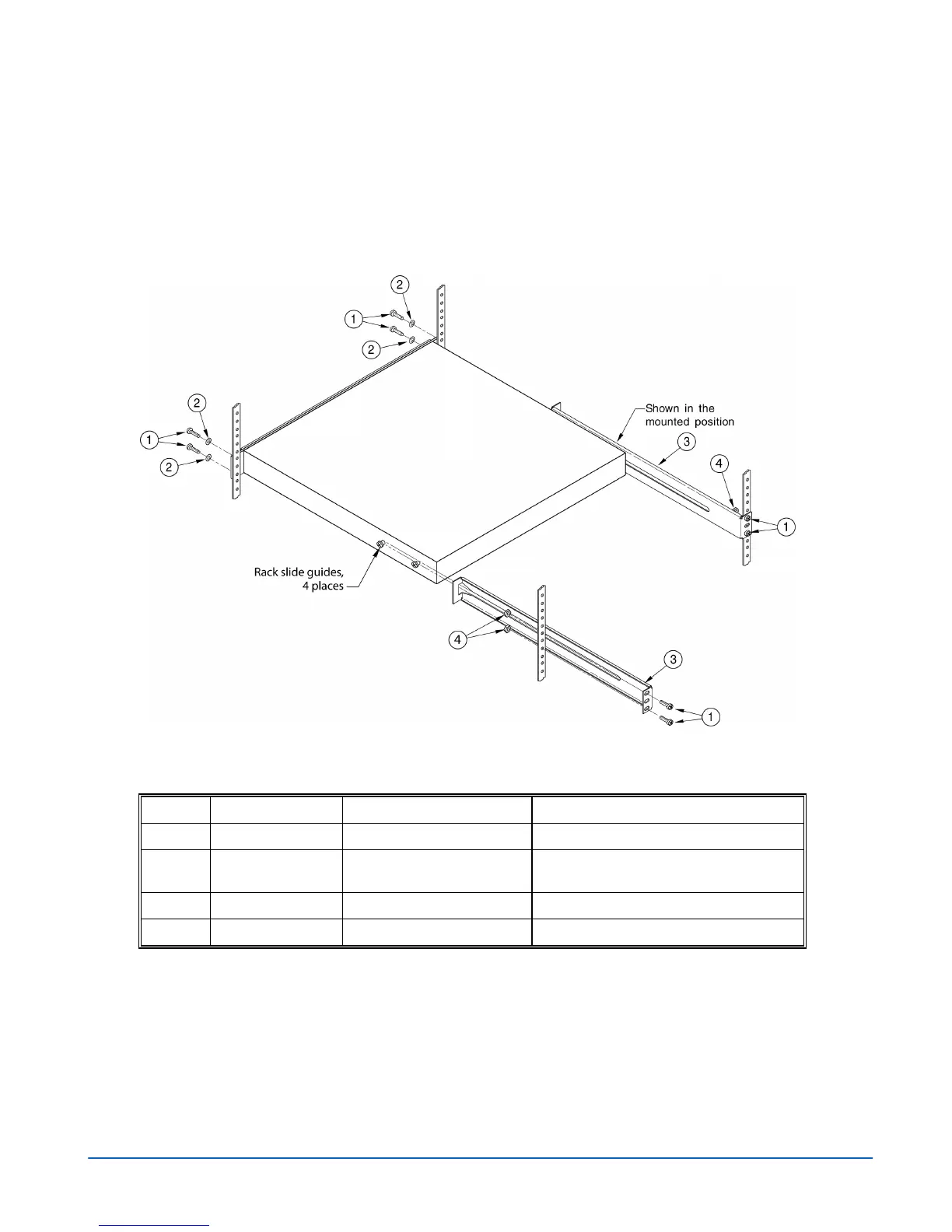
mounting the VTM-2000 is illustrated in Figure 2-1. The parts required to rack mount
the VTM-2000 are listed in Table 2-1.
Figure 2-1. Mounting the VTM-2000 in a Rack
Table 2-1. Parts Required to Rack Mount the VTM-2000 using the DRC-2
Key Item Number Quantity Description
1
831030 8 (4 for each side) Hardware screw, 10-32 x 3/4 PP black
2
831019 4 (2 for each side) Hardware washer, nylon, .437 x .195 x
.032
3
832076 2 (1 for each side) Metal rack extension bracket
4
831060 4 (2 for each side) Hardware knut 10-32
Attach the rack extension brackets to the back of the rack. Once the extension brackets
are in place, guides on the VTM-2000 unit enable it to slide in and out of rack
extension brackets for easy access and removal.



 To Next Page