VIPER-H4 user
manual V1.0
4.7.2 DVRNS/DDNS
DVRNS/DDNS > DVRNS/Dashboard
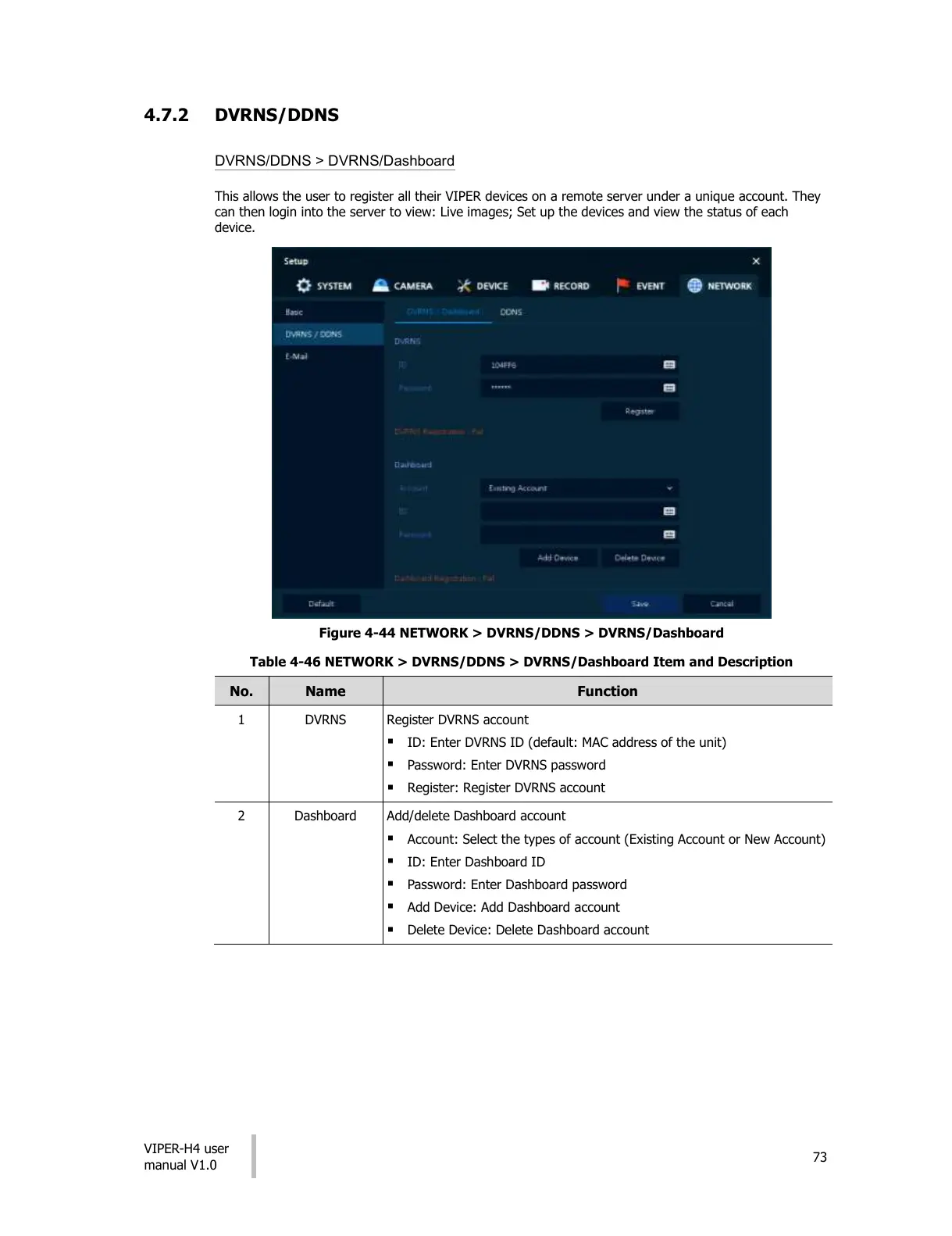
This allows the user to register all their VIPER devices on a remote server under a unique account. They
can then login into the server to view: Live images; Set up the devices and view the status of each
device.
Figure 4-44 NETWORK > DVRNS/DDNS > DVRNS/Dashboard
Table 4-46 NETWORK > DVRNS/DDNS > DVRNS/Dashboard Item and Description
Register DVRNS account
ID: Enter DVRNS ID (default: MAC address of the unit)
Password: Enter DVRNS password
Register: Register DVRNS account
Add/delete Dashboard account
Account: Select the types of account (Existing Account or New Account)
ID: Enter Dashboard ID
Password: Enter Dashboard password
Add Device: Add Dashboard account
Delete Device: Delete Dashboard account
All manuals and user guides at all-guides.com




 To Next Page