VIVOTEK - Built with Reliability
104 - User's Manual
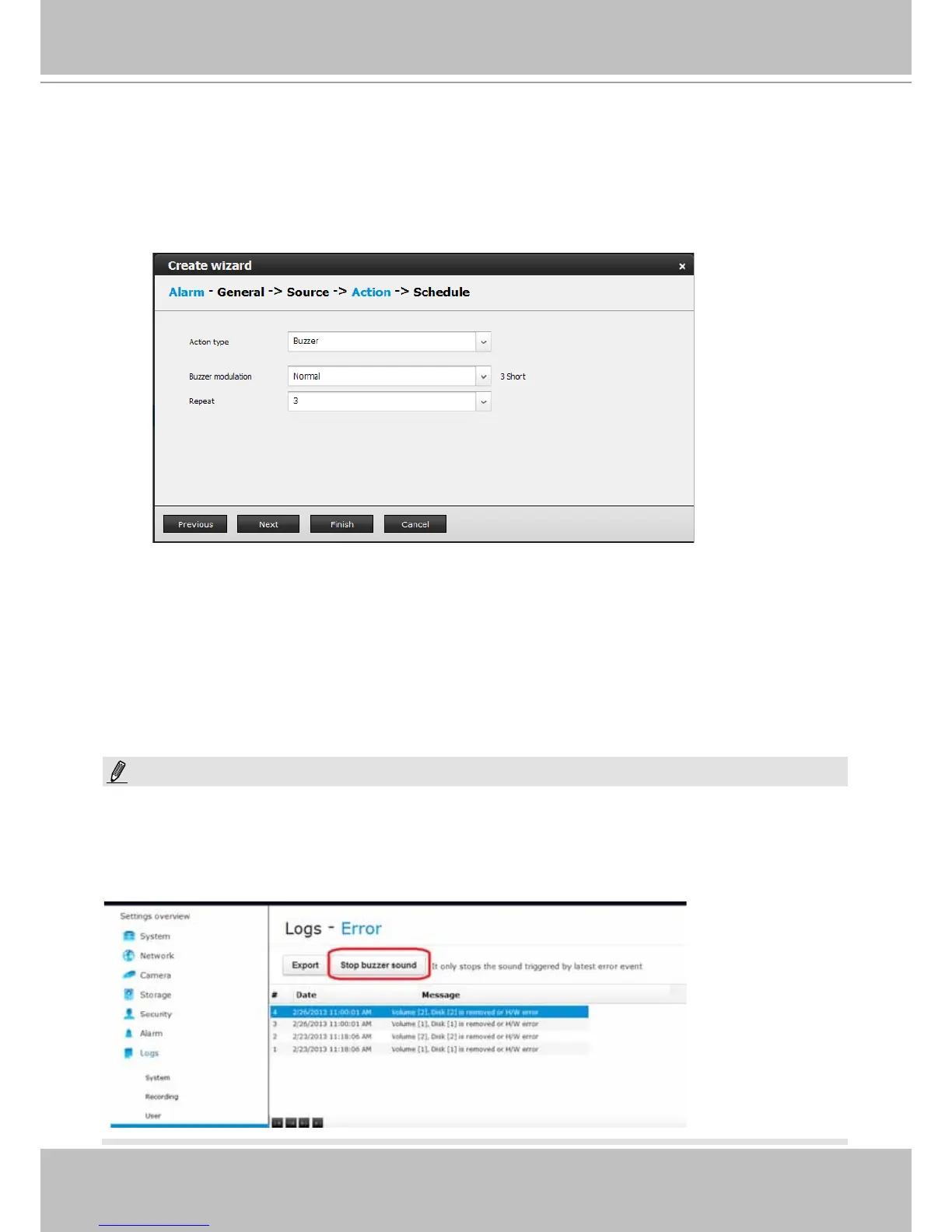
4-3. Buzzer - The buzzer is sounded on the occurrence of the event. The buzzer tones
are categorized into: Major (1 long 2 shorts), Normal (3 shorts), and Minor (2 shorts)
depending on the importance of an event. Select a Buzzer modulation from the drop-
down list. A long tone has a duration of 1 second, while a short tone 0.5 second.
Select how many times the buzzer tones will be repeated on the occurrence of an event.
If events of different importance are issued at the same time, e.g., one major and one
minor event, system will ignore the minor event and sound the buzzer tone for the major
event only. The buzzer can be sounded either by the Alarm actions or the system events.
If Alarm actions and system service events occur at the time, Alarm actions have the
higher priority.
If multiple Alarm actions occur, the currently-sounded events can be depleted by the new
event.
If system buzzer is sounded, turn it off in Settings > Logs > Error page. Click the Stop
buzzer sound button.
Serious system faults, such as a missing volume, can trigger the system buzzer. Verify the
cause of system fault and turn off the buzzer.
NOTE:



 To Next Page