VIVOTEK - Built with Reliability
User's Manual - 83
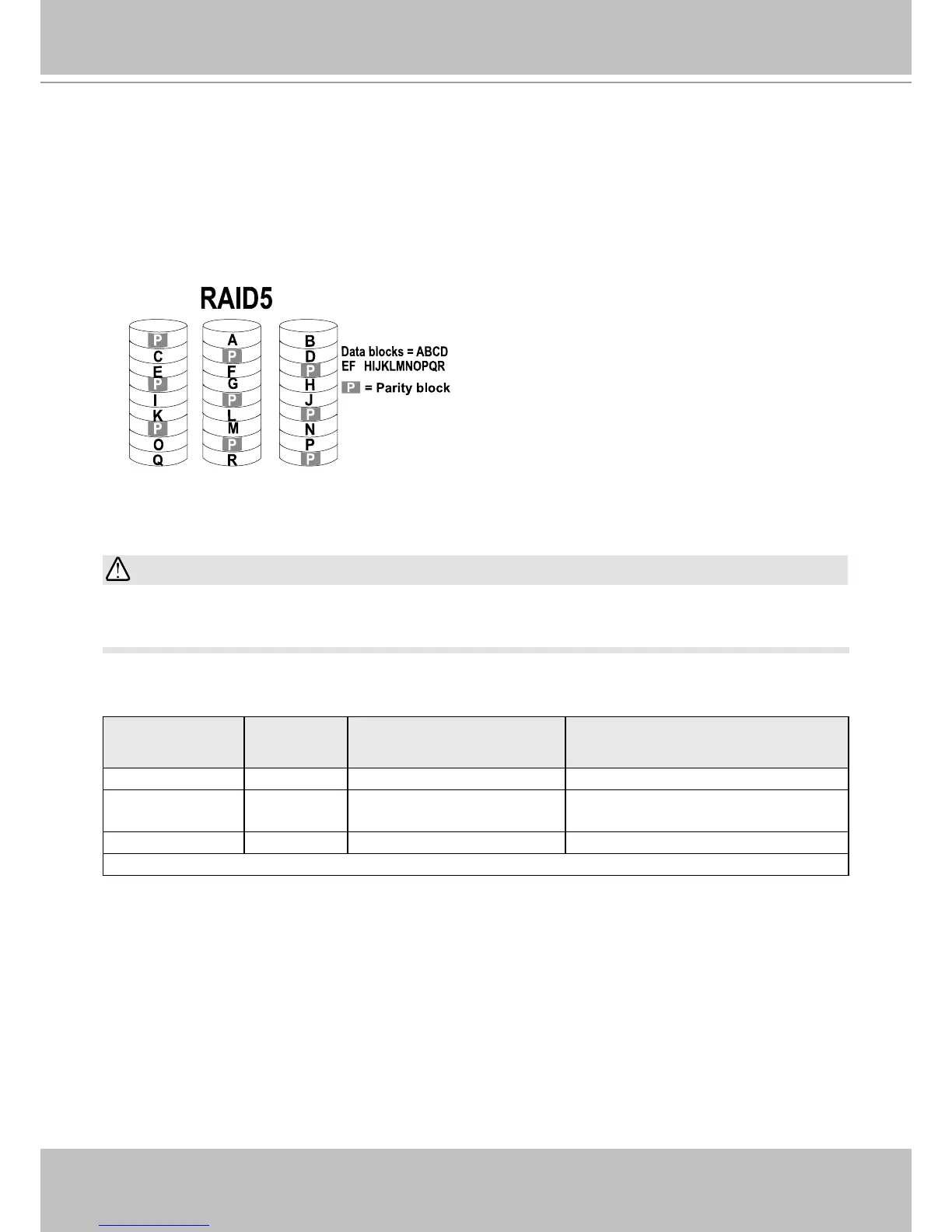
4. RAID5: A RAID5 volume provides a balance in performance and good fault tolerance. RAID5
stripes data and also generates error correction information (parity bits). One drive’s capacity
is needed to store the error correction information from all member drives. A RAID5 volume
requires at least 3 disk drives.
Note that if a member drive fails, the rebuild process of a RAID5 volume can take about
several days to complete (using 2TB drive members). The rebuild runs in the background,
and the rebuild progress is indicated on the volume page.
G
On this conguration window, a "disk" refers to a physical disk drive, a "volume" refers to the
logical conguration of disk drives which may include multiple disk drives.
If you remove a disk drive and insert it into a different drive bay, the system will consider it as a
new and different disk drive.
Some of the RAID levels provide data protection. Below is the summary of RAID level features:
RAID level No. of HDD No. of HDD failure
Allowed
Capacity
RAID0 2 0 HDD # x (smallest HDD size)
RAID1 2 - 4 1 or 2 (if counterparts in
the mirrored pair survives)
HDD # / 2
RAID5 3 1 (HDD # - 1) x (smallest HDD size)
>
=
>
=
IMPORTANT:



 To Next Page