VIVOTEK - Built with Reliability
User's Manual - 87
To rebuild a storage volume:
The precondition is that you have a fault-tolerant storage volume made in a RAID5 or RAID1
conguration. A faulty drive is indicated by the front panel LED or messages in the system logs.
The White Volume LED on the drive tray will be turned off.
2. Click to select the degraded volume, and then click on the Advance... button.
Please carefully identify which disk drive has failed. Replacing the wrong drive in a logical
volume that already has a failed member will destroy the whole volume.
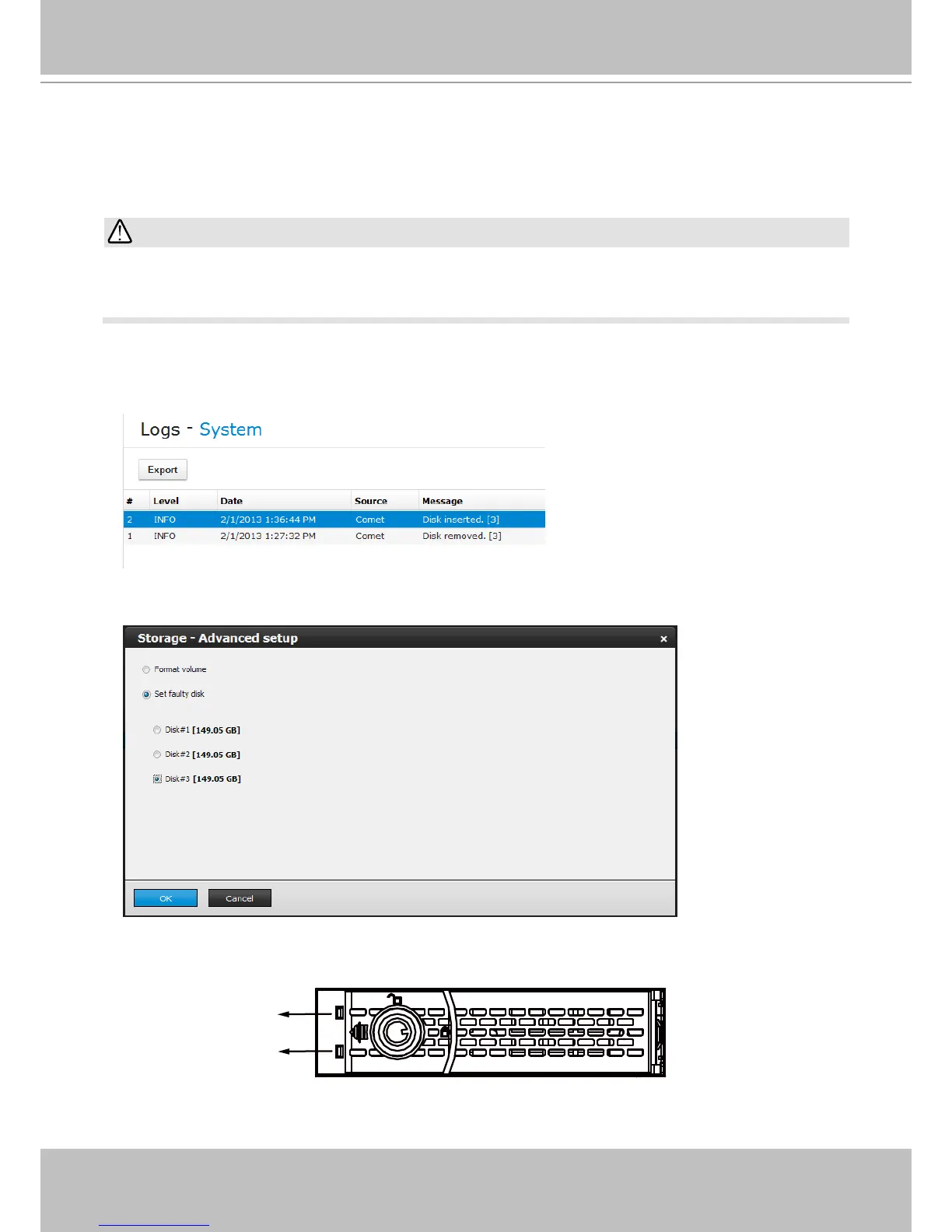
1. In System > Logs window, make sure which disk drive has failed. The sample screen shows
that Disk [3] has failed. A failed drive can sometimes be indicated as a removed drive.
HDD tray LEDs
Volume status
Read/write status
A failed drive or a drive set as faulty will turn off its LEDs or the White I/O LED is off.
3. Select the faulty drive to set it as "Faulty." Click OK to proceed.
IMPORTANT:



 To Next Page