C
SB2265F
A B C D E
H J
K
L
HOC
O
ot
1•
G
Io•
//
S82265E
M
Instruments and controls
Switches
71
Operating heater (direct)
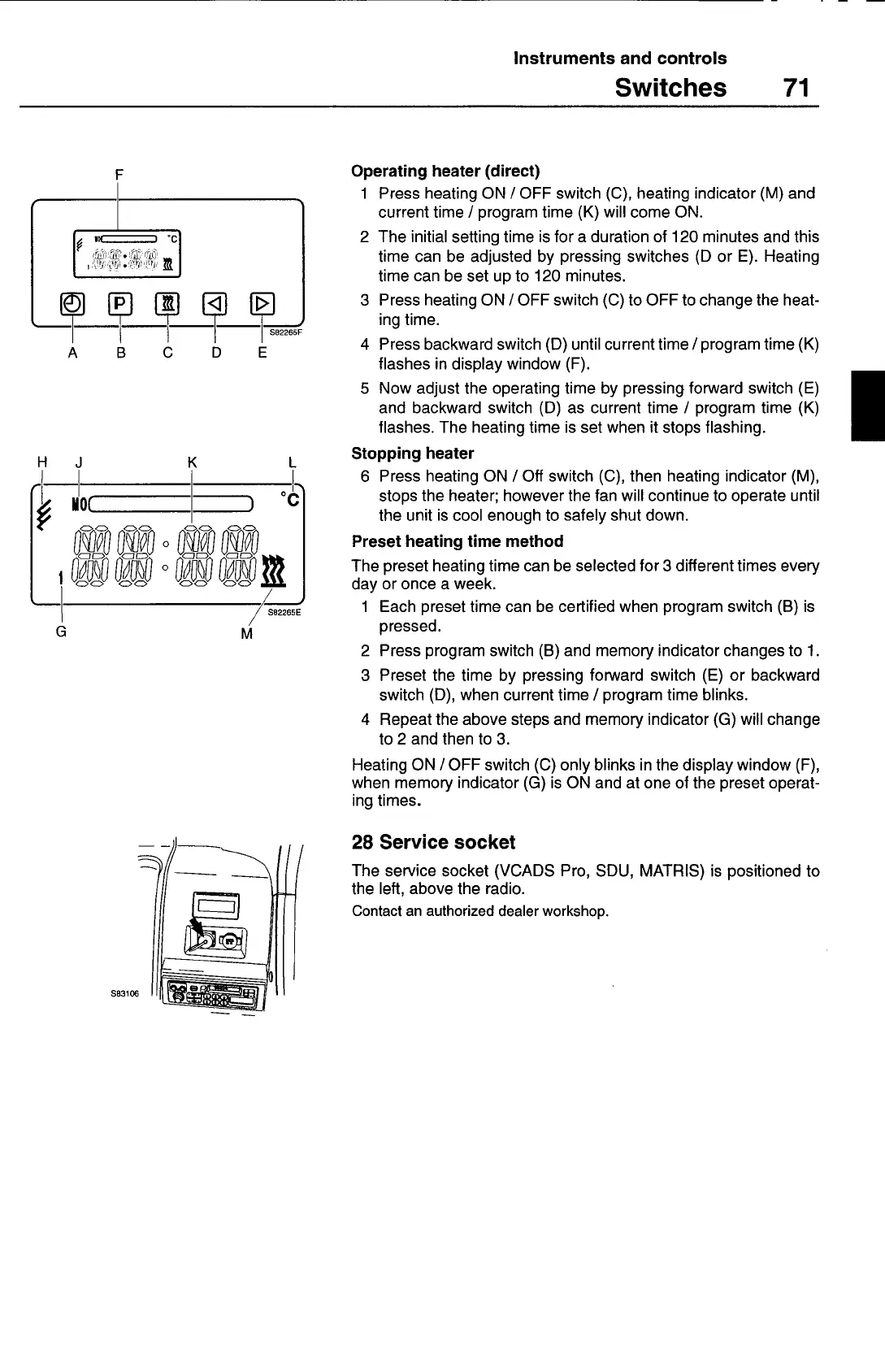
1 Press heating ON / OFF switch (C), heating indicator (M) and
current time / program time (K) will come ON.
2 The initial setting time is for a duration of 120 minutes and this
time can be adjusted by pressing switches (D or E). Heating
time can be set up to 120 minutes.
3 Press heating ON / OFF switch (C) to OFF to change the heat-
ing time.
4 Press backward switch (D) until current time / program time (K)
flashes in display window (F).
5 Now adjust the operating time by pressing forward switch (E)
and backward switch (D) as current time / program time (K)
flashes. The heating time is set when it stops flashing.
Stopping heater
6 Press heating ON / Off switch (C), then heating indicator (M),
stops the heater; however the fan will continue to operate until
the unit is cool enough to safely shut down.
Preset heating time method
The preset heating time can be selected for 3 different times every
day or once a week.
1 Each preset time can be certified when program switch (B) is
pressed.
2 Press program switch (B) and memory indicator changes to 1.
3 Preset the time by pressing forward switch (E) or backward
switch (D), when current time / program time blinks.
4 Repeat the above steps and memory indicator (G) will change
to 2 and then to 3.
Heating ON /0FF switch (C) only blinks in the display window (F),
when memory indicator (G) is ON and at one of the preset operat-
ing times.
28 Service socket
The service socket (VCADS Pro, SDU, MATRIS) is positioned to
the left, above the radio.
Contact an authorized dealer workshop.



 To Next Page