EasyManua.ls Logo

WBOX Technologies 0E-4CHNVR2TB - Page 41

WBOX Technologies 0E-4CHNVR2TB
97 pages
Print Icon
To Next Page IconTo Next Page
To Previous Page IconTo Previous Page
Loading...
Setting
Network Video Recorder(NVR)
User Manual
Issue V1.0 (2018-05-11)
33
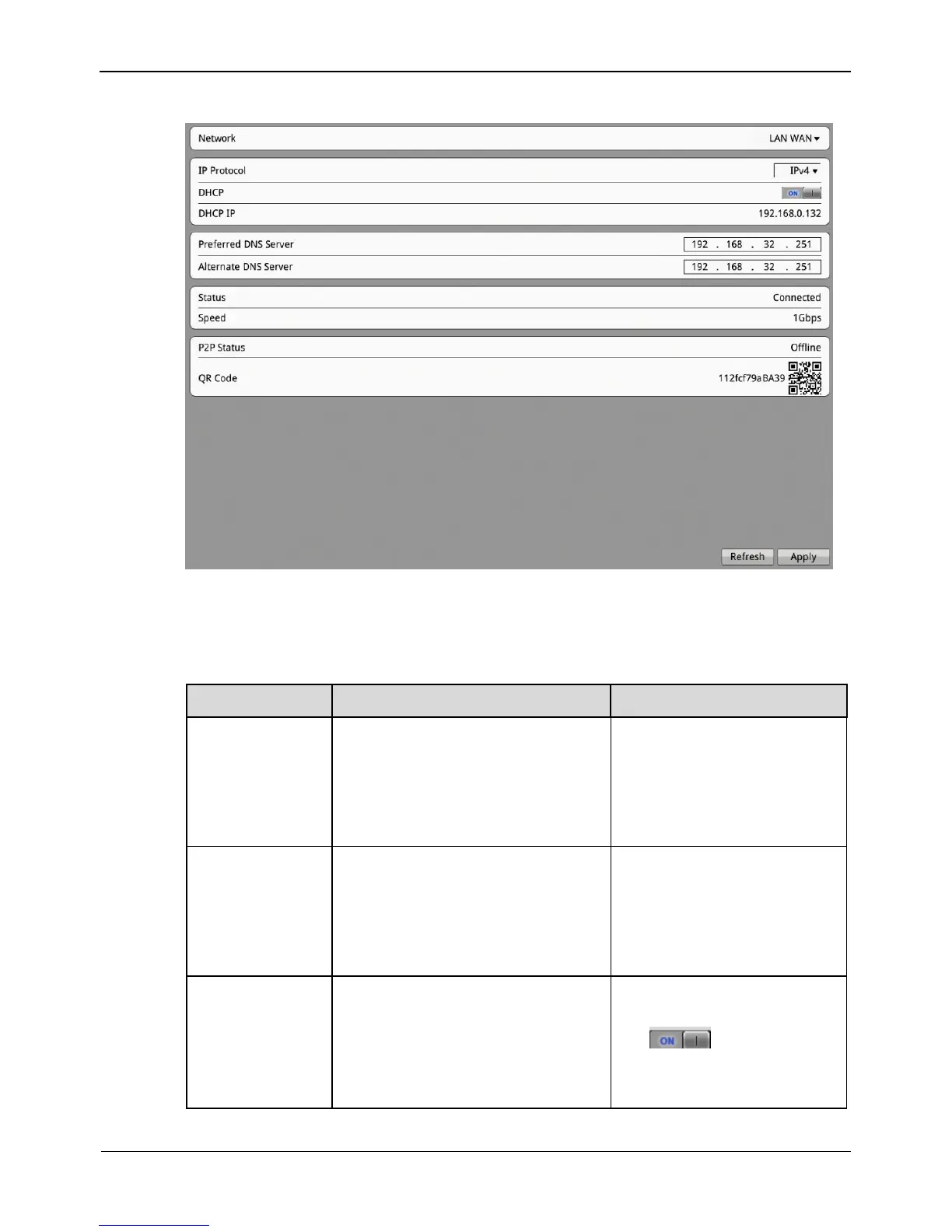
Figure 8-2 Network interface
Step 2 Set parameters on the Network interface. Table 8-1 describes the meanings of the
parameters.
Table 8-1 Description of network parameters
Parameter
Description
Setting
Network
Ethernet interface of NVR.
[Setting method]
Select a value from the
drop-down list box.
[Default value]
LAN WAN
IP Protocol
IPv4 is the IP protocol that uses
an address length of 32 bits.
IPv6 is the IP protocol that uses
an address length of 128 bits
[Setting method]
Select a value from the
drop-down list box.
[Default value]
IPv4
DHCP
DHCP server-assigned IP address
that the NVR obtains
automatically
[How to set]
Set DHCP to On (indicated
by ).
[Default value]
ON

Other manuals for WBOX Technologies 0E-4CHNVR2TB

Related product manuals