EasyManua.ls Logo

WBOX Technologies 0E-4CHNVR2TB - Page 53

WBOX Technologies 0E-4CHNVR2TB
97 pages
Print Icon
To Next Page IconTo Next Page
To Previous Page IconTo Previous Page
Loading...
Setting
Network Video Recorder(NVR)
User Manual
Issue V1.0 (2018-05-11)
45
Preferred Domain Name System (DNS) server
Alternate DNS server
MTU
Procedure
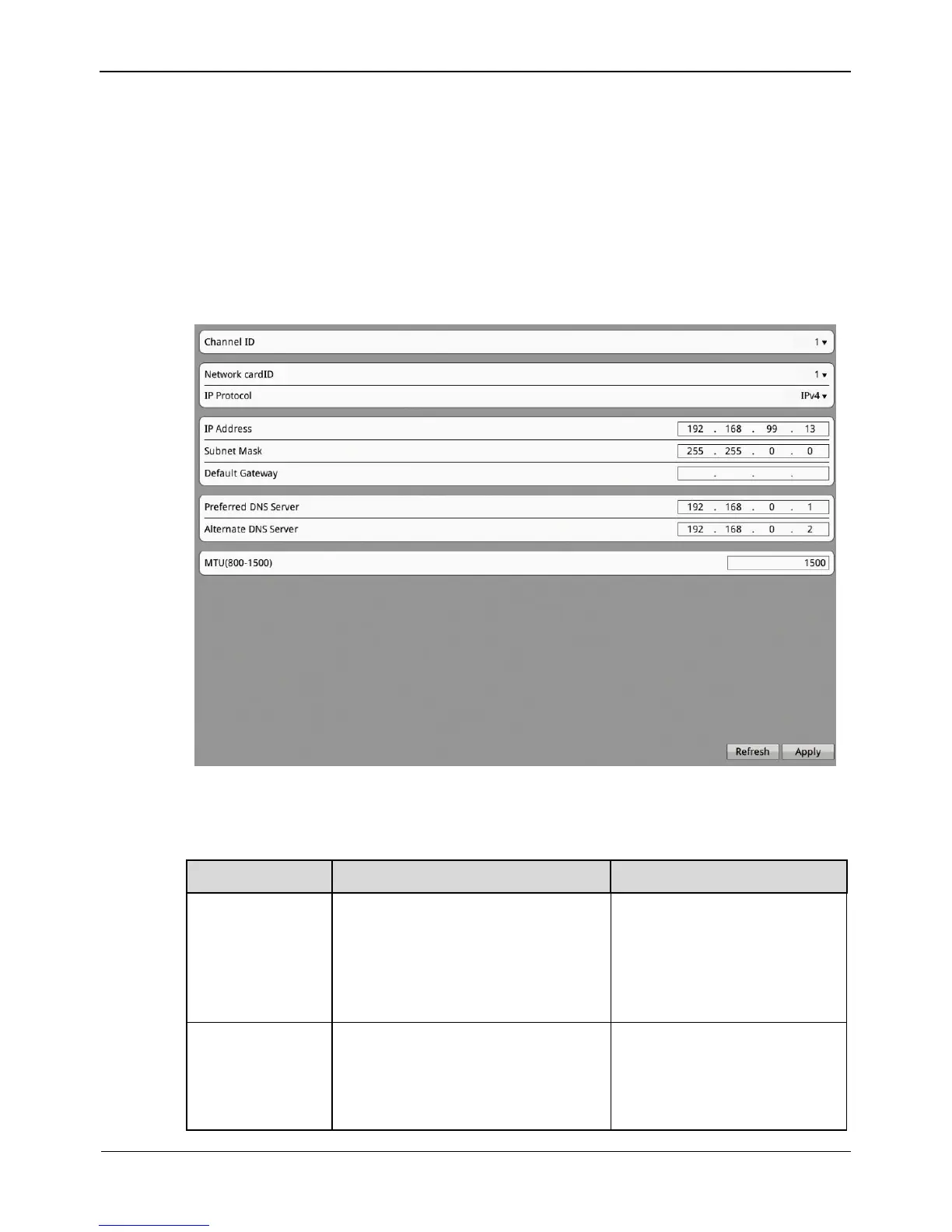
Step 1 Click Setting>NVR Setup>Channel>Network.
The Network interface appears, as shown in Figure 8-9.
Figure 8-9 Network interface
Step 2 Set the parameters according to Table 8-5.
Table 8-5 Network parameters
Parameter
Description
Setting
IP Protocol
IPv4 is the IP protocol that uses
an address length of 32 bits.
IPv6 is the IP protocol that uses
an address length of 128 bits

[Setting method]
Select a value from the
drop-down list box.
[Default value]
IPv4
IP Address
Device IP address that can be set
as required.
[Setting method]
Enter a value manually.
[Default value]
-

Other manuals for WBOX Technologies 0E-4CHNVR2TB

Related product manuals