Weatherdock AG Seite 11
www.easyAIS.com
CPA Alert
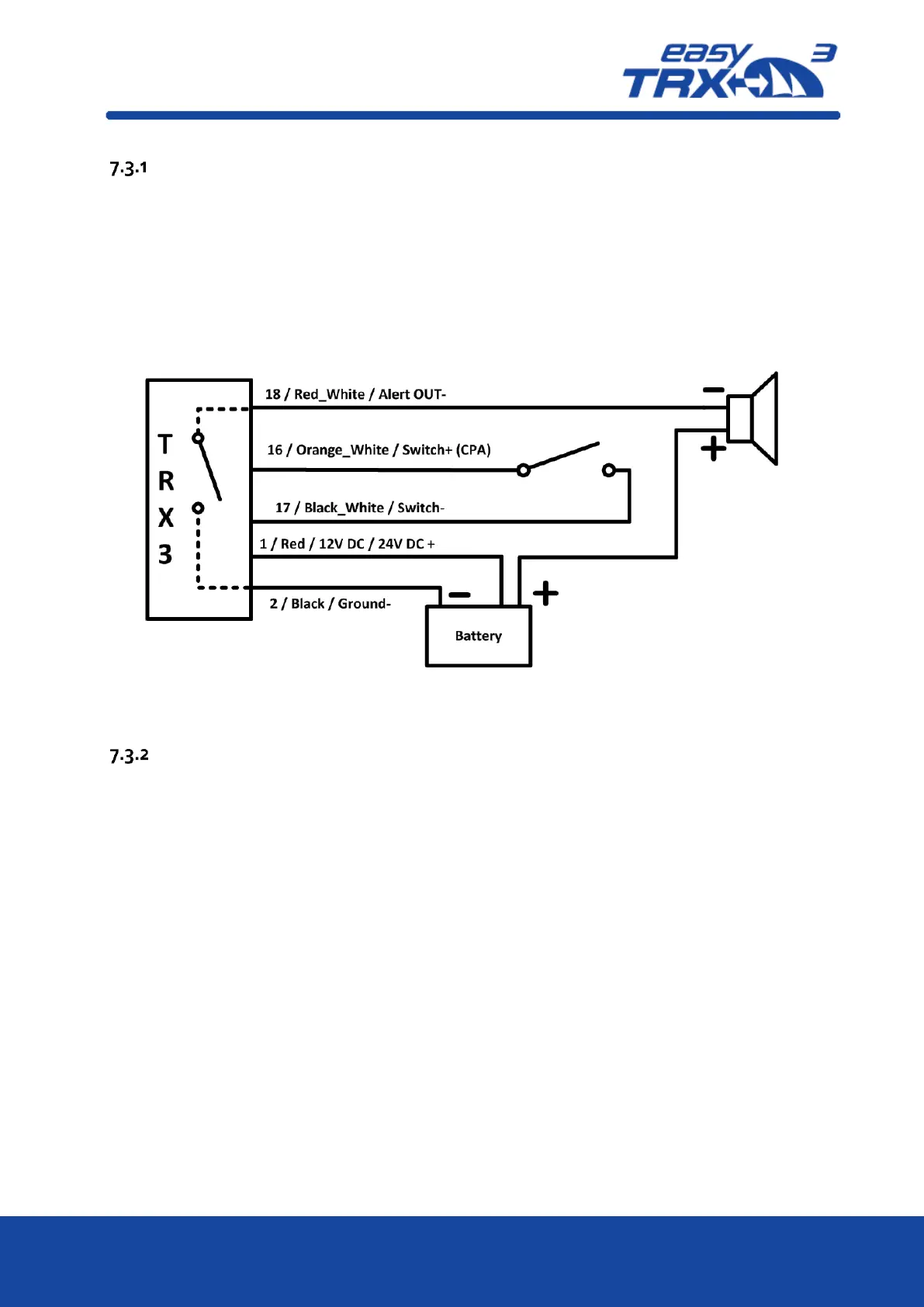
To keep the daily usage of this functionality as easy as possible, you can connect an external
switch and an external signal generator (e.g. a horn, see chapter 7.3.4).
External Switch
Out of the 18-pin cable harness please connect cables
“16 / Orange_White / Switch+ (CPA)” and
“17 / Black_White / Switch-“
with the corresponding pole of your switch. According to your software settings you are able to
activate or deactivate this CPA functionality.
Figure: 4 CPA Alert connection sketch
Anchor Alert
To keep the daily usage of this functionality as easy as possible, you can connect an external
switch and an external signal generator (e.g. a horn, see chapter 7.3.4).
External Switch
Out of the 18-pin cable harness please connect cables
“14 / Blue_White / Switch+ (Anchor)” and
“17 / Black_White / Switch-“
with the corresponding pole of your switch. According to your software settings you are able to
activate or deactivate this Anchor alert functionality.


 To Next Page