Weatherdock AG Seite 27
www.easyAIS.com
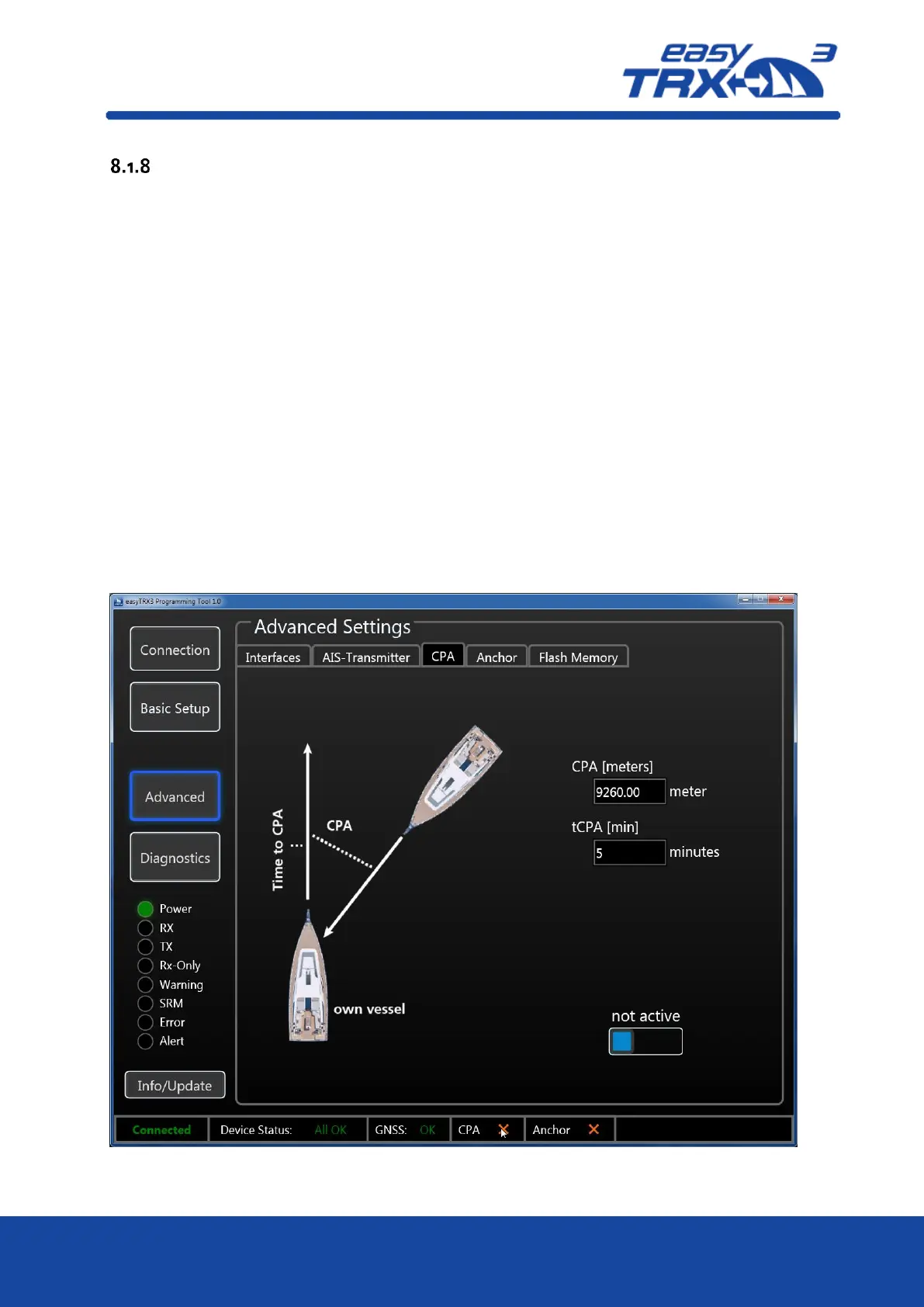
CPA Alert
The CPA (Closest Point of Approach) alert functionality was developed to avoid collisions due to
low visibility at night or bad weather conditions.
You can create your own “safety area” around your vessel by activating time- and distance
settings.
Usually CPA settings will be done at the chart plotter. But the chart plotter has to be switch on
all the time during the trip to keep the CPA functionality running. This might cause to a power
supply problem aboard because chart plotters often need a lot of power. But during a long-
term-trip it is absolutely needful to reduce power consumption to a minimum.
The big advantage of the easyTRX3 is that it has got an own internal CPA functionality and the
chart plotter doesn’t need to be switched on. All incoming AIS position reports will be
investigated regarding the CPA settings done in this programming tool. In event of receiving a
position report within the self-defined “safety area” which means potential collision, the Alert
LED starts to glow.
To get the daily use of this functionality as convenient as possible, please take a look back to
chapter 7.3 “External switches – connecting possibilities” how to use switches and external signal
generators.
Please keep in mind that a switch, connected via the 18-pin cable harness (hardware), always
takes priority over software programming-settings.
Figure: 24 CPA settings programming tool



 To Next Page