30 | CFW701
First Time Power-Up and Start-Up
English
Step Action/Display Indication Step Action/Display Indication
11 12
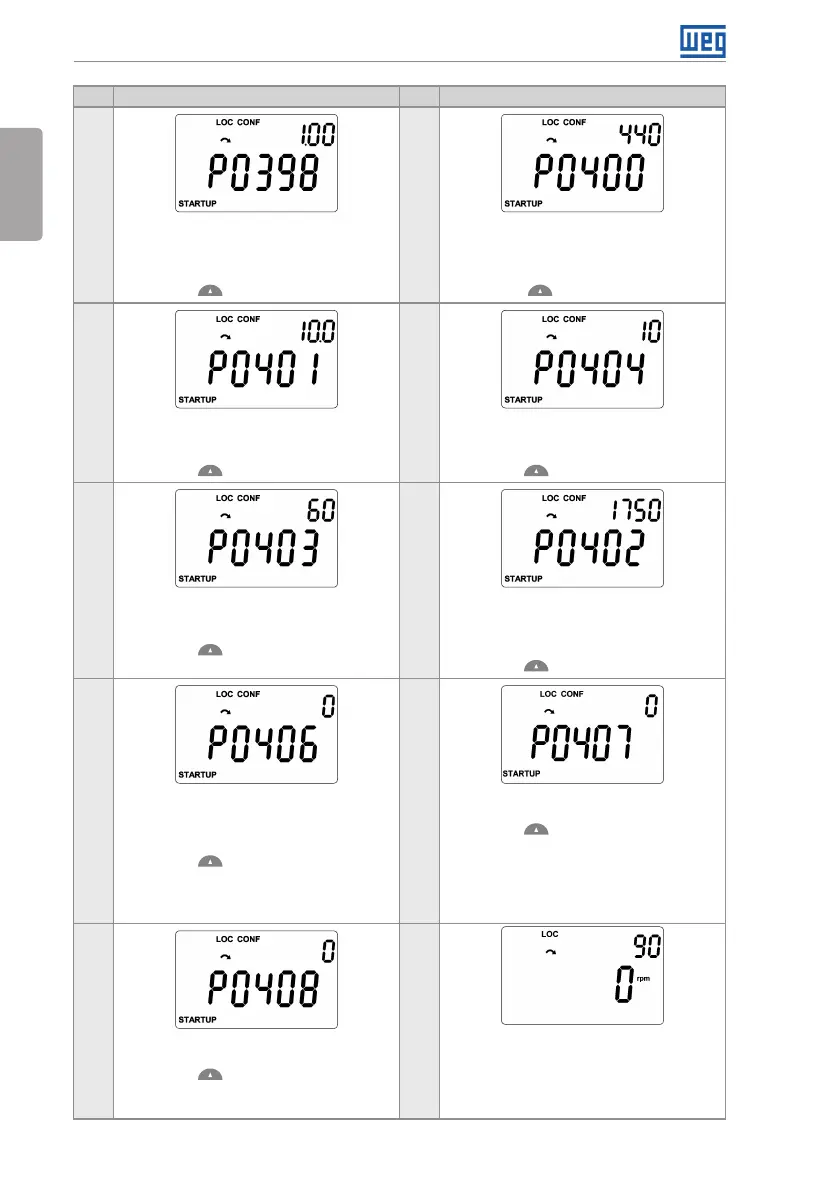
If necessary, change “P0398 – Motor
Service Factor” parameter. This change
will affect the current and the time of the
motor overload protection operation.
Press the key to the next parameter.
If necessary, change “P0400 – Motor
Rated Voltage” parameter. This change
corrects the output voltage by the factor
“x = P0400/P0296”.
Press the key to the next parameter.
13 14
If necessary, change “P0401 – Motor
Rated Current” parameter. This change
will affect P0156, P0157, P0158 and P0410.
Press the key to the next parameter.
If necessary, change “P0404 – Motor
Rated Power” parameter. This change will
affect P0410.
Press the key to the next parameter.
15 16
If necessary, change “P0403 – Motor
Rated Frequency” parameter. This change
will affect P0402.
Press the key to the next parameter.
If necessary, change “P0402 – Motor
Rated Speed”. This change will affect
P0122 to P0131, P0133, P0134, P0135,
P0182, P0208, P0288 and P0289.
Press the key to the next parameter.
17 18
This parameter will only be visible if
P0202 = 3 or 4.
If necessary, change “P0406 – Motor
Ventilation” parameter.
Press the key to the next parameter.
The parameters to come after selecting
P0406 may vary according to the type of
control set at P0202.
If necessary, change “P0407 - Motor Rated
Power Factor” parameter.
Press the key to the next parameter.
19 20
If necessary, change “P0408 – Run Self-
Tuning” parameter.
Press the key to the next parameter.
Run the self-tuning when running in V V W
and sensorless.
Press the BACK/ESC key to end the
Oriented Start-up routine.
Press the BACK/ESC again to go back to
the monitoring mode.
Figure 5.1: Oriented start-up



 To Next Page