11
Indicator Technical Manua
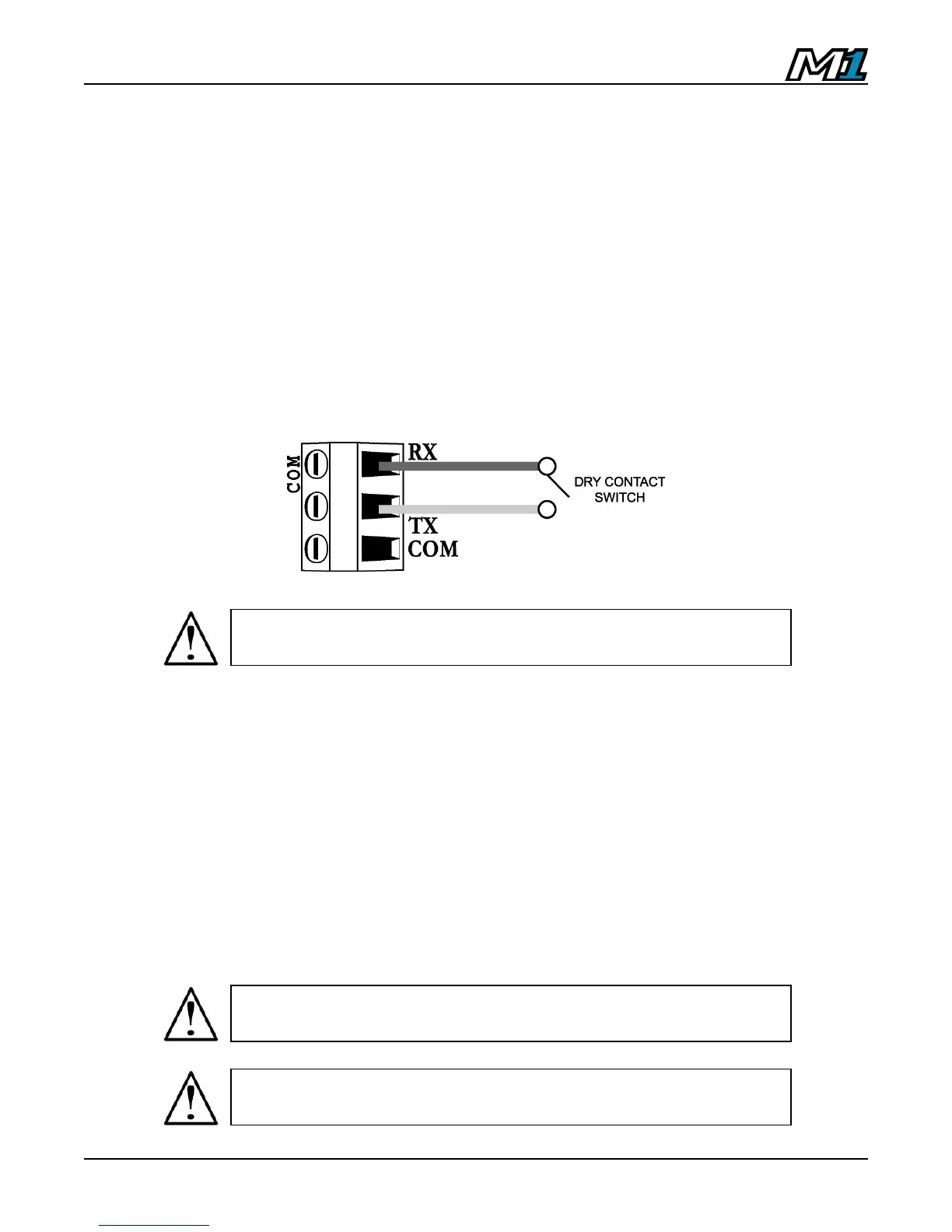
Remote Switch Wiring
Use the COM port for remote input control (CLEAR, TARE, ZERO or PRINT)
using a pushbutton switch.
1. Ensure the unit is disconnected from power.
2. Run a 2 conductor cable through the strain-relief, connecting one
conductor to the TX terminal and one conductor to the RX terminal on the
COM Port Terminal Block.
3. Use a dry contact, push-to-make switch to short TX and RX together.
4. Enable the Remote Switch Function in Calibration Mode (P5.3 & P5.8).
Battery / Battery Replacement
The M1 uses a 3 Volt lithium battery. Power is drawn from the battery only when
the unit is disconnected from AC power. If time and date are lost when the unit is
disconnected from AC power, the battery likely needs replacement.
1. Remove the old battery from the B1 terminal on the M1 PCB by hand.
2. Observe proper battery polarity before inserting new battery.
3. Ensure the battery is seated correctly in the B1 terminal.
ATTENTION! DO NOT supply any external voltage to the
remote switch terminal! A contact closure is all that is required.
CAUTION! Risk of explosion if battery is replaced by an incorrect
type. Dispose of used batteries according to their instructions.
CAUTION! Never use metal objects such as screwdrivers to remove
batteries! This may result in personal injury or damage to the unit.



 To Next Page