25
Indicator Technical Manua
QUICK SCALE CALIBRATION
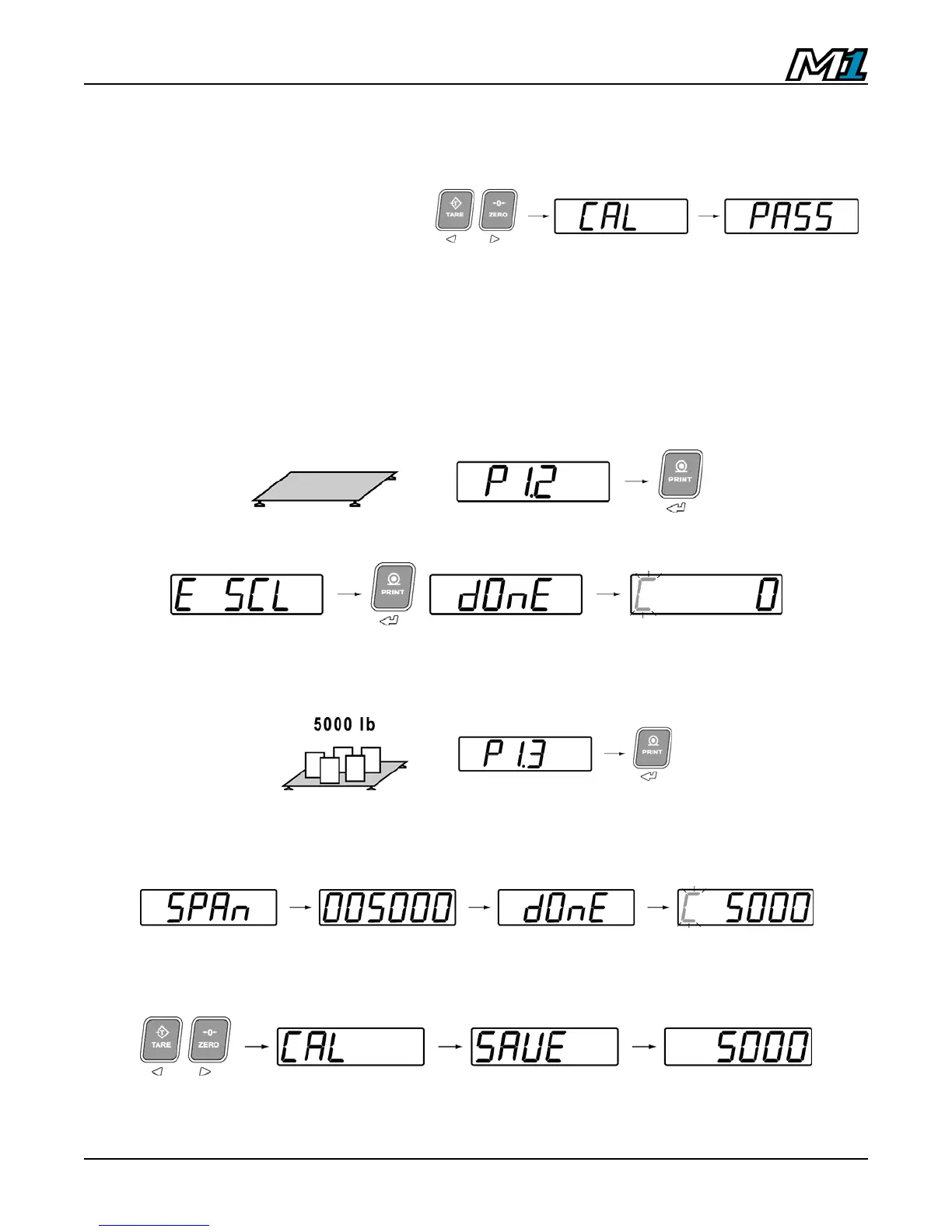
This example covers the DEADLOAD & SPAN of a 5,000 lb x 1 lb floor scale.
1. Enter Calibration Mode
(factory password 0001).
2. Set the following parameters:
P1.0 – Grad Size = 1d
P1.1 – Decimal Place = 0
P1.4 – Capacity = 005000
P1.6 – Calibrated Units = 2 (lb)
3. Remove any weight from the scale and go to P1.2 – Deadload Scale (Scale
Zero Calibration). Press ENTER to select the parameter. “E SCL” is displayed.
4. Press ENTER to begin deadload. When done, the scale weight should read “0”.
5. Verify the scale is at zero and add test weights. This example shows 5000 lbs
(max. capacity). The M1 indicator can be calibrated to any test weight amount.
Go to P1.3 – Calibrate Scale. Press ENTER to select the parameter.
6. “SPAn” is briefly displayed. Enter the test weight amount using the ARROW
keys to select and alter digits. Press the ENTER key to confirm the test weight
value.
7. Press the LEFT and RIGHT ARROW keys together to exit Calibration Mode.



 To Next Page