15
Indicator Technical Manua
Navigating Calibration Parameters
1. Use the UP and DOWN ARROW keys to navigate the Parameter List.
Calibration Parameters are displayed by the letter “P” preceding the
parameter number (Ex. “P1.0, P1.1, P1.2 …”).
2. Holding down the UP or DOWN ARROW key for more than 1 second will
scroll through the Calibration Sub-blocks for quicker navigation. (Ex.
“P1.0, P2.0, P3.0 ...”).
3. Press the ENTER key to select the parameter for editing.
Editing Calibration Parameters
1. Use the UP and DOWN ARROW keys to edit the parameter value.
2. Press ENTER to confirm the parameter value.
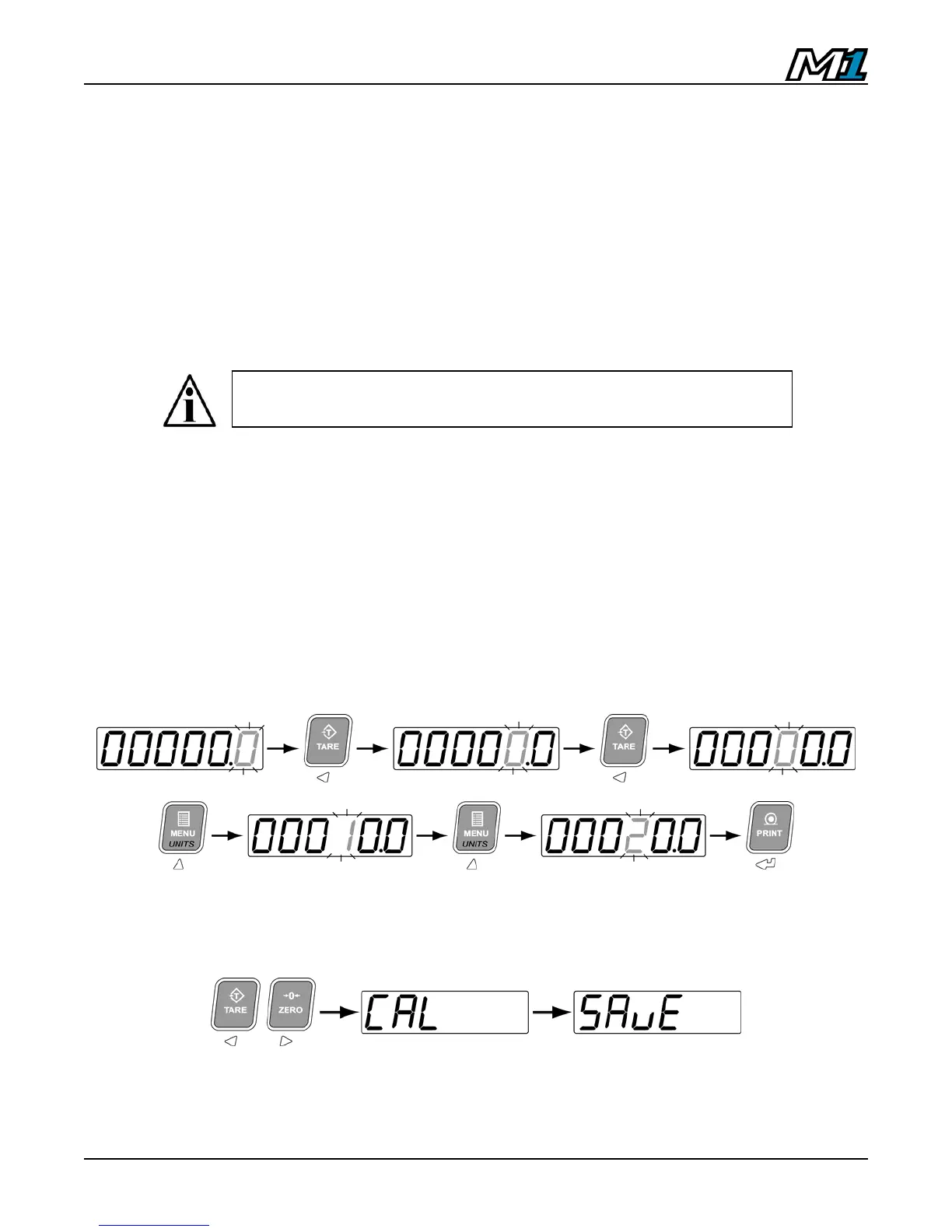
To edit a numeric value (Ex. Weight), use the LEFT and RIGHT ARROW
keys to select the digit and the UP and DOWN ARROW keys to alter the
digit’s value. Press the ENTER key when done.
Example: Enter 20.0 (Note: Decimal point is determined by P1.2)
Exit & Save Calibration
1. Press the LEFT and RIGHT ARROW keys together.
2. The indicator will exit Calibration Mode and return to Weighing Mode. All
calibration information is saved.
If no parameter is selected after 6 seconds, the display returns to
the scale weight with the blinking “C” on the left-hand side.



 To Next Page