27
Indicator Technical Manua
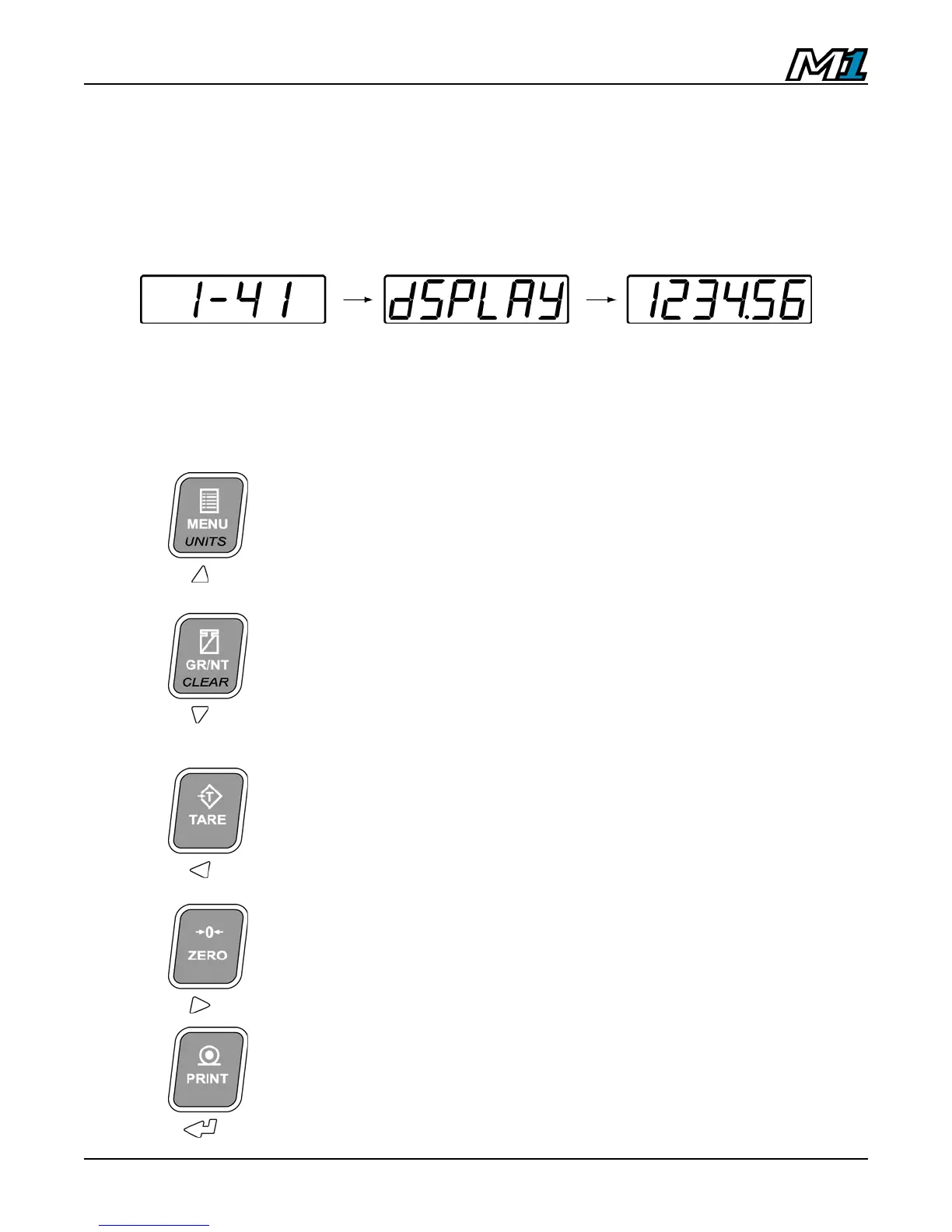
Start-Up
1. Connect the AC power cord from the indicator into a power outlet.
2. The start-up sequence displays the software version then the word ‘dSPLAY’ on
the screen to indicate Remote Display Mode. The scale weight from the
connected indicator is then displayed.
Remote Keypad Functions
Remote Display Mode utilizes the keypad to send serial commands for remote operation
of indicator functions. To maximize functionality, some keys perform multiple functions.
Press the key:
MENU – NO FUNCTION
Press & hold
the key (2 sec):
UNITS - Sends a serial command to toggle between
Primary and Secondary Weighing Units.
Press the key:
GR/NT - Sends a serial command to toggle between
GROSS and NET weighing modes if a tare value is
stored.
Press & hold
the key (2 sec):
CLEAR - Sends the serial command ‘C’ (ASCII 67) to
clear any tares from the indicator.
TARE:
Sends the serial command ‘T’ (ASCII 84) to tare the
indicator.
ZERO:
Sends the serial command ‘Z’ (ASCII 90) to set the
indicator weight display to ZERO.
PRINT:
Sends the serial command ‘P’ (ASCII 80) to the
other indicator to transmit a scale ticket.



 To Next Page