EasyManua.ls Logo

Winmate M101BK - Page 13

Winmate M101BK
64 pages
Print Icon
To Next Page IconTo Next Page
To Previous Page IconTo Previous Page
Loading...
12
Chapter 2: Getting Started
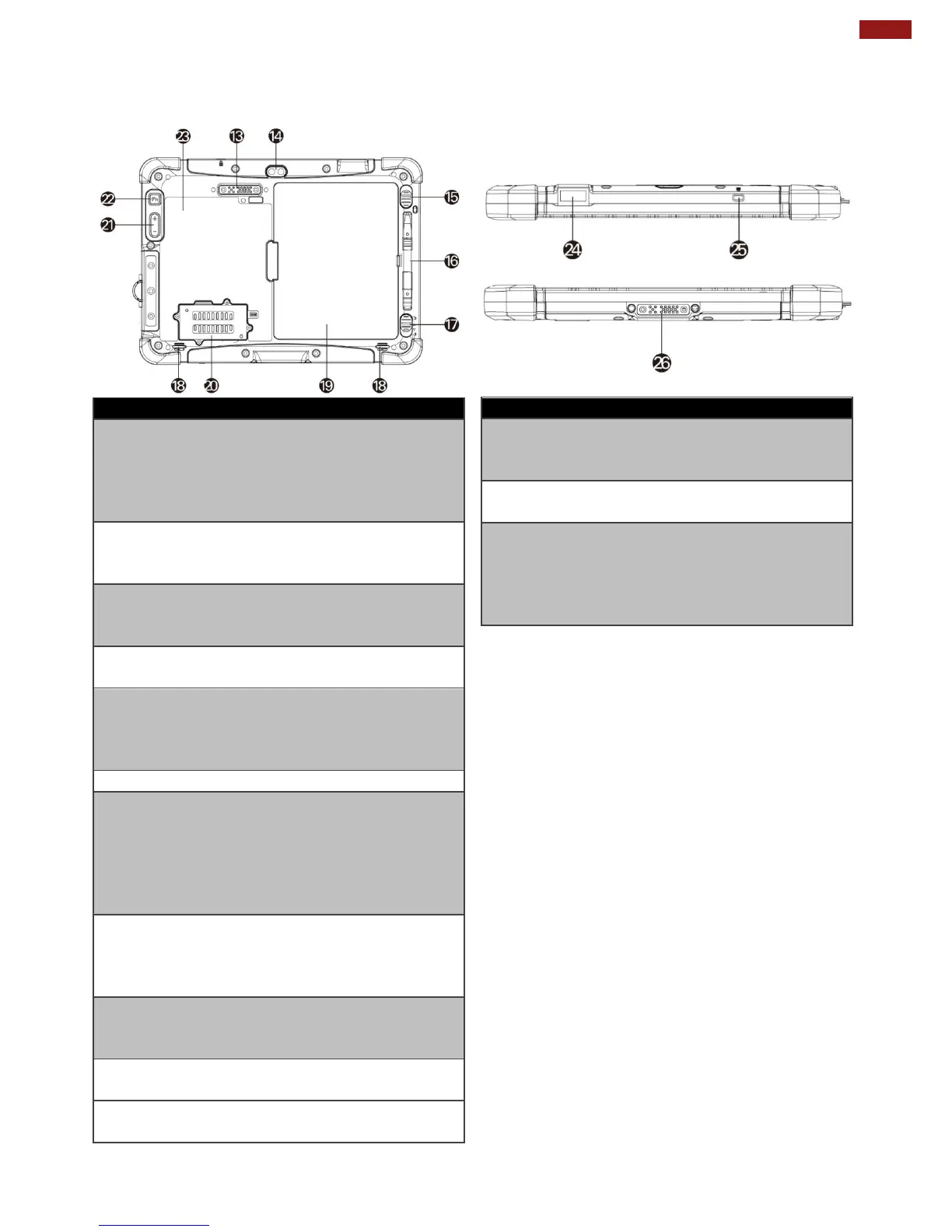
Rear:
No
Item
Description
13
Expansion
Port
Provide optional
connectivity to custom
modules for special
application (USB2.0 x 1,
RS232 x 1).
14
Rear Camera
5MP Autofocus
Camera. Captures
photos and videos.
15
Battery
Release
Slider
Spring-loaded slider
that latches the battery
in.
16
Touch Pen
Slot
Pen holder slot to store
touch pen.
17
Battery Lock
Latch
Latch to lock the battery
in place once battery is
inserted. Not spring-
loaded.
18
Speakers
Emit sounds.
19
Battery
7.4V, typ. 5140 mAh Li-
Polymer Battery
(2S1P).
7.4V, typ. 10280 mAh
Li-Polymer Battery
(2S2P, optional).
20
LTE Module
/ SIM card
slot
Service window to
insert Micro SIM card.
Also provide access to
LTE Module.
21
Volume
Buttons
Volume Control.
(+) Raise volume,
(-) Lower volume.
22
Fn2 Button
Toggles Barcode
Scanner
23
Optional HF
RFID Reader
Scans HF RFID tags.
Top:
Bottom:
No
Item
Description
24
Optional
Barcode
Reader
Barcode Scanner for
reading of 1D/2D
barcode.
25
Kensington
Lock Port
Provides lock access
for Kensington Lock.
26
Docking
Connector
Port to docking
solutions such as
vehicle docking to
provide power and
external antenna

Other manuals for Winmate M101BK

Related product manuals