4.2 Using Bluetooth
Your device has integrated Bluetooth capabilities for short-range wireless communication between
Bluetooth- enabled devices. You can transfer files, playback audio, configure virtual serial ports, and
share network connection via Bluetooth.
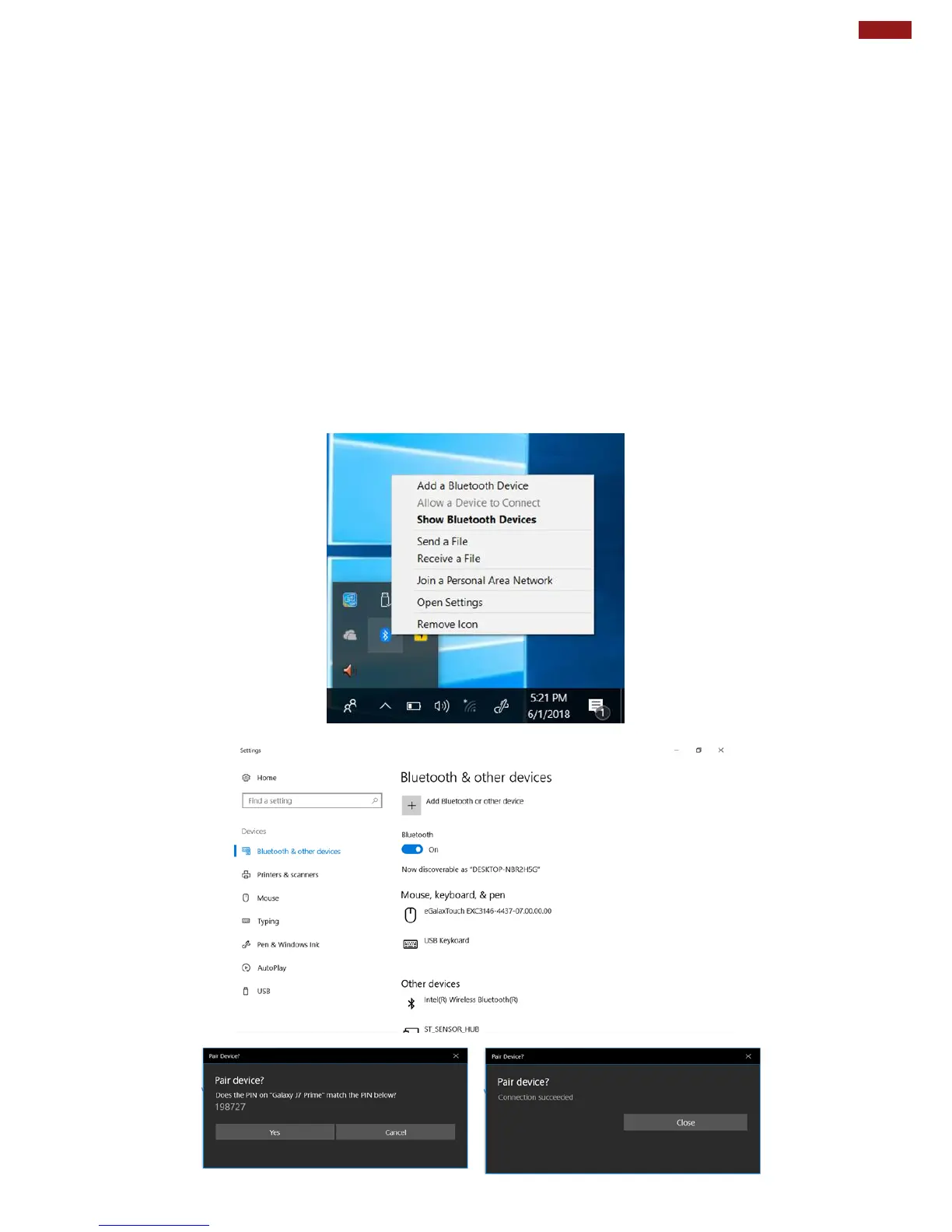
By default, the Bluetooth feature is enabled as indicated by the Bluetooth icon on the taskbar.
To Enable the Wireless Bluetooth:
1. Click the Bluetooth icon in the windows notification area, a contextual menu for Bluetooth is displayed.
2. To add a device, tap on Add a Bluetooth Device, Windows will search any Bluetooth device
automatically.
3. Choose the Bluetooth device that user wants to connect and follow onscreen prompt to
continue the pair procedure and use the Bluetooth device.
Opening My Bluetooth:
1. In the notification area in the Taskbar, click to open the Action Center button.
2. From the Quick actions area, tap the Add a Bluetooth Devices.
3. Then all the enabled devices will appear in the list; click on the device, and it should pair automatically.



 To Next Page