EasyManua.ls Logo

Winmate M101BK - Description of Parts; Part

Winmate M101BK
64 pages
Print Icon
To Next Page IconTo Next Page
To Previous Page IconTo Previous Page
Loading...
11
Rugged Windows Tablet PC M101BK
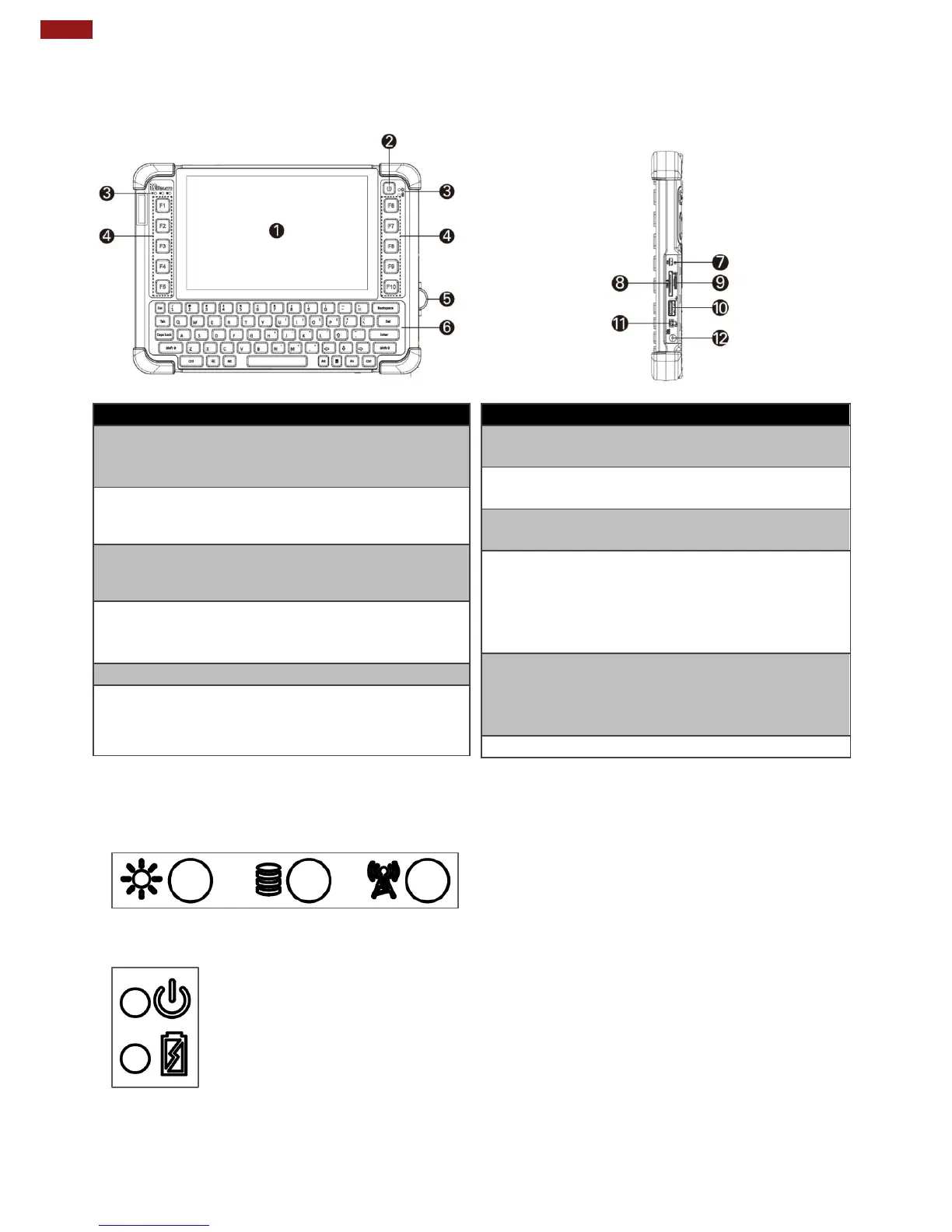
2.2 Description of Parts
Front:
Right:
No
Item
Description
1
Touch Screen
Displays and acts as
one of the inputs for the
computer
2
Power Button
Power on/off computer
3
LED
Indicators:
Shows the current
status of the computer
4
Function
Buttons
Programmable function
keys configured by Win-
Set Utility
5
I/O Cover
Protects I/O ports
6
QWERTY
Keypad
Input characters using
the QWERTY keypad.
No
Item
Description
7
Micro HDMI
HDMI output to
external display
8
LAN/RS232
Adapter port for
LAN/RS232 connector
9
MicroSD
Card Reader
Memory card reader
port for MicroSD Card
10
USB 3.0
High speed USB port
connects to USB
devices, such as USB
flash drive, mouse,
keyboard, printer, etc.
11
Mic In/Line
Out
Headset or headphone
can be connected (Mic
is only supported with
3.5mm 4-pin headset)
12
Power Jack
DC-IN power input jack
Front LED Indicators Details:
Left side
Right side

Other manuals for Winmate M101BK

Related product manuals