Page | 27
JoeTap NITCOM Refrigeration System Troubleshooting
Symptom 12: Incorrect Temperature Reading Out of Acceptable Range:
1. Verify overall Fridge condition/usage:
a. Verify condition of door gasket for proper fit and seal.
b. Verify the Fridge is not overcrowded with other products preventing air circulation and creating hot/cold
spots. The unit should only be housing Coffee Kegs.
c. Verify that there is sufficient airflow behind the cooler to dissipate heat from the condenser.
d. Verify that the Front Grill is not obstructed allowing for air flow to dissipate heat from the condenser.
e. Remove the Rear Bottom Cover and verify that the condenser grill is not covered in lint/dirt.
2. Verify setpoint temperature:
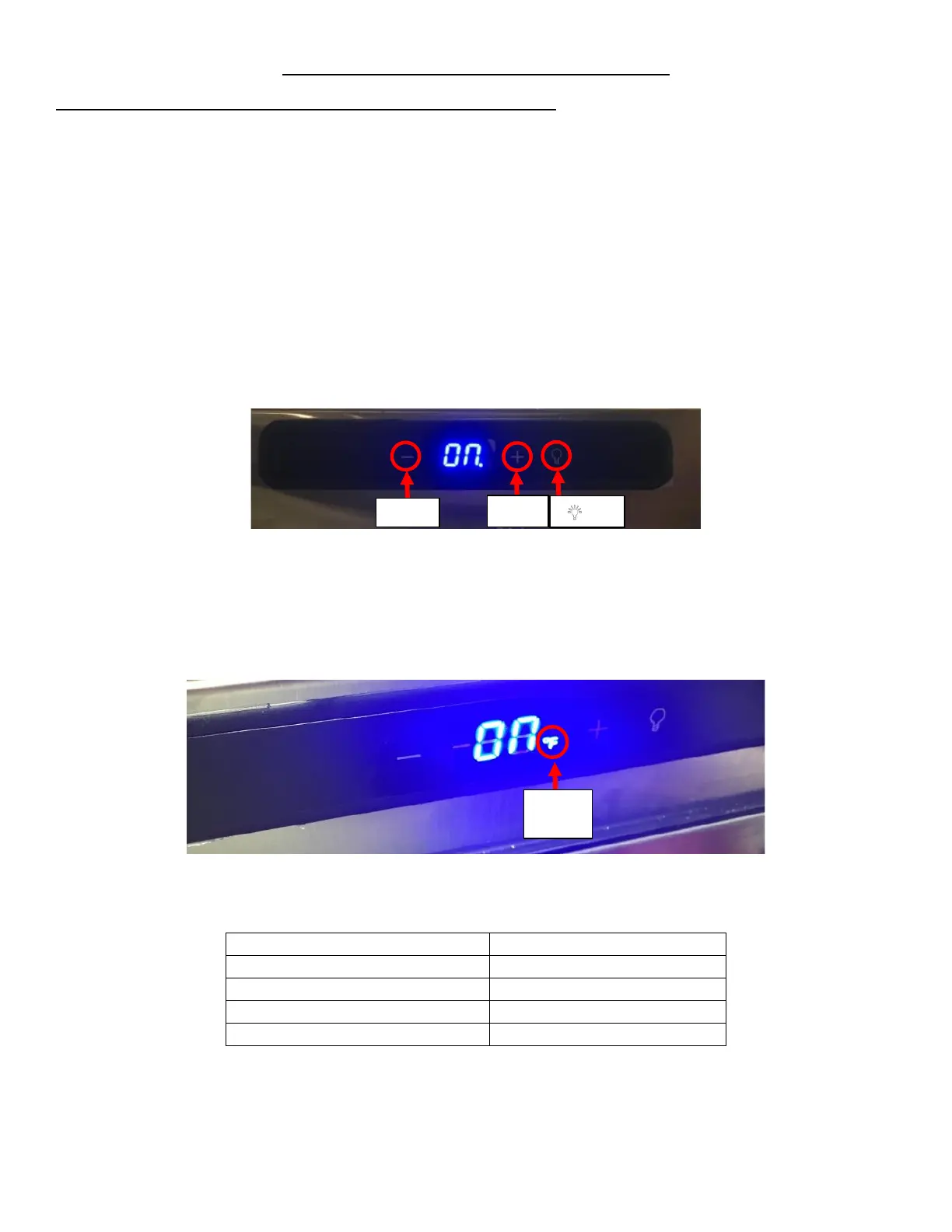
a. Press the “+” or “-” key, the display board will flash the current set point. See Figure 53. Press the “+” key to
increase the temp and “-” key to decrease the temp. Range will be 34℉ to 60℉. The display will blink while
setting the temperature. After 5 seconds display will show “ON”. See Figure 53.
b. Set the temperature to 38℉.
3. Verify that the Setpoint Temperature is in the correct unit:
a. Press the ’’+’’ and “-” key together for 5 seconds, the display board will change from Degree F to Degree C.
Repeat to change back. See Figure 54.
b. Set it to ℉ if it is not already.
4. Verify the calibration setting is correct:



 To Next Page