Page | 3
JoeTap NITCOM Dispensing System Troubleshooting
Symptom 1: Screen Blackout
1. Verify if the rest of the unit is getting power. Open fridge door and check if light/fan/ fridge controller is on:
a. If the entire unit is not getting power (Fridge light/fan/ Touch Screen is OFF):
i. Verify fridge is plugged in.
ii. Check that the wall receptacle has power using DVOM.
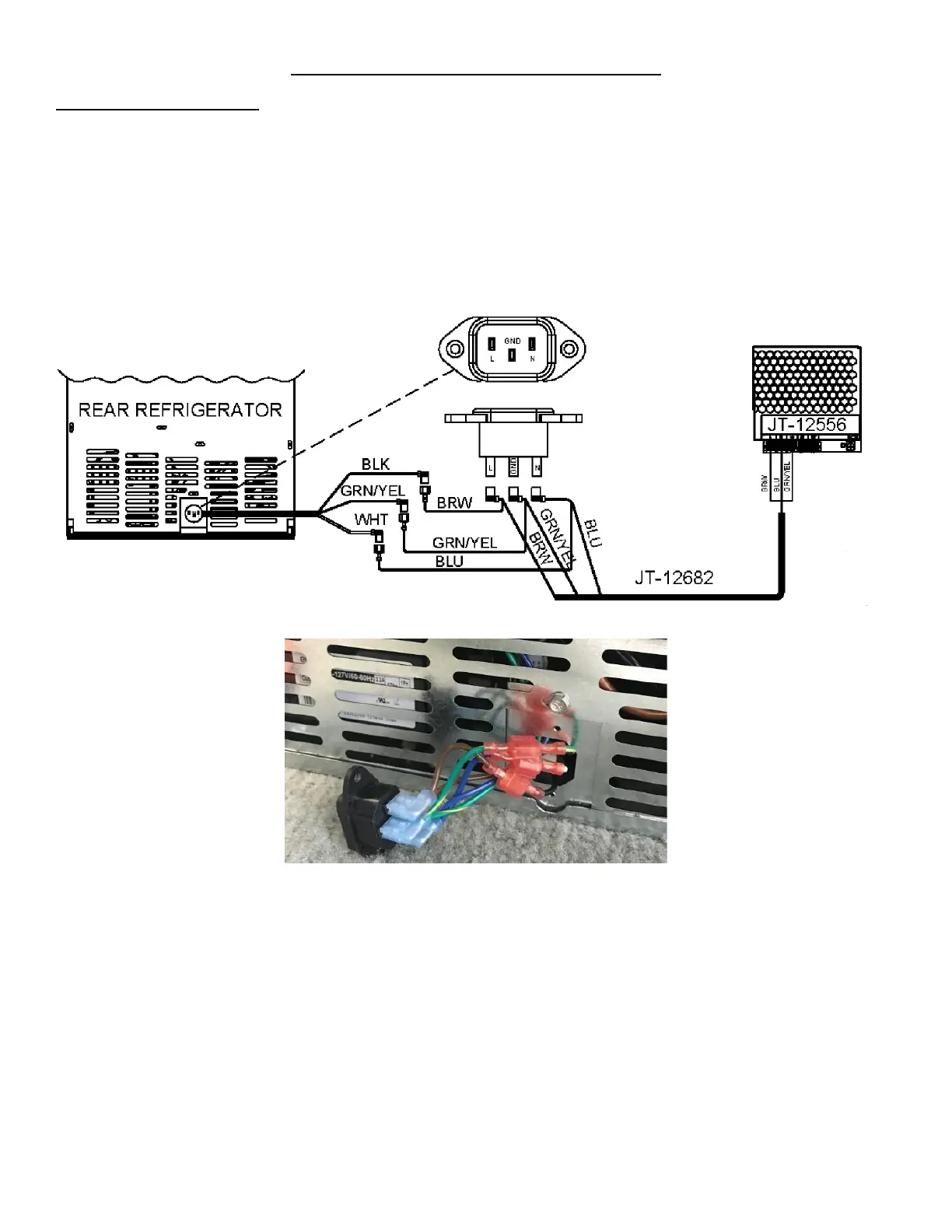
iii. Check the High Voltage Power Supply Harness to verify it is connected as per Figure 1a. Remove two
screws from the fridge power plug to check the connections to the plug as seen in Figure 1b. Refer to
Appendix C: JoeTap NITCOM Wiring Diagram for full wiring diagram.
b. If the system is getting power (Fridge light/fan/fridge controller is on and the screen is OFF):
i. Open the door and remove the screen cover and foam to verify that the Display Power Supply Harness is
plugged in. See Figure 2a. If the Display Power Supply Harness is under a lot of tension, cut the cable tie
and remove the tension. The P-Clamp, seen in Figure 2b, at the exit (bottom of door) might need to be
loosened accommodate this. Refer to Appendix C: JoeTap NITCOM Wiring Diagram for full wiring
diagram.



 To Next Page