Page | 4
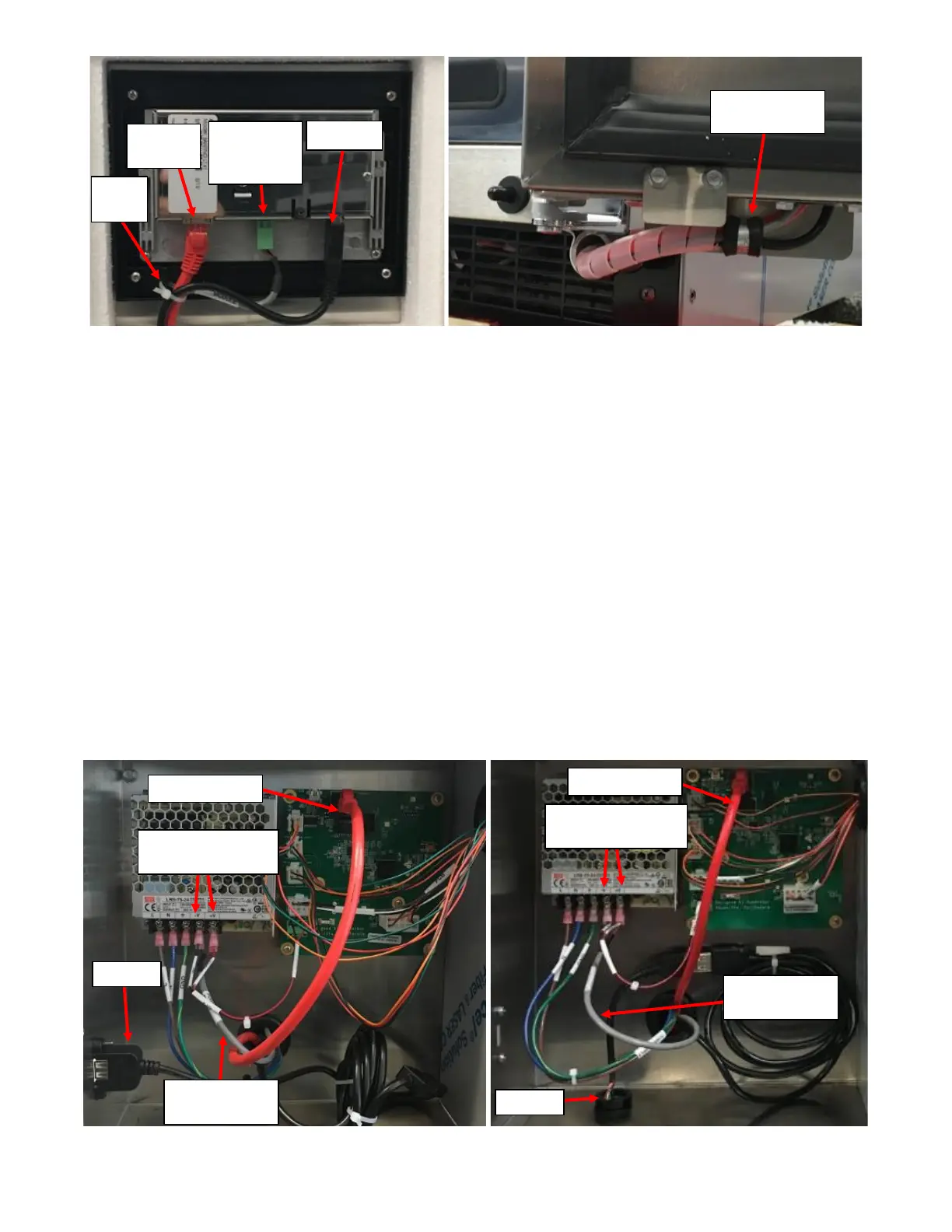
ii. If the Screen does not turn on with the Display Power Supply Harness plugged in, verify that there is
24VDC by unplugging the harness and probing the green power connector with a DVOM.
• If there is no power, then remove the Rear Enclosure Panel and check the Power Supply to
ensure the Spade Connectors at the end of the Display Power Supply Harness is screwed into
the Power Supply output as seen in Figure 3a and Figure 3b. Refer to Appendix C: JoeTap
NITCOM Wiring Diagram for full wiring diagram. If loose or disconnected, reconnect and power
the unit to see if the screen is turning on.
• If there is 24VDC at the Power Supply output but no voltage at green connector, the Display
Power Supply Harness is damaged and needs to be replaced.
• If screen is getting power, plug the Display Power Supply Harness back in power cycle the unit. If
the screen does not respond (nothing is seen on the screen), then replace the screen.
• If the screen is initially turning on then going to a black screen (appears to be off but is actually
on with a black screen), there may be an issue with the Ethernet Cable or there is a Software
bug. If all the wires are plugged correctly (and not damaged), verify that the ethernet cable is
undamaged. Bypassing the installed ethernet cable with a known/functioning ethernet cable
would be easiest way to check. If issue persists, update the software. Refer to Appendix F:
Software Update.



 To Next Page