EasyManua.ls Logo

Wunder-Bar JoeTap NITCOM - Appendix F: Flowmeter;Solenoid Module Replacement Page

Default Icon
95 pages
Print Icon
To Next Page IconTo Next Page
To Previous Page IconTo Previous Page
Loading...
Page | 59
18. Select BACK.
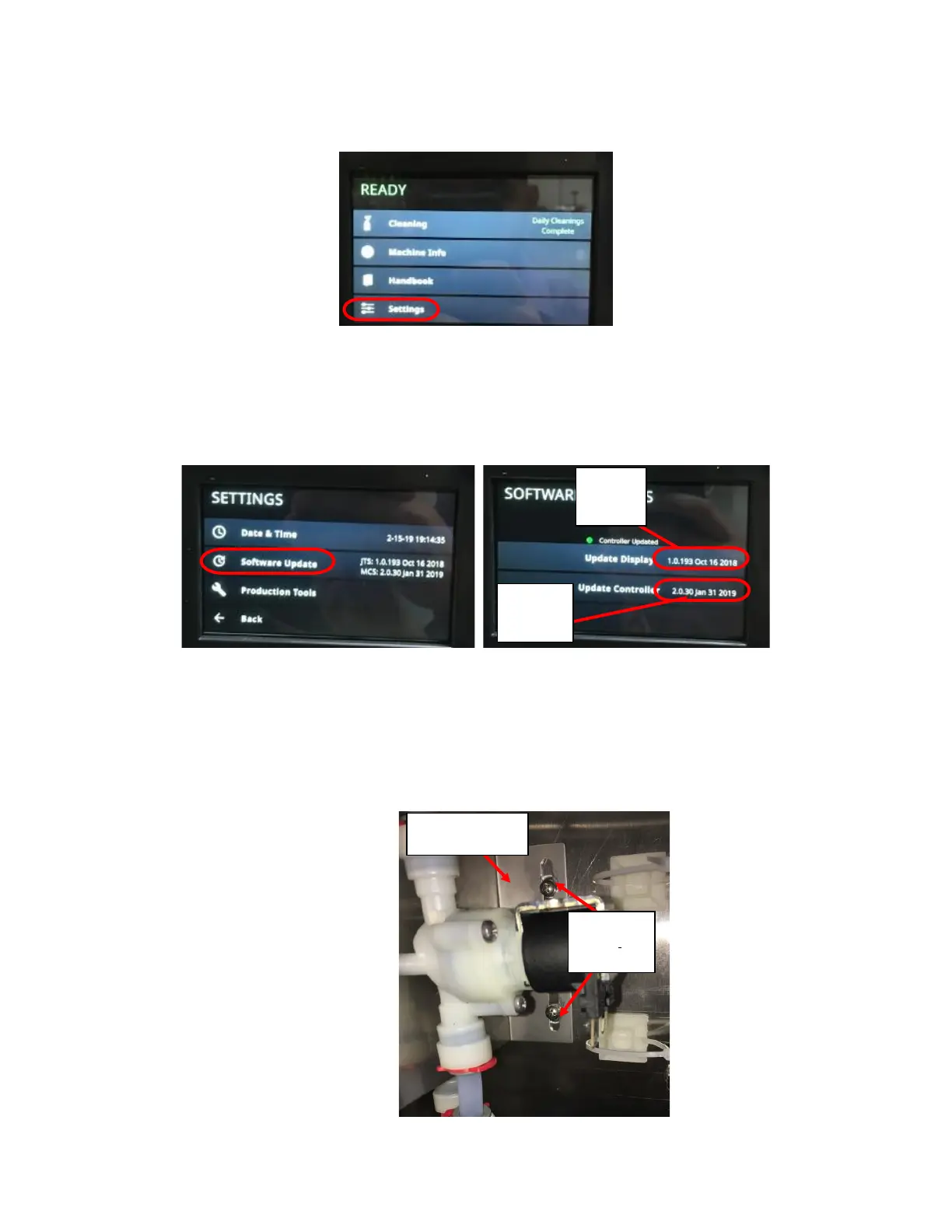
19. Wait until READY indicator appears at top of screen. See Figure E12.
20. Select SETTINGS. See Figure E12.
21. Enter passcode 2186 and select enter.
22. Select SOFTWARE UPDATES. See Figure E13.
23. Enter passcode 2186.
24. Record Display Software Version and Controller Software Version displayed on the right-hand side of screen for your
records. See Figure E14.
25. Select BACK until home screen is reached.
Appendix F: Flowmeter Solenoid Module Replacement
1. Remove the two screws (8-32) holding the flowmeter-solenoid bracket in place. See Figure F1.

Figure E12: Home Screen with Settings Circled.
Figure E14: Pin Code Screen with Enter
Circled.
Figure E13: Settings Screen with Software
Updates Circled.
Display
Software
Version
Controller
Software
Version
#8-32
Screws and
#8 Washers
Solenoid and
Flowmeter Bracket
Figure F1: Flowmeter-Solenoid bracket held
with two #8-32 Screws and two (2) #8 Washers.

Table of Contents

Related product manuals