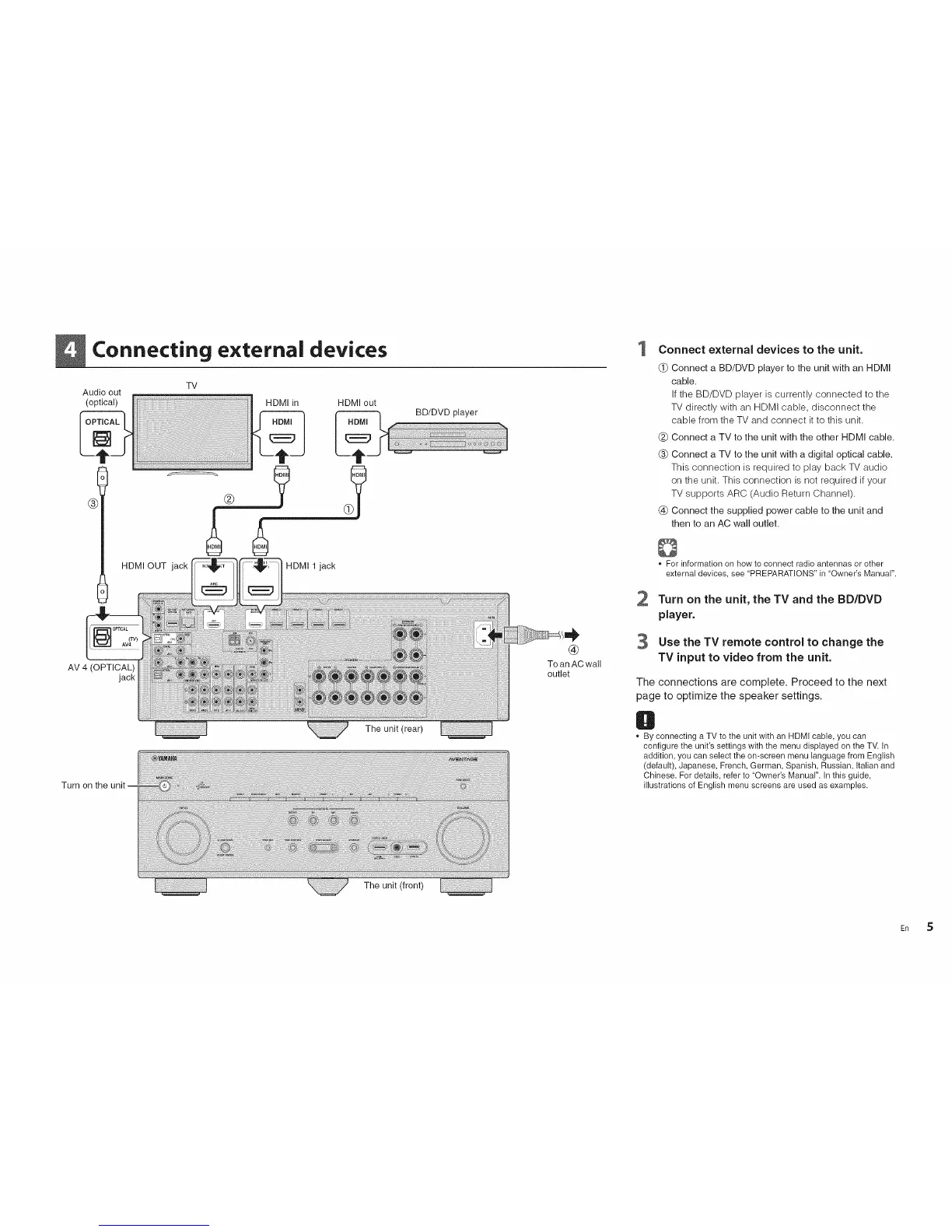
Connecting external devices 1 Connect external devices to the unit.
TV
Audio out
(optical) HDMI in HDMI out
HDMI OUT jack HDMI 1 jack
AV 4 (OPTICAL)
jack
The unit (rear)
Turn on the
The unit (front)
®
To anAC wall
outlet
2
3
(_ Connect a BD/DVD player to the unit with an HDMI
cable.
If the BD/DVD player is currently connected to the
TV directly with an HDMI cable, disconnect the
cable from the TV and connect it to this unit.
(_ Connect a TV to the unit with the other HDMI cable.
(_ Connect a TV to the unit with a digital optical cable.
This connection is required to play back TV audio
on the unit. This connection is not required if your
TV supports ARC (Audio Return Channel).
(_ Connect the supplied power cable to the unit and
then to an AC wall outlet.
0
* For information on how to connect radio antennas or other
external devices, see "PREPARATIONS"in "Owner's Manual".
Turn on the unit, the TV and the BD/DVD
player.
Use the TV remote control to change the
TV input to video from the unit.
The connections are complete. Proceed to the next
page to optimize the speaker settings.
O
By connecting a TV to the unitwith an HDMI cable, you can
configure the unit'ssettings with the menu displayed on the TV. In
addition, you can select the on-screen menu language from English
(default), Japanese, French, German, Spanish, Russian, Italian and
Chinese. For details, refer to "Owner's Manual". In this guide,
illustrations of English menu screens are used as examples.
En 5












 To Next Page