ii_iiii!!_i_iii'i
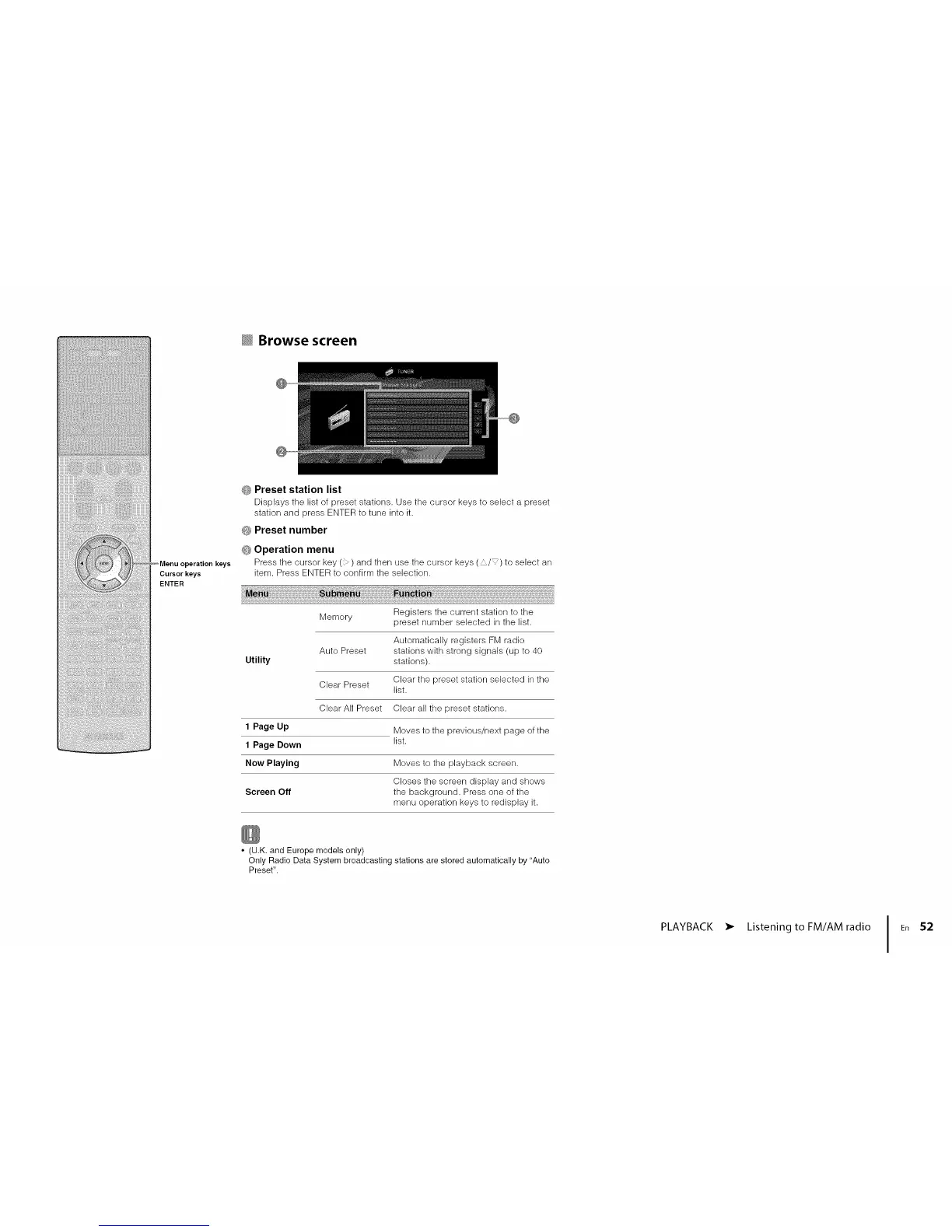
Menu operation keys
Cursor keys
ENTER
_ Browse screen
@
_; Preset station list
Displays tile list of preset stations. Use tile cursor keys to select a preset
station and press ENTERto tune into it.
O Preset number
G Operation menu
Press the cursor key( ) and then use ttle cursor keys ( ,_/_) to select an
item. Press ENTER to confirm the selection.
Memory
Auto Preset
Utility
Clear Preset
Clear All Preset
1 Page Up
1 Page Down
Now Playing
Screen Off
Registers the current station to the
preset number selected in the list.
Automatically registers FM radio
stations with strong signals (up to 40
stations).
Clear the preset station selected in the
list,
Clear all the preset stations.
Moves to the previous/next page of the
list,
Moves to the playback screen.
Closes the screen display and shows
the background. Press one of the
menu operation keys to redisplay it.
• (U.K. and Europe models only)
Only Radio Data System broadcasting stations are stored automatically by "Auto
Preset".
PLAYBACK
• Listening to FM/AM radio
52












 To Next Page