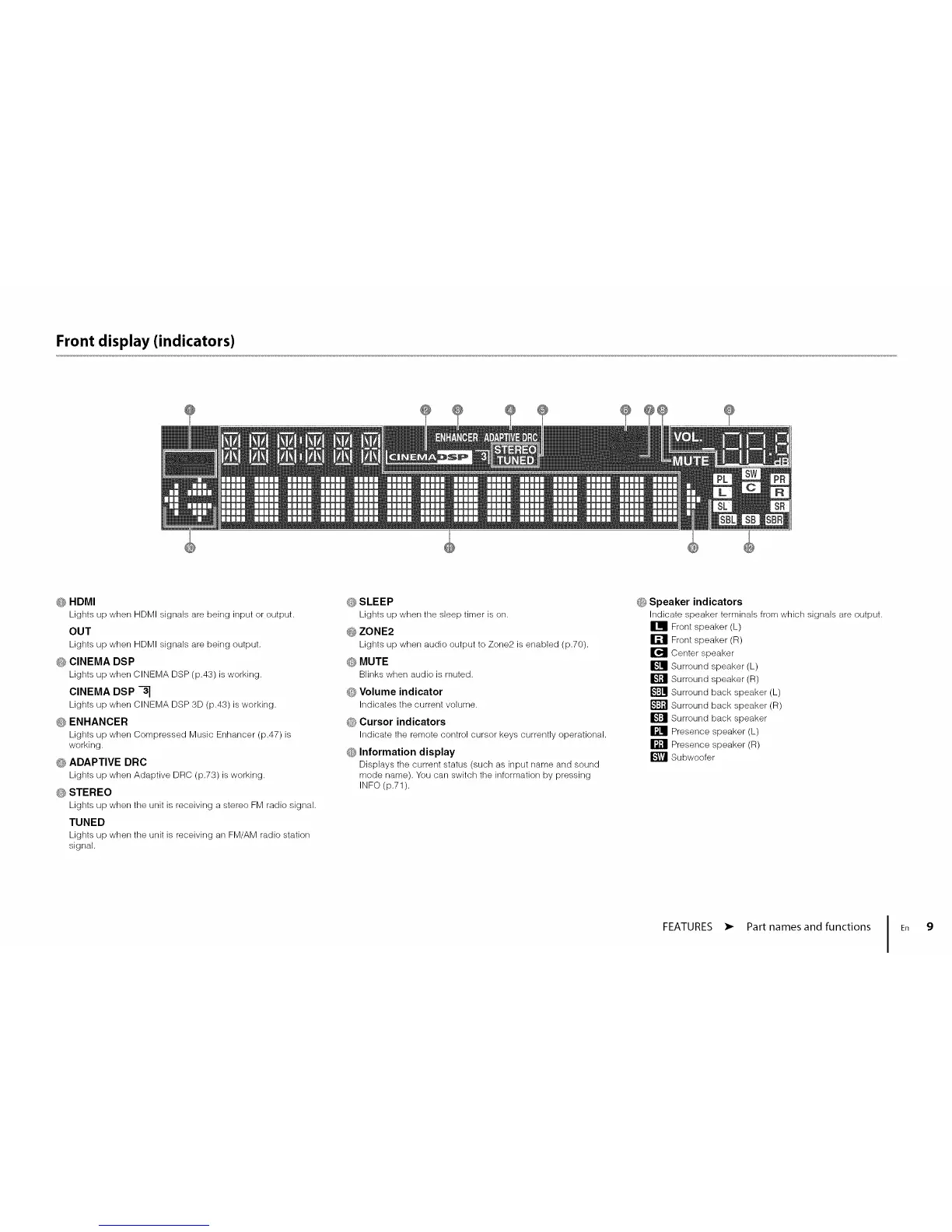
Front display (indicators)
_; HDMI
Lights up when HDMI signals are being input or output.
OUT
Lights up when HDMI signals are being output.
_ CINEMA DSP
Lights up when CINEMA DSP (p.43) is working.
CINEMA DSP -_
Lights up when CINEMA DSP 3D (p.43) is working.
G ENHANCER
Lights up when Compressed Music Enhancer (p.47) is
working.
_ ADAPTIVE DRC
Lights up when Adaptive DRC (p.73) is working.
0 STEREO
Lights up when the unit is receiving a stereo FM radio signal.
TUNED
Lights up when the unit is receiving an FM/AM radio station
signal.
#_SLEEP
Lights up when tile sleep timer is on.
#_ ZONE2
Lights up when audio output to Zone2 is enabled (p.70).
Q MUTE
Blinks when audio is muted.
0 Volume indicator
Indicates tile current volume.
_!_Cursor indicators
Indicate tile remote control cursor keys currently operational.
O Information display
Displays tile current status (such as input name and sound
mode name). You can switch the information by pressing
INFO (p.71).
0 Speaker indicators
Indicate speaker terminals from which signals are output.
Front speaker (L)
Front speaker (R)
Center speaker
Surround speaker (L)
Surround speaker (R)
Surround back speaker (L)
Surround back speaker (R)
Surround back speaker
Presence speaker (L)
Presence speaker (R)
Subwoofer
FEATURES • Part names and functions I En 9












 To Next Page