The unit is equipped with a variety of input jacks including HDMI input jacks to allow
you to connect different types of playback devices. For information on how to connect
an iPod or a USB storage device, see the following pages.
- Connecting an iPod (p.53)
- Connecting a USB storage device (p.57)
Connecting video devices (such as BD/DVD players)
Connect video devices such as BD/DVD players, set-top boxes (STBs) and game
consoles to the unit. Depending on the video/audio output jacks available on your video
device, choose one of the following connections. We recommend using an HDMI
connection if the video device has an HDMI output jack.
• Ifthe combination of video/audio input jacks available on the unit does not match your video device, change
its combination according to the output jacks of your device (p.27).
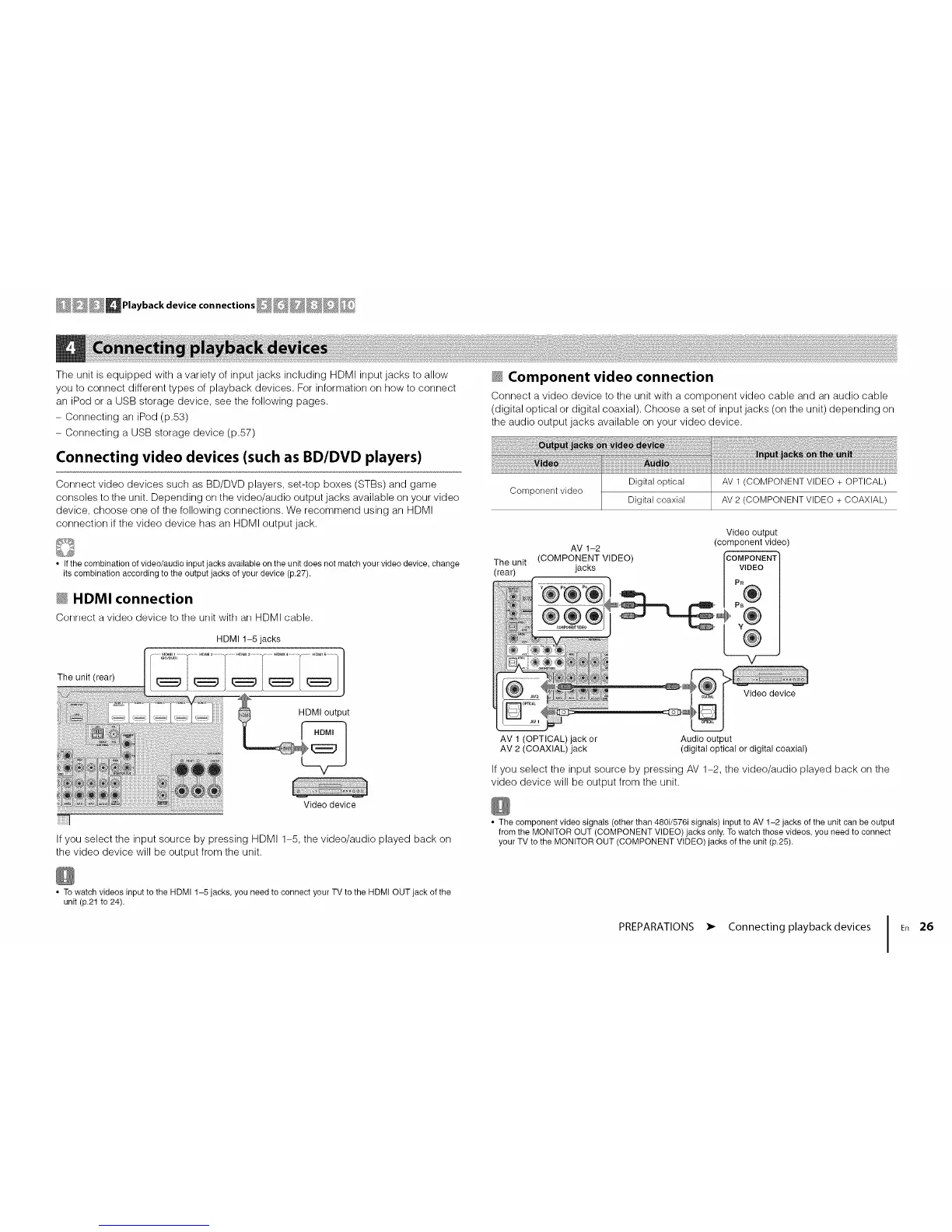
_ HDMI connection
Corlrlect a video device to tile urfit with arl HDMI cable.
HDMI 1-5 jacks
_ Component video connection
Connect a video device to the unit with a component video cable and an audio cable
(digital optical or digital coaxial). Choose a set of input jacks (on the unit) depending on
the audio output jacks available on your video device.
Component video
Digital optical
Digital coaxial
AV 1 (COMPONENT VIDEO + OPTICAL)
AV 2 (COMPONENT VIDEO + COAXIAL)
AV 1-2
The unit (COMPONENT VIDEO)
(rear) jacks
Video output
(component video)
COMPONENT
VIDEO
PB
v
AV 1 (OPTICAL) jack or
AV 2 (COAXIAL) jack
Audio output
(digital optical or digital coaxial)
If you select the input source by pressing AV 1-2, the video/audio played back on the
video device will be output from the unit.
If you select the input source by pressing HDMI 1-5, the video/audio played back on
the video device will be output from the unit.
• The component video signals (other than 480i/576i signals) input to AV 1-2 jacks of the unit can be output
from the MONITOR OUT (COMPONENT VIDEO) jacks only. To watch those videos, you need to connect
your TV to the MONITOR OUT (COMPONENT VIDEO) jacks of the unit (p.25).
• To watch videos input to the HDMI 1-5 jacks, you need to connect your TV to the HDMI OUT jack of the
unit (p.21 to 24).
PREPARATIONS
• Connecting playback devices
26




 To Next Page