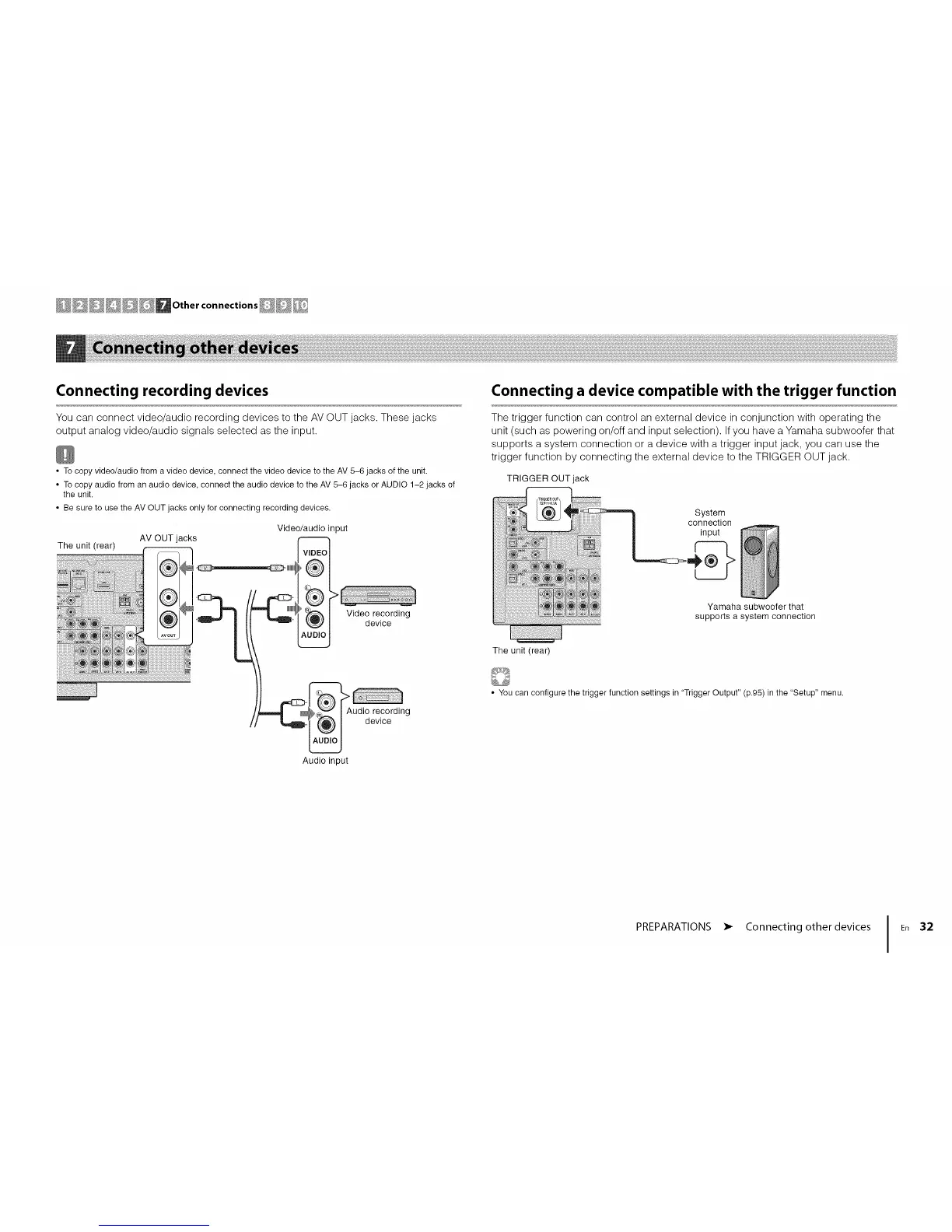
Connecting recording devices
You can connect video/audio recording devices to the AV OUT jacks. These jacks
output analog video/audio signals selected as the input.
• To copy video/audio from a video device, connect the video device to the AV 5-6 jacks of the unit.
• To copy audio from an audio device, connect the audio device to the AV 5-6 jacks or AUDIO 1-2 jacks of
the unit.
• Be sure to use the AV OUT jacks only for connecting recording devices.
Video/audio input
The unit (rear)
AV OUT jacks
Video recording
device
Connecting a device compatible with the trigger function
The trigger function can control an external device in conjunction with operating the
unit (such as powering on/off and input selection). Ifyou have a Yamaha subwoofer that
supports a system connection or a device with a trigger input jack, you can use the
trigger function by connecting the external device to the TRIGGER OUT jack.
TRIGGER OUT jack
System
i connection
input
_'/ Yamaha subwoofer that
supportsa system connection
The unit (rear)
Audio recording
device
• You can configure the trigger function settings in "Trigger Output" (p.95) in the "Setup" menu.
Audio input
PREPARATIONS • Connecting other devices I En 32












 To Next Page