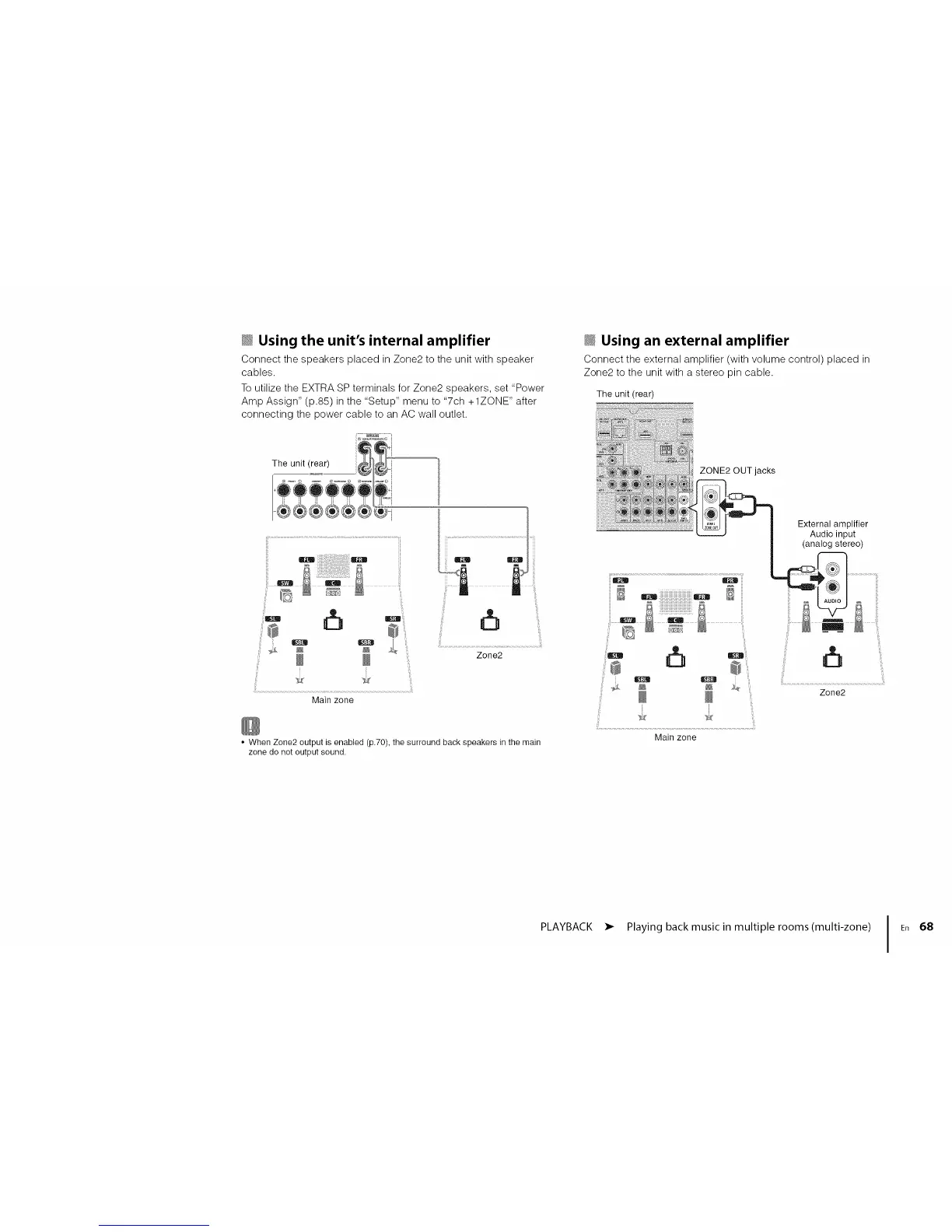
_ Using the unit's internal amplifier
Connect the speakers placed in Zone2 to the unit with speaker
cables.
To utilize the EXTRA SP terminals for Zone2 speakers, set "Power
Amp Assign" (p.85) in the "Setup" menu to "7ch +1ZONE" after
connecting the power cable to an AC wall outlet.
iil i o o ,!i!_'................................................................
i:iSii ° ° zone2
Main zone
• When Zone2 output is enabled (p.70), the surround back speakers in the main
zone do not output sound.
_ Using an external amplifier
Connect the external amplifier (with volume control) placed in
Zone2 to the unit with a stereo pin cable.
The unit (rear)
ZONE2 OUT jacks
External amplifier
Audio input
(analog stereo)
.....................................................................
ii"
Zone2
PLAYBACK • Playing back musicin multiple rooms(multi-zone) I En 68




 To Next Page