PLAYBACK
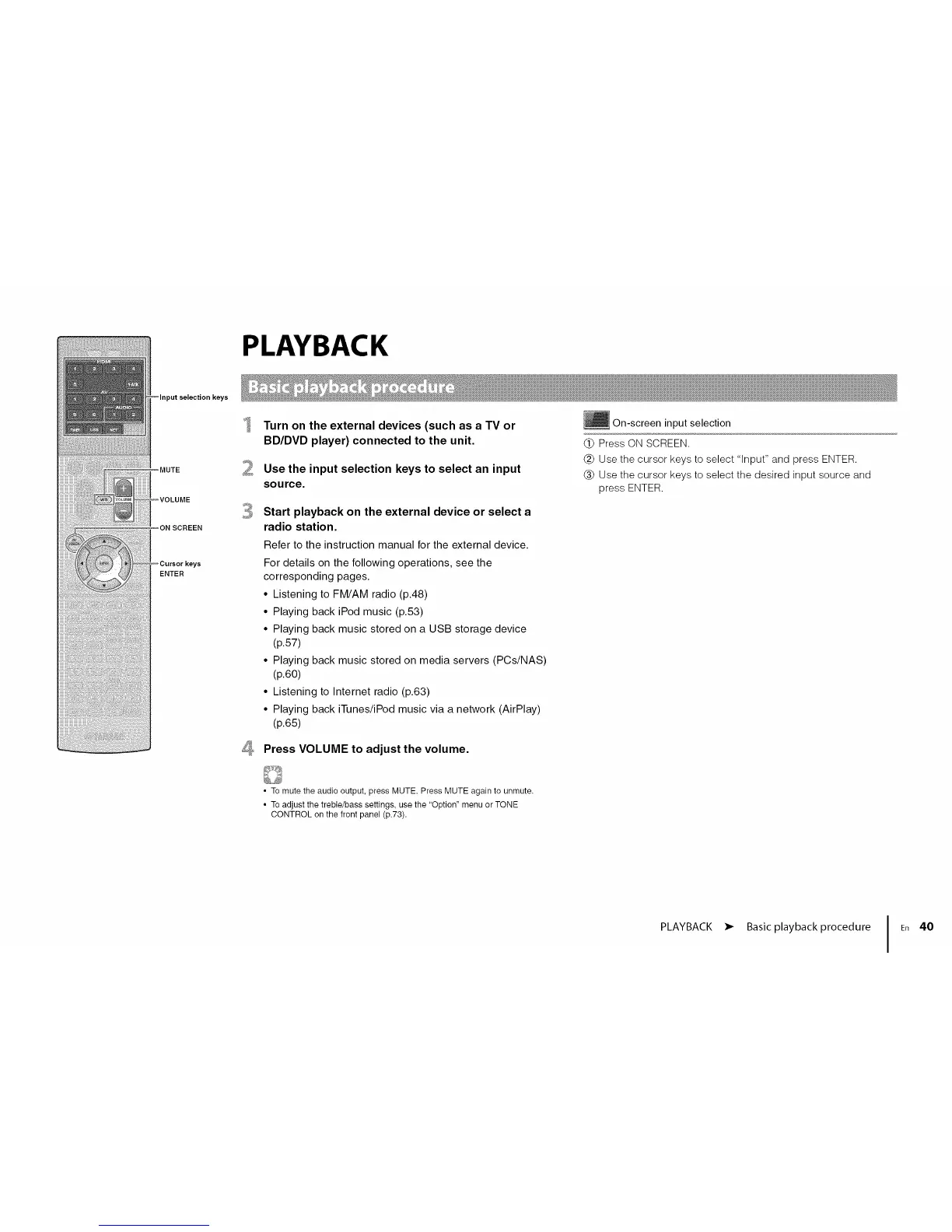
)ut selection keys
MUTE
ON SCREEN
ENTER
4
Turn on the external devices (such as a TV or
BD/DVD player) connected to the unit.
Use the input selection keys to select an input
source.
Start playback on the external device or select a
radio station.
Refer to the instruction manual for the external device.
For details on the following operations, see the
corresponding pages.
• Listening to FM/AM radio (p.48)
• Playing back iPod music (p.53)
• Playing back music stored on a USB storage device
(p.57)
• Playing back music stored on media servers (PCs/NAS)
(p.60)
• Listening to Internet radio (p.63)
• Playing back iTunes/iPod music via a network (AirPlay)
(p.65)
Press VOLUME to adjust the volume.
_} On-screen input selection
(_ Press ON SCREEN.
(_) Use the cursor keys to select "Input" and press ENTER.
(_) Use the cursor keys to select the desired input source and
press ENTER.
• To mute the audio output, press MUTE. Press MUTE again to unmute.
• To adjust the treble/bass settings, use the "Option" menu or TONE
CONTROL on the front panel (p.73).
PLAYBACK • Basic playback procedure I En 40












 To Next Page