@@ TVconnec,ion @ @ %
@ Connection Method 2 (HDMI Control-compatible TV)
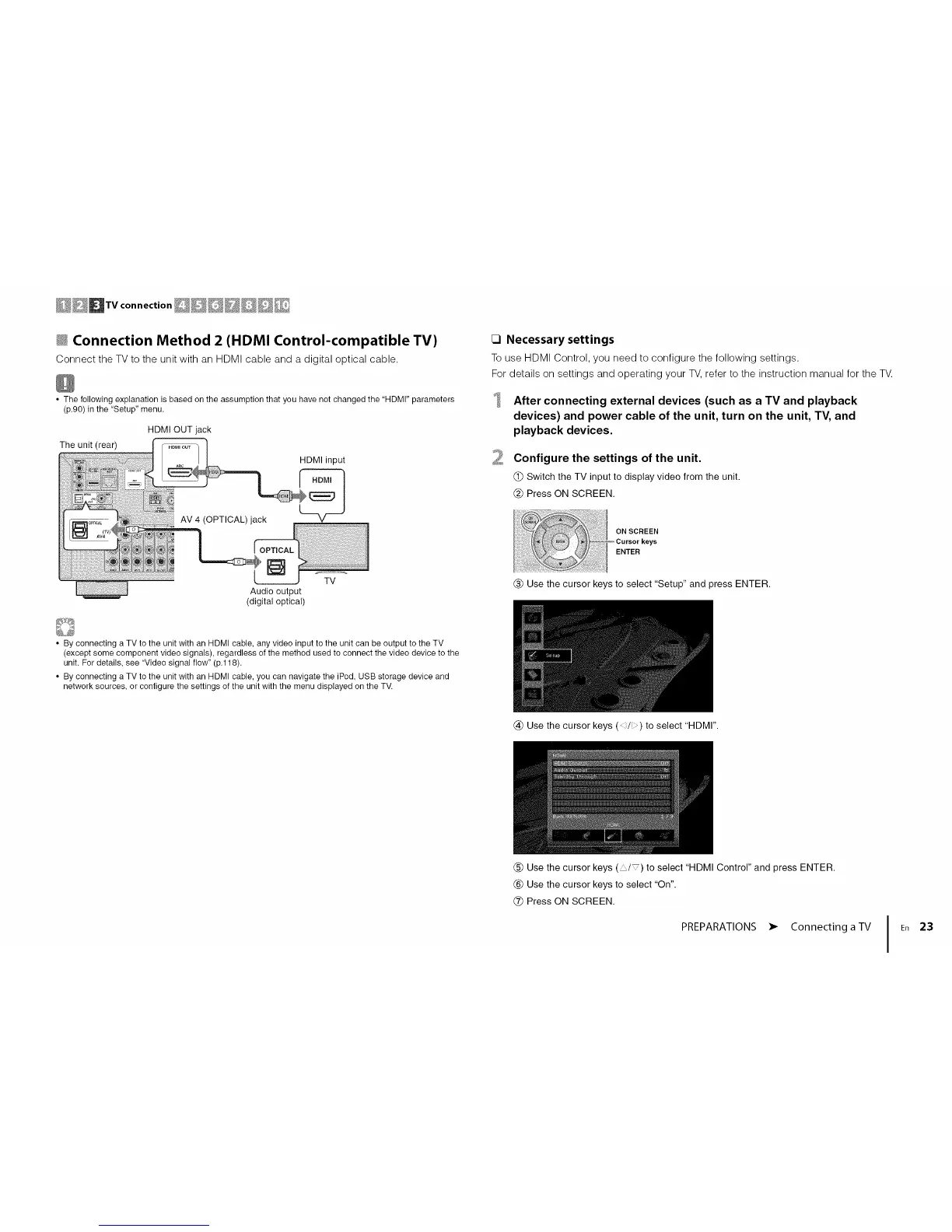
Connect the TV to the unit with an HDMI cable and a digital optical cable.
• The following explanation is based on the assumption that you have not changed the "HDMI" parameters
(p.90) in the "Setup" menu.
HDMI OUT jack
The unit (rear) [ _ ]
_ _,.j/ HDMI input
AV ,O T,OA ),ack
#
-- Audio output
(digital optical)
_] Necessary settings
To use HDMI Control, you need to configure the following settings.
For details on settings and operating your TV, refer to the instruction manual for the TV.
2
After connecting external devices (such as a TV and playback
devices) and power cable of the unit, turn on the unit, TV, and
playback devices.
Configure the settings of the unit.
(_) Switch the TV input to display video from the unit.
(_ Press ON SCREEN.
ON SCREEN
ENTER
(_) Use the cursor keys to select "Setup" and press ENTER.
• By connecting a TV to the unit with an HDMI cable, any video input to the unit can be output to the TV
(except some component video signals), regardless of the method used to connect the video device to the
unit. For details, see "Video signal flow" (p.118).
• By connecting a TV to the unit with an HDMI cable, you can navigate the iPod, USB storage device and
network sources, or configure the settings of the unit with the menu displayed on the TV.
@ Use the cursor keys (,/i) to select "HDMI".
(_) Use the cursor keys ( / ) to select "HDMI Control" and press ENTER.
(_) Use the cursor keys to select "On".
(_) Press ON SCREEN.
PREPARATIONS • Connecting a TV
I En 23




 To Next Page