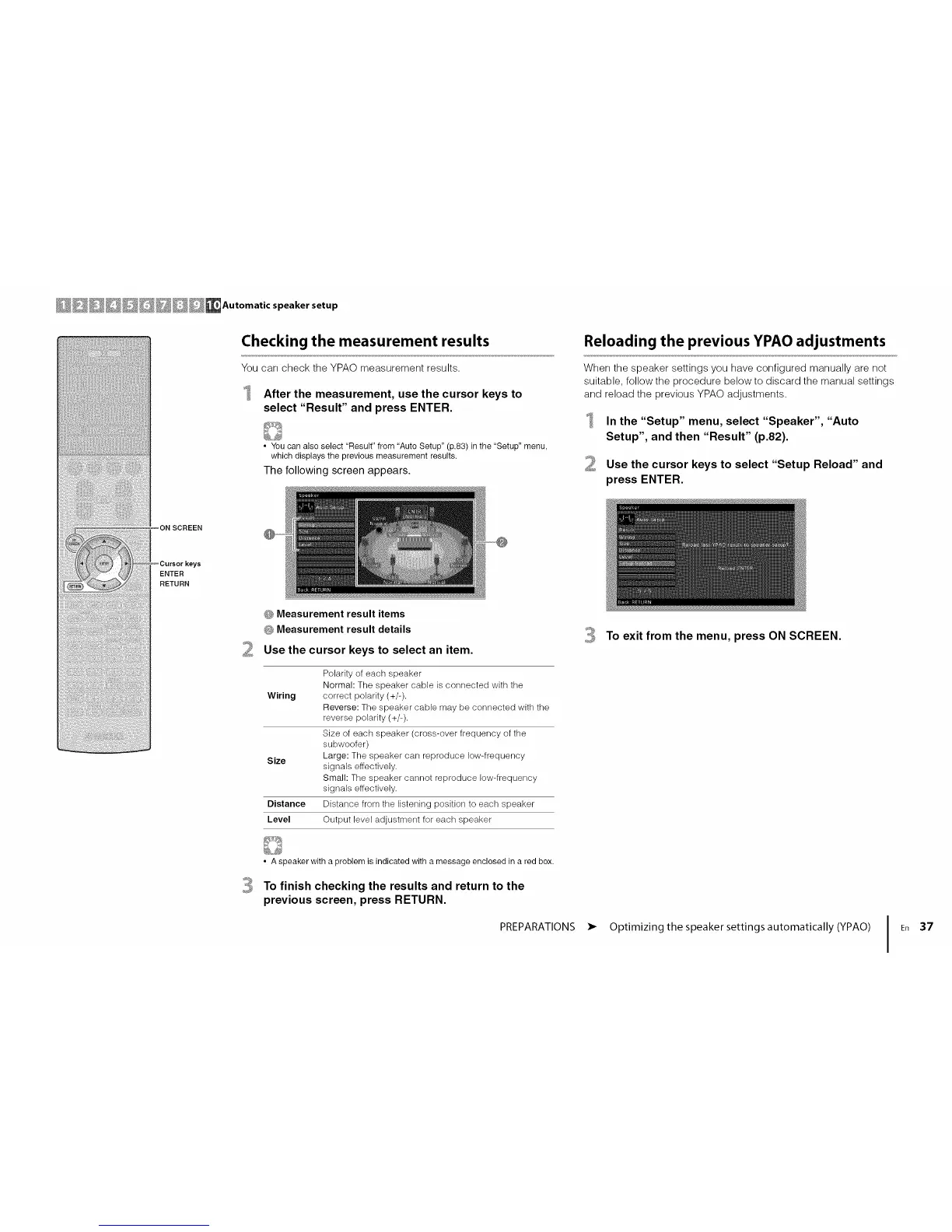
Checking the measurement results
You can check the YPAO measurement results.
After the measurement, use the cursor keys to
select "Result" and press ENTER.
• You can also select "Result" from "Auto Setup" (p.83) in the "Setup" menu,
which displays the previous measurement results.
The following screen appears.
Reloading the previous YPAO adjustments
When the speaker settings you have configured manually are not
suitable, follow the procedure below to discard the manual settings
and reload the previous YPAO adjustments.
In the "Setup" menu, select "Speaker", "Auto
Setup", and then "Result" (p.82).
2 Use the cursor keys to select "Setup Reload" and
press ENTER.
ON SCREEN
ENTER
RETURN
O Measurement result items
G Measurement result details
Use the cursor keys to select an item.
Polarity of each speaker
Normal: The speaker cable is connected with the
Wiring correct polarity (+/-).
Reverse: The speaker cable may be connected with the
reverse polarity (+/-).
Size of each speaker (cross-over frequency of the
subwoofer)
Size Large: The speaker can reproduce low-frequency
signals effectively.
Small: The speaker cannot reproduce low-frequency
signals effectively.
Distance Distance from the listening position to each speaker
Level Output level adjustment for each speaker
3 To exit from the menu, press ON SCREEN.
• A speaker with a problem is indicated with a message enclosed in a red box.
To finish checking the results and return to the
previous screen, press RETURN.
PREPARATIONS
• Optimizing the speaker settings automatically (YPAO)
I En 37




 To Next Page