GENERAL CHASSIS
4-2
EAS1SM1119
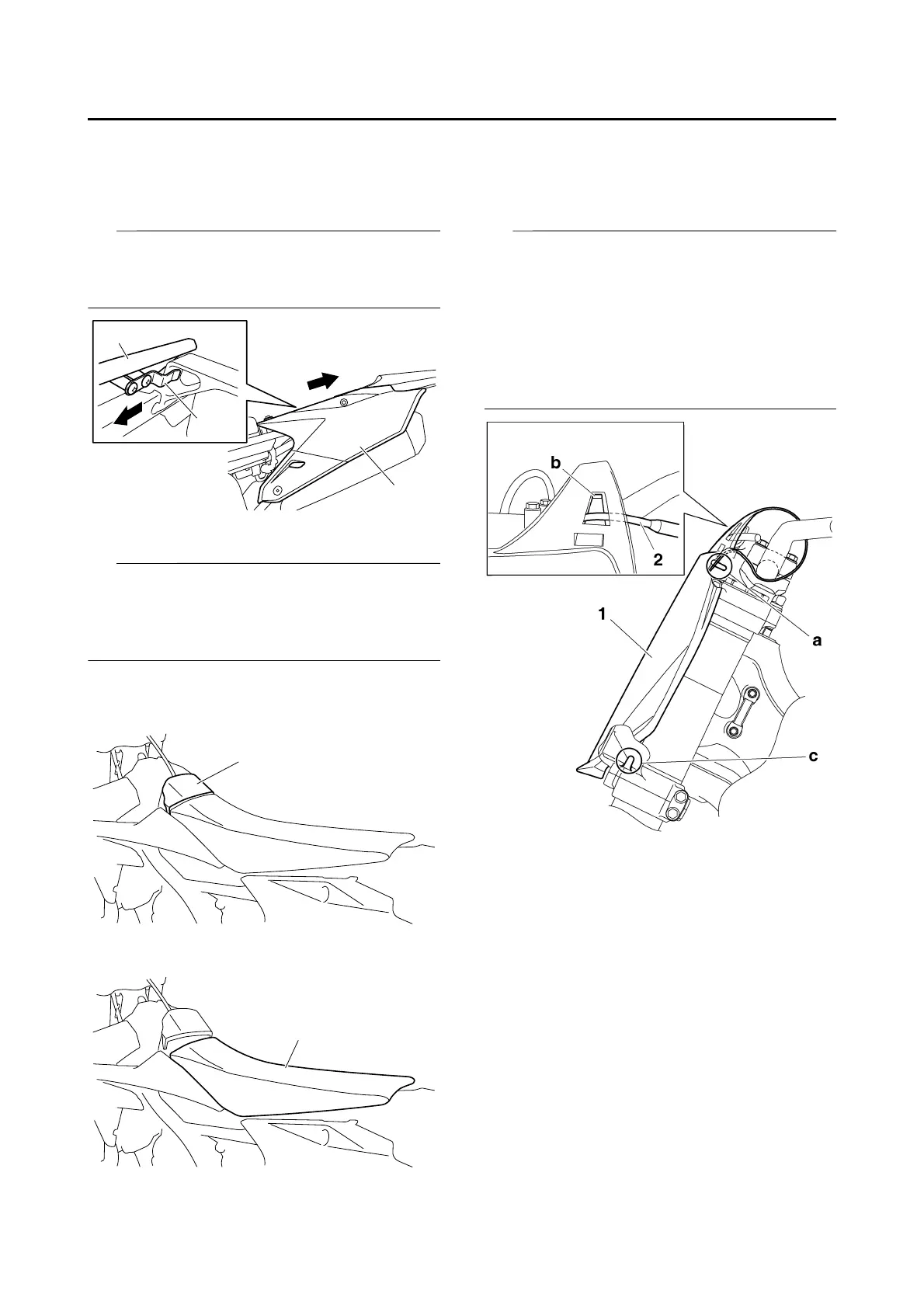
REMOVING THE LEFT SIDE COVER
1. Remove:
• Bolt (side cover)
• Side cover “1”
Draw the left side cover “1” backward to re-
move it because its projection “a” is inserted in
the rear frame.
EAS1SM1120
REMOVING THE SEAT
The fuel tank cap cover and the seat are cou-
pled with each other with a plastic band.
When removing the seat, always remove the
fuel tank cap cover beforehand.
1. Remove:
• Fuel tank cap cover “1”
Refer to “FUEL TANK CAP” on page 1-21.
2. Remove:
• Seat “1”
EAS1SM1121
REMOVING THE NUMBER PLATE
1. Remove:
• Bolt (number plate)
• Number plate “1”
• The projection “a” is inserted into the band of
the number plate. Pull the band off the projec-
tion before removal.
• Remove the clutch cable “2” from the cable
guide “b” on the number plate.
• The projection “c” on the lower bracket is in-
serted into the number plate. Remove the
number plate by pulling it off the projection.





 To Next Page