4 - 10
How to Skillfully Operate the Touch Key Switches
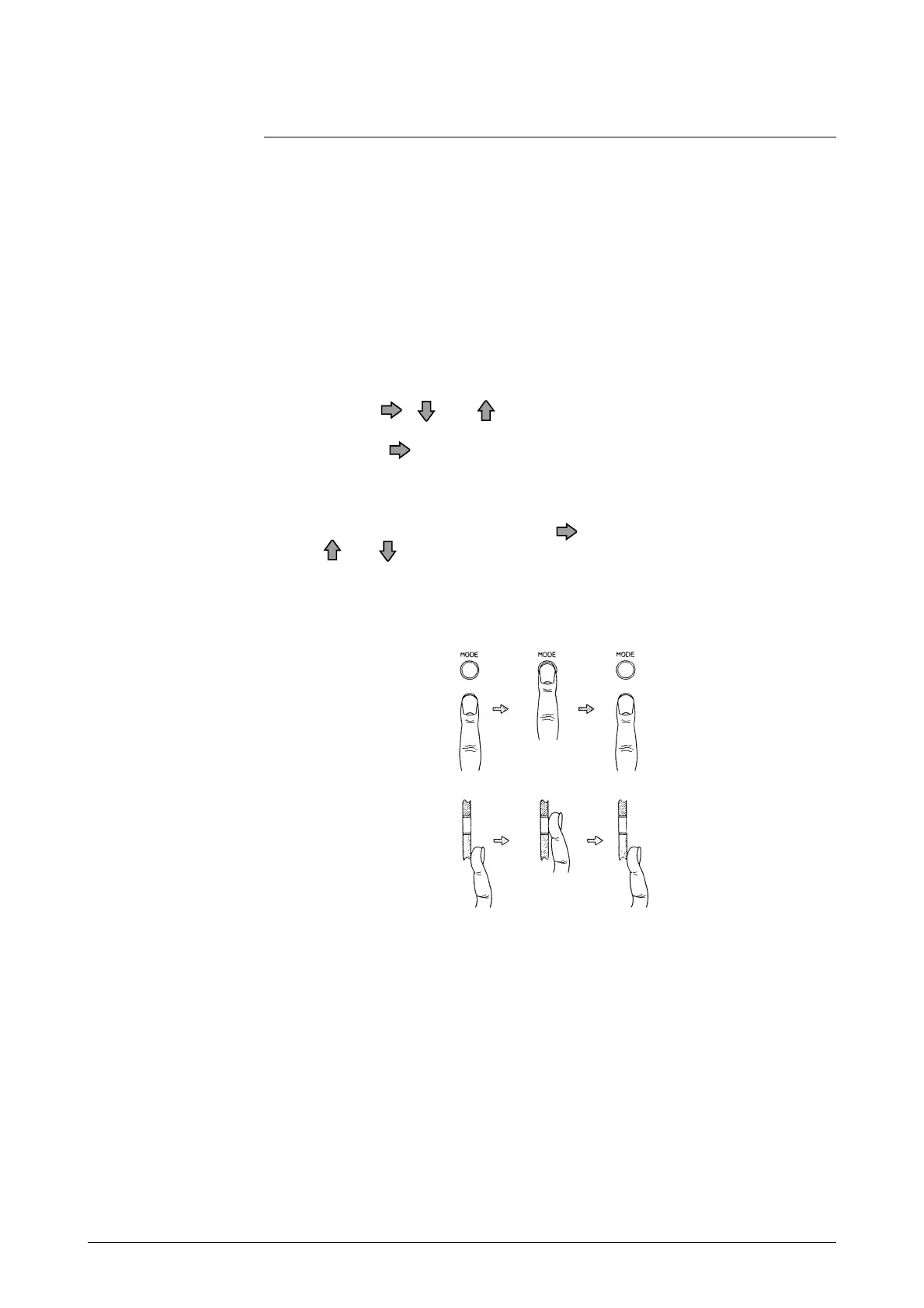
1. As illustrated, move your finger upward from underneath the target, and
completely cover the white round target.
Then, move the finger downward to its original position.
These motions ensure smooth key operation. If you move your finger side-
ways, you may inadvertently actuate the wrong key.
2. To enter the MODE key, keep touching the key for 3 seconds. Release the
key on completion of screen change to ensure smooth operation. If the
screen change is not completed within 3 seconds, move the finger off, and
touch the MODE key again 3 seconds later. If you touch the key right
away, the input may not be accepted.
3. To enter the , , or keys in succession (increment or decrement),
keep touching the target until the desired display is obtained. Note, how-
ever, that the key stops at the mode signs shown below.
* (OPERATOR'S MODE)
# (ENGINEERING MODE)
> (MAINTENANCE MODE)
To move the cursor again, press the key again.
The and keys can be incremented or decremented up to 40 times in
succession. If you want to make another key entry, press the key again.



 To Next Page